

Real-Time Find and Replace for WordPress
Table of Contents

Introduction
This plugin allows you to dynamically (i.e. at the time when a page is generated) replace code and text from themes and other plugins with code and text of your choosing before a page is delivered to a user's browser.
Because the find and replace happens in real-time no changes are needed to plugins or themes which means upgrades remain easy!
Here are some examples:
- Are plugins inserting redundant JavaScript files such as multiple versions of jQuery? Get rid of all but one!
- Want to change the URLs of JS or CSS files, including those inserted by plugins, to load from a CDN instead of locally? No problem!
- Want to tweak how Woocommerce product pages display headings without modifying the template? It's easy.
- Don't like the “Category:” text that the Dagon Design Sitemap plugin puts in front of every category? Remove it!
- Annoyed by the link that Global Translator adds to every page? Remove it!
- Have you noticed that the Sociable plugin doesn't correctly display the Twitter image? No problem, insert it!
- Don't like the link that the Photodropper plugin inserts with every image? It's out of there!
And remember, all of the above can be done WITHOUT modifying theme or plugin files so you'll always be able to upgrade them without having to worry about losing custom edits.
Real-World Examples
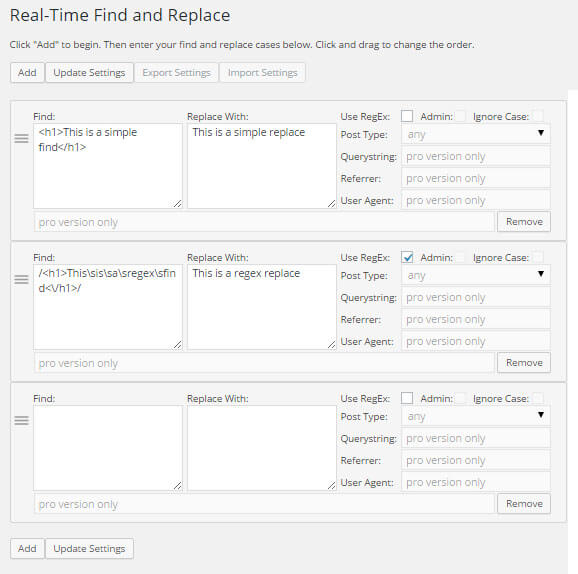
First of all, the interface (shown below) is pretty straightforward. On the left is where you specify what to search for. On the right is what, if anything, you want to replace it with. And in the middle you can indicate whether you're specifying a standard rule or a regular expression i.e. with pattern matching.
1. Have you ever noticed that Google is picking up multiple versions of your pages with different replytocom parameters? This can result in a lot of duplicate content. There are have been a bunch of suggestions on how to fix this including redirects, disallow entries in your robots.txt file, and dynamic parameter settings in Google Webmaster Tools. With the Real-Time Find and Replace plugin you can keep Google from finding these URLs entirely while still keeping the commenting functionality. Just add this rule:
?replytocom= replaced with #replytocom=
Pretty sweet, right? Now the duplicate URLs don't even exist so you don't have to block them and you won't lose link equity.
Note: This solution works perfectly on this site with this theme. I haven't tested it exhaustively with other themes so be sure to test our your comment form after implementing.
2. Sometimes I close comments on a page or post. I don't like having the text that reads “Comments are closed”. I figure such a message is redundant since you can't enter a comment. To remove this I use this regex rule:
/<p class=\"nocomments\">(\s)*Comments are closed.(\s)*<\/p>/
Note: With regex rules you to need to start and end with a forward slash.
3. I use the Author Bio Widget, but it spits out a tag I don't use. I could modify the plugin to remove it, but that would mean that when I upgrade the plugin I'll lose the code update I made. So instead I use this rule:
<span class="bio-title"></span>
4. I want Gravatar support on this site in some areas, but I hate having the same unknown icon displayed for commenters that don't have a Gravatar image and in my case that's most of them. To keep Gravatar support on while also eliminating the image I use this regex rule:
/<img(.*)?gravatar\.com\/avatar(.*)?>/
As an added bonus, removing all of these Gravatar calls reduces page load time.
5. I use the Digg Digg plugin for displaying social media buttons. This plugin injects an unnecessary call to a big JavaScript file that just slows down the page. I remove it from the HTML code using this regex rule:
/<script(.*)?sharethis\.com\/button\/buttons\.js(.*)?<\/script>/
6. The Photodropper Plugin outputs a link to an external site for every image it adds to a post. I think this is excessive so I remove the link with this rule:
<a href="http://www.photodropper.com/photos/">photo</a> which is replaced with just "photo"
Note this technique of removing links from plugins works everywhere. I've used it for a bunch of plugins.
7. The Digg Digg plugin (mentioned above) calls a JavaScript file well above the closing body tag of the page. To help with fixing a problem related to Facebook generating pages by appending a parameter (see this discussion on the fb_xd_fragment problem) to my URLs I need to remove this JavaScript call so I can manually add it to footer.php in the right place. I remove this code with this replace rule:
<script src="http://connect.facebook.net/en_US/all.js#xfbml=1"></script>
Still don't see the value? Here's another write-up showing you how to use this plugin for SEO and some more real-world, but more general, examples.
Pro Version
The pro version of this plugin includes some filtering options (querystring, referrer, useragent, and post type) so you can better control when matching rules are executed. There's also a description field to help you manage your many rules.
Before you buy, please note that:
- Unlike most plugins, you are buying a lifetime license. You do NOT need to pay yearly or ever again.
- You need to deactivate the free/trial version of the plugin before activating the pro version.
- One (1) license is needed per site. Additional installations on ‘localhost' do not require a separate license.
- You should receive an email with a download link and your license within 10 minutes of completing your purchase. If you don't, please leave a comment below.

 (45 votes, average: 4.02 out of 5)
 Loading...
I purchased some time ago for a website i worked on. a few months ago we split the website up to 3 domains and move the plugin over to 1 of the subdomains.. now the license doesnt work.
What can i do to fix it ?
Try:
1. Clearing the license field and clicking Save.
2. Adding the license back in and clicking Save.
3. Clicking Activate.
I installed the pro plugin on a test subdomain (www.wp.comprahormigon.com), and now when I migrated it to production (www.comprahormigon.com), the domain no longer works. Is there a way to get the plugin working on the final domain? The test subdomain is already disabled.
I can unregister the license so you can register it with the production domain. However, I can't find your record. Can you post the license here or email the support address? All comments are moderated here so nothing will be made public.
I cannot update my Pro version of the plugin. I get a message saying it's unauthorized. Can you please assist.
This usually means the plugin is being used on a site other than the one it is registered to. You can email the support address if you want and I can look up the registration.
I cannot update the settings anymore (less than 40 pairs), but can edit and save my site as usual.
When I press 'Update Settings' I get the message '503 Service Unavailable'.
There shouldn't be a problem with saving 40 pairs. I can think of 2 possibilities:
1. If you're using a firewall/security plugin like WordFence, disable it or whitelist the plugin URL until you've saved the changes.
2. Consider increasing the value for the max_input_vars setting in your php.ini file. Usually this isn't needed until you get closer to 100 pairs, but maybe your configuration is different.
Hi Marios,
I use your PRO plugin to replace the href of images in a story timeline within Elementor.
When adding the 38th pair, the timeline-structure is being smashed.
I am aware that there is no limit in the PRO version itself (I can add more pairs outside the timeline container), but maybe you can help me locate the problem within the story-timeline.
Thanks!
Sorry, I have no experience with Elementor.
i want to change into my theme. In booking option "Adult" word to "single package" for specific products, not all of them is it possible?
With enough specificity, just about any replacement is possible.
I used this plug, it works well but just need to fix the issue with tags, i added a query using regex which works perfectly as i wanted but for some reason it breaks title tag on some of the page which had particular text in the title, how can i avoid adding HTML tags in title. My current page title looks like blabla bla bla | particular text | BLa Bla bla instead of blabla bla bla | particular text | BLa Bla bla. Any idea how can i fix this?
You have to make sure the Find portion is specific enough so that it only matches what you want it to match.
If there's no simple way to do that, then you'll need to look into how to use the RegEx option which allows you to use Regular Expressions to specify complex matching including the ability to not change things in title other HTML tags. Regular Expressions are tricky. I suggest testing using an online regular expression tool before trying such a Find on your site.
I purchased Real-Time Find and Replace Pro for another WordPress site and it is working very well. Thank you. I am wondering if it is possible to relace a string "abcdef" with PHP?
So replace the string "abcdef" wherever it is found on the site with:
input->getString('utm_term'));
// Check if utm_term is exactly '{keyword}'
if ($utmTerm !== '{keyword}') {
// If it's not '{keyword}', replace "+" with spaces
echo str_replace("+", " ", $utmTerm);
} else {
// If it is '{keyword}', do nothing (or output the original term if needed)
echo 'Marriage Prep'; // You can remove this line if you want to leave it showing {keyword}
}
?>
Thanks in advance!
Ed
You can replace text with PHP, but the PHP won't execute. The replacements occur just prior to the page being sent to a user's browser i.e. after all PHP has executed.
I am not able to update my real-time find and replace pro. I have a license, but it says the download is forbidden. What do I do to get this updated?
Almost 100% of the time this is due to the plugin being updated from a site for which it was never registered with. If you had the plugin on a different domain before that is no longer active, I can clear the registration.
I did have the plugin on the site when it was a dev site with a dev URL. Can you clear the registration for me?
Registration cleared. On the new domain, you might have to clear the license field, save, add the license back, and then activate it.
Hi team,
For some reason, your plugin seems to be breaking the “Add to Cart” button on my site.
When I click to add a product, it enters an infinite loop and never actually adds the item to the cart.
Could you please help me resolve this issue?
Thanks in advance,
Remove your rules and add them back one by one until you find the rule that's causing the problem. Chances are you're replacing something unintentionally like the pathname or filename of a Javascript or CSS file.
Hi,
A few hours ago I purchased the Pro plugin, but I haven't received anything in my email yet. I’ve also checked the spam folder, but there’s nothing there either.
I’d like to know if there’s a solution, as I need it urgently.
Thank you
I've re-sent the email. You should have it by now. If not, let me know.
how to specify google user agent in the useragent field
this is google useragent
Mozilla/5.0 (Linux; Android 6.0.1; Nexus 5X Build/MMB29P) AppleWebKit/537.36 (KHTML, like Gecko) Chrome/W.X.Y.Z Mobile Safari/537.36 (compatible; Googlebot/2.1; +http://www.google.com/bot.html)
tried to type all of the useragent and part of it doesnt work , i cannot figure out how this work
please help
The field uses a simple match. So if you put in googlebot, it'll match and user agent that includes googlebot.
Hi,
I want to use this plugin to replace text on webpages for a scientific website. I have over 500 words to replace. I simply want to replace them with italicized vertions. Opuntia ==> Opuntia.
Do I need to enter each word individually into the software interface (500 separate entries), or can I enter them all at once in a list that I prepare in MS Word?
May I past in a block of text? E.g.
azurea => azurea
Opuntia => Opuntia
O. => O.
abjecta => abjecta
triacantha => triacantha
aciculata => aciculata
and so on?
You could use a regular expression to specify many of the words to match. I'm not sure of the max length of a math rule, but even if you got 100 words in a single rule, then you'd be down to creating just 5 rules.
There are many sites that provide instructions for writing regular expressions. There are also online testing tools to make sure what you've written works before you put it into the plugin.
Hi,
I want to use this plugin to replace text on webpages for a scientific website. I have over 500 words to replace. I simply want to replace them with italicized vertions. Opuntia ==> Opuntia.
Do I need to enter each word individually into the software interface (500 separate entries), or can I enter them all at once in a list that I prepare in MS Word?
May I past in a block of text? E.g.
azurea => azurea
Opuntia => Opuntia
O. => O.
abjecta => abjecta
triacantha => triacantha
aciculata => aciculata
and so on?
Hi Marios. I have only a handful of rules, none of them with admin ticked. I find however that the Add button is not adding any blank fields for me to fill in. The pro version is activated with the licence. I am asking you what you think might be happening as you will have more of a clue than me!
I suspect interference from another plugin. I have purged my cache.
Wordpress 6.7.2
When you click on Remove, does the rule disappear? Note, don't save. I'm just trying to determine if the Javascript is working.
Another thing to try, can you change the order of the rules by clicking and dragging the 3 horizontal lines that appear to the left of each rule?
Hi Marios. Thanks for getting back to me. I found that the Add button became present if I used a different browser. I was using Safari. So I have ditched that for Chrome/Vivaldi. It's a shame, as I am a Mac guy! Thanks anyway for your time and your wonderful plug-in that has got me out of many intractable problems - not just on my own website ;-)
Hello,
Thank you for the great plugin! I recently purchased the Pro version to dynamically extend all external links on our client’s website https://mpos-app.de by appending ?wpmobileexternal=true.
For example, if the editor enters:
It should be transformed into:
However, internal links must remain unchanged; otherwise, the website functionality would break.
I have tried several Regex patterns in the "Find" field, but it seems that negative lookaheads (to exclude internal links) are not working in the plugin. Here are some examples I attempted:
Find Patterns I Tried
(<a\s+href=["']https?:\/\/(?![^\/]*mpos-app\.de)([^"']+?))(["'])
(<a\s+href=["']https?:\/\/(?!www\.?mpos-app\.de|mpos-app\.de)([^"']+?))(["'])
Replace String
$1?wpmobileexternal=true$3
Despite these efforts, the plugin still modifies internal links, which should not happen.
Could you please clarify:
Does the plugin fully support negative lookaheads ((?!...)) in Regex?
If not, is there an alternative approach to exclude internal links?
Is there a known working pattern for this use case?
Any help would be greatly appreciated.
Best regards,
Gerald
The plugin implements PHP's regex functionality which, as far as I can tell, includes negative lookaheads.
Have you tried putting your regex into an online regex checker (e.g. https://regex101.com)? If the substitution works with one of these checkers, then it could indicate a problem with my plugin. However, I've never had a regex work with the regex101 site and fail to work with my plugin.
I'm interested in buying the Plugin, but firstly I want to confirm if I can get the free version of the plugin on WordPress plugin center or is there a platform I can get the free version to test it out before paying for the premium version.
Thanks for your perusal
The free version of the plugin is available on the WordPress plugin site: https://wordpress.org/plugins/real-time-find-and-replace/
Hi there! I have a simple search and replace. When I imported a new product listed it randomly added a ? around some product titles and descriptions. Will your plugin handle this and if so, do I use the RegEx? Thank you!
My plugin can replace and text/code that you can see when you use your browser's "view source" feature on the page of interest.
Hello, in the PRO version is it possible for me to choose only specific times for Find And Replace to work?
No.
i didint receive license , invoice paid through paypal
I re-sent the email. You should have received it by now.
Hi, I need to install freshly on my site. Can you please send me or tell me how I can get installation files for Pro version?
Email the support address and include your license.
I tried updating my Pro version, but I get a message saying I am "unauthorized" accessing the update.
I have purchased a Pro license for this domain and have never had any issues.
Please advise,
Taisha
Usually the explanation for this is that you're trying to update a version that is on a site that isn't registered to the license.
In case it's another issue, I've also re-sent the email with the download link in case you need it.
still does not update...
What domain are you using the plugin on?
Something else to try...
1. Clear the license field and then click on Save.
2. Add the license back and click on Save.
3. Click on Activate.
Hi,
I am waiting for the licence key, i didn't get it on email....
Email sent to the email address you used to make the purchase.
Hello
I have bought, downloaded and installed the pro version - and still do not have the option to add more than the 5 that are in the free version
Is it work now? If not, send a screenshot of the plugin's admin page to the support email address you received.
I'm looking for a plugin that will allow me to replace all data starting with a specific phrase and and ending with another specific phrase within the database. (I want to remove scripts that all start the same but may not be exactly the same. Is this possible and how can I accomplish this?
For example, any group of data starting with:
script ABC
and ending with:
XYZ /script
I had to remove brackets to make this post.
If what you want to do can be accomplished using a Regular Expression, then this plugin can do it as it supports Regular Expressions. If you search for online regular expression tester you can work out the details before buying the plugin.
I get a line like shown here
[24-Aug-2024 07:41:49 UTC] PHP Warning: Trying to access array offset on value of type bool in F:\xampp\htdocs\doc\wp-content\plugins\real-time-find-and-replace\real-time-find-and-replace.php on line 256
in my php_error_log file every time I display or refresh a page.
It happened, I think, after installing WP Data Access and or Code Manager
What should I be looking at?
Regards,
PHP Warnings typically don't cause problems. If you something isn't working, let me know.
However, I'll work on eliminating the warning in the next release.
I tried updating my Pro version, as there is a notification of an update, but I get a message saying I am "unauthorized" accessing the update.
I have purchased a Pro license.
Please advise,
Ed
My guess is you're using the plugin on a domain that differs from what the license has been registered to. Perhaps a change in domain since you bought it? If you send email to the support address you received with your license and current domain, I can check.
I have purchased the pro version. now I want to change my checkout page text. but it doesn't work
what can I do now??
please help
Use your browser's "view source" feature to make sure the text you want to replace appears in the HTML as you expect.
Certainly! Here's a rewritten version:
"I want to purchase this, but my website operates as an autoblogging platform. It automatically replaces content when a new post is published. Are there any updates available for this feature?"
I still have no idea what you're asking, but there are no updates in the works related to autoblogging platforms.
Hi,
I can't use Paypall. My account has been limited due to location. I need this plugin. Do you offer any other payment methods?
Thank you.
No I don't.
That sucks. I really need the Pro version of your plugin. Is there any way I can have it besides Paypal? Most appreciated.
Not that I know of.
Hello! If I buy and use the PRO version, what happens if you stop your service in a few years for example? Will the plugin then deactivated if your server is no longer accessible?
The plugin will continue to function and will not be deactivated. Some features would stop working e.g. you wouldn't be able to add more rules. However, assuming there was warning, I would release the plugin for free or have someone take over. I've been at this for over 9 years.
Hi ,When I add a new item today, it remind of me: Please buy/activate a license for this plugin. A license is required per domain other than localhost.
And I found my key is not active anymore, then I clink active, not workable.
How to solve this problem?
(I didn't use my key in the other site.)
Please email the license to the support address that was provided when you made your purchase.
Hello, I installed the plugin via the WordPress plugin manager and even though I entered the license code that was sent to me via email, when I want to add one more field or parameter, an advertisement appears asking me to activate the license again.
Here is the screenshot:
https://prnt.sc/iGkTxvZ0rsnr
The license isn't active. You can determine this because the button label is ACTIVATE instead of DEACTIVATE.
Email the support address with your license so I can look it up.
Hi,
I would like to find and replace few of words from my clients website. Will This plugin help me with that? Also after replacing will it generate the report like list of pages where the changes have been made?
I am ok to buy pro version if required.
Thank You
Try the free version to see if you can replace what it is you want to replace.
There is no report of where changes are made.
I have several sites on the same server. Do I need a Pro license for each site then?? Thank you for your time.
Yes.
Hi,
so every page has a post ID. meaning, the ID that wordpress represents the ID of the page. When using friendly URLS or on the home page... there is no ID used. If you can't find or have anything specific on a specific page...
Is there a way you can identify a page with the "ID"?
basically, how to find/replace items on specific page when you can't use the URL?
and don't or can't use something unique on a page to identify a page
is there a way?
If there isn't anything unique to a page and you can't rely on a URL, then there's no way to restrict the replacement to that page. That's an unusual situation that I've never come across though.
:) so you are saying, at a minimum--- you manually ADD something to the homepage, so you can identify it?
- if you wanted to replace something ONLY on the homepage... what is the best way to do it?
I'm not understanding how to identify a page with html text, so you can replace something?
I only see Post Type = page
querystring = only URL text
referrer = not helpful
user agent = not helpful
Maybe I'm missing something obvious?
Thanks
No, I'm saying I've always been able to make a replacement and restrict that replacement to whatever page(s) I needed to restrict it to. Most of the time the URL was sufficient to use via the Querystring box and other times a sufficiently long match from the page's source worked.
The homepage typically has a different structure than any other page on the site. So I would include a string of html/text which is unique to the homepage in the Find box to restrict the replacement to the homepage.
Oh... i see what you are saying.
Let me ask my question this way:
1. lets say every page has the exact meta tag for keywords.
2. with your tool, it is not possible to only change the meta tag keyword for ONLY the home page
is that correct, or is there a way?
Sorry to be very specific or bring up this 1 case situation, but I just found your plugin... I love it, ((huge time saver)) but wanted to see if I can do this one thing.
thanks
I would find a block of HTML text that included something from the homepage that only appears on the homepage. For example, the title of the of the home page is likely to be different than any other page. So that title plus the meta keywords would (along with everything in between) would form the Find. And then the Replace would be the same except with whatever changes I wanted.
okay thanks!
1 more question:
from a performance point of view (or any negative really)...
is there any cons for using to much?
-- too many charactors
-- or too many directives
-- or having your tool do "to much"
is or can using it create a problem?
Happy New Years
Only way to know is to try it since the answer is highly dependent on the server's resources.
Hello, I am having trouble updating this plugin. It says unauthorized - https://share.wirebirdmedia.com/5zuvgPN4 - but I purchased a lifetime license for this site back in April 2023.
I think this is related to some issues my hosting company is having. I've submitted a ticket. Please try updating again. Alternatively, if you want I can send you a link to download the files and then you can upload them to your site.
Installed pro version. Works as advertised...however, elementor will not load with this plugin activated. Elementor does work with it deactivated. Is there a fix for this? If not, please refund my purchase price.
Does Elementor work with the plugin active, but without any replacements inputted? If yes, then the problem is with one of the replacements replacing something you didn't expect. Usually this is a result of a JS or CSS path being modified because of a replacement that relies on matching a common word.
Hello,
i am using a plugin called translatepress to make my website multilingual. and i want to change some words of the translation.
but they are stored in a different database file.
can i change the database somehow?
This plugin doesn't alter data in any database. It works with the actual web page generated by WordPress.
Hello, I need some assistance. This plugin is working a little too well. It's changing words that I don't need it to change because the share a few characters. Example Below.
Find: Replace With:
Ad Post
It's also replacing my word Advice with Postvice, how do I prevent this?
Website: asthewebturns . com It's located on the homepage, the category icons.
You need to be more specific with your Finds. Add text or HTML at the beginning or end of the Find so that it only matches what you want it to match.
I've tried several different ways. I don't have a lot of experience with coding. I do have the Pro Version.
Find: Ad
Replace With: Post
What basic coding can I use to prevent my "Advice" from changing to "Postvice"?
OR, the solution I was able to create was,
Find: Postvice
Replace with: Advice (Just want to make sure, this will not corrupt my website or pages doing it this way?)
Navigate to the page you want to change and use "view source" to see all of the text/HTML. Find the instances you want replaced with the plugin and look for text/HTML that can be included in the Find so that the match only happens where you want it to happen. You don't need to know coding. You're just identifying a string of text/HTML to match.
Thank you, It worked. I was just skeptical, and didn't try it the first time.
I have an issue with the plugin. It was working fine until i created about a 100 cases then it stop working. It doesnt save what i create anymore. When i enter the texts for "find:...." and "Replace with...." then click on "save", the page loads but the case i just created doesn't save.
Therefore i am not able to add anything to the 100 cases i already created.
Before purchasing plugin, I thought i could create unlimited cases?
At the top of the plugin's admin page there's a line that says "Warning: If you expect to have 100+ rules, consider increasing the value of the max_input_vars setting in your php.ini file." If you do that, you should be able to create more rules. You've run into a limitation of your server configuration, not the plugin.
Hi there,
Here is so many different questions, so I dont know how to seacrh here, so here are my questions:
1. I want to replace a word "Bio" only one of my specific page, which URL has text: dashboard-page/settings So, how or where or what I have to do?
2. I want to change one word inside WordPress admin. How to do that?
1. Use the QueryString field to restrict to a certain URL.
2. Check the Admin box. Be careful though. If you replace something unexpected, you could prevent admin pages from loading properly.
Hi! I cant make replase the follow: WHY?
TO
Source Language:
Can you help me please?
Thanks
I don't understand what you're asking.
You have right!
I want to replace the follow:
input type=”text” name=”sl” id=”goog-gt-votingInputSrcLang”
with laber type and not working
label for="goog-gt-votingInputSrcLang">Source Language:
input type=”text” name=”sl” id=”goog-gt-votingInputSrcLang”
Licence id : f15d1ecbb1dd48d7d2bb40db227db86d
I cant find the last replay, so I write again,
(using the WAVE compliance checker), I have been getting missing form label errors on the “hidden” voting frame. The missing form label errors are for:
from GTraslate:
input type=”text” name=”sl” id=”goog-gt-votingInputSrcLang
input type=”text” name=”tl” id=”goog-gt-votingInputTrgLang
input type=”text” name=”query” id=”goog-gt-votingInputSrcText
input type=”text” name=”gtrans” id=”goog-gt-votingInputTrgText
input type=”text” name=”vote” id=”goog-gt-votingInputVote
so need to replace these lines with new one, for example
label for="goog-gt-votingInputSrcLang">Source Language:
But not working!
LICENCE ID f15d1ecbb1dd48d7d2bb40db227db86d
If the replace isn't working, it means what you've put into the Find box doesn't match what's in the source.
1. Make sure you're using "view source" in your browser to see the source. Don't use "inspect" as that doesn't work properly.
2. Verify what you've put into the Find box by using your browser's search feature to highlight it in the source. Even a difference with just a space will result in the replacement not working.
Same problem here
https://wordpress.org/support/topic/ada-errors-missing-labels/
is the same code
The link has nothing to do with the instructions I've provided.
About the code, everything is fine, I want to say is the same without spaces, it just doesn't work. I'm asking if there are any tips!
I've provided 2 steps on how to proceed in a previous reply. I highly recommend you follow the steps I've described.
Need more payment method. I want pay with Card: visa or AMEX.
PayPal should accept credit card payments.
If I buy the pro version, can i have it change out text strings on a page or is it only html?
It can change any text that you can see when you use the "view source" feature of your browser.
Purchased,,
how can i restrict the following:
1)only find/replace content on a SPECIFIC PAGE - not all pages
2)only replaces exact match term - for example, if I want to change "dentist" but I don't want to change "female dentist"
thanks
1. Use the Querystring to match the URL (don't include the domain) of the page where you want the change.
2. The simplest approach is to use a rule to replace female dentist to something, then another rule to change dentist, and then another rule to undo the female dentist change. This is practical only if the number of dentist variations very small.
Good day,
I purchased the PRO version of the plugin and activated the license key you sent me on the temporary domain. Now I switched the site to an official domain and the plugin stopped working, it looks inactive. So I would like to ask if it is necessary to somehow activate the plugin with the same license key even on the official domain or if it is necessary to buy the plugin again? It is still the same website, just switched to the official domain.
Thank you!
You need to deactivate the license on the old domain and activate it on the new domain. Sometimes, on the new domain, you need to remove the license, save a blank, add the license back, and the activate it.
Thank you for the quick reply. I also thought of doing this, but unfortunately too late, I already deleted the old domain. Is there still an option besides buying a new license?
Thank you
I can release the license so it can be used on another domain. But know which license you're asking about. And your email address isn't on file.
Thank you very much. This is the address wp.oadomazlice.cz and it was bought by a colleague, the address will be either xyz or xyz.
Thanks again.
Try activating the license now.
Thank you very much for the solution! I reactivated the plugin on the official domain oadomazlice.cz.
Thanks and have a nice day!
Hi, where do I get PRO plugin when I already own the licence code for the website? (I'm merely reinstalling Wordpress) - obviously don't want to pay twice.
I would need to know the email you used to purchase the plugin or the license code. You can post that here. All comments are moderated so the information won't be visible to the public.
I have Pro 4.0.3 version installed. When I look at ftp files, I see last changes were in like 2020.
I am not sure if I have latest version. Can you tell me how I can obtain fresh plugin files.
Available plugin updates are shown just like any other plugin updates i.e. in the plugin admin page. Version 4.0.3 is the latest.
i already purchase a pro version plugin ..i deactivate the free one and install the pro version...but when I try to activate the license... it's not work. its again say
"Please buy/activate a license for this plugin. A license is required per domain other than localhost.""
Send a screenshot of the plugin's admin page to the support email address you received.
replacement doesn't seem to be working with the block editor. If an article TITLE is YYYY and I want it replaced with 2023 and I have a block on the homepage showing the latest posts, the titles still appear as YYYY when I click the article and go to the single post then the replacement happens. Why does it not work in the homepage as well?
The plugin will replace ANYTHING if it can be seen when you "view source" using your browser. Can you confirm that what you want to replace appears exactly as expected when you "view source"? Note that "view source" is different than "inspect".
I bought the pro version. How can I replace the following:
%1$s of %2$s %3$s answered correctly
with
%1$s van %2$s %3$s goed beantwoord
I'm not sure what you're trying to do. However, when using the Regex option, I suggest using an online tester such as https://regex101.com/ to confirm your regex works against the source of the page on which you're trying to make the change.
Hi. I want to replace all instances of wi-fi with Wi-Fi, except where they are in a src or href attribute. Is this possible?
You might be able to accomplish what you want using RegEx. RegEx is tricky though and can result in a blank page. Proceed carefully.
I just did something similar on my site today, wrapping my business name in a set but only when it appeared outside of the head, script, style elements, or as an element/tags attribute.
Try this on your site. If it break your site, just remove the rule and you'll be back online :)
If you're not concerned about head/script/style, you can just use FIND:
/(?:)(*SKIP)(*F)|(wi-fi)/ms
REPLACE:
Wi-Fi
If you want to be extra careful and exclude head/script/style occurrences, use FIND:
/(?:{{script.*?script}}|{{style.*?style}}|{{head.*?head}}|{{.*?}})(*SKIP)(*F)|(wi-fi)/ms
(note: replace the {{ and }} with ... the security settings here won't allow me to save the post with .
Oops -- the security setting stripped ALL my GREATER THAN and and LESS THAN symbols even when they weren't looking like code!
Replace {{ and }} with GREATER-THAN sign and LESS_THAN sign
FIND:
/(?:{{.*?}})(*SKIP)(*F)|(wi-fi)/ms
Or with the second head/script/style version of FIND:
/(?:{{script.*?script}}|{{style.*?style}}|{{head.*?head}}|{{.*?}})(*SKIP)(*F)|(wi-fi)/ms
I want replace more words in my website i the next articles , is that need pro version ?
I don't understand your question. Can you provide more information?
fore example :
i want replace woman word in article to girl
before : i love this woman
after : i love this girl
and want replace more words by another one Like the previous example
You should be able to do what you've described.
How many words can I change in the free version?
You can create 5 replacements.
ever one replacement one word ?
I still don't think I understand what you're asking. Why not try the free version and see if it works for you?
i did that , how many replacement in pro version ?
No limit in the pro version.
thank you very much
if i purshase plugin can i use it in my all subfolders in wordpress network?
One license is needed per site whether that site is a domain, subdomain, or sub-folder.
Wassup 😎
Disclaimers: I am a novice. I have wordpress admin access, but I do not have access to the site files and such as that is handled by an organisation that is providing hosting services for free.
I'm having a recurring issue, where every now and then all of my settings get wiped. I have not identified a specific trigger. Is this a known issue with this plugin? Or is it likely being affected by some conflict in the theme or perhaps with another plugin?
This is not a high-priority issue for me, as the settings are easily reinstated. But it would be nice to not have to check it every day!
Much love,
Cappuccino
Are you saying the plugin's settings are wiped? You are the first to report such an issue. Conflicts with other plugins/themes don't typically affect the plugin's settings. They just prevent things from running as expected.
Yeah, so all the find-and-replace settings are being wiped without any apparent cause.
I feel as though I lack the skill to fully troubleshoot this 😅 I don't think I even have access to logs. So. Not much I can offer to help *you* get to the bottom of it either. I was hoping this was not a new issue and you might know some tricks! But as that is not the case, I will simply live with it.
If you have any ideas, let me know!
Much love,
Cappuccino
Like I said, you're the first to report this. Without some sort of logging, I don't see a way to diagnose the problem.
I'm not sure what changed, but the problem only recurred once after I brought it up, maybe on the 6th April, and hasn't happened since. If you changed something, well done!! If not, uhhhhh sorry to bother you 😅
I have a plugin called "Local Pickup" and it is throwing unnecessary text in the Order Confirmation email and I would like to get rid of this extra text in the email but unable. I do have the pro version.
Any advice?
Thank you
Unfortunately, the plugin works with web pages, not emails.
Hi!
Worked good with latin characters, but can`t with sprcial symbols, I mean cyrillic (Ukrainian, Bulgarian, Greek etc.)
What can I do for finding solution?
You should be able to replace anything. Make sure you're using "view source" to see how these characters are encoded in the page.
I understand, but it really doesnt work.
Maybe you give me some brainstorming idea where is have bug to fix need?
If you described the exact steps you're following to create the rule, I might see something wrong. Otherwise, not sure what I can do without more information.
Good afternoon,
I have a site with WooCommerce and as I wasn't able to translate some parts I bought the Real-Time Find and Replace Pro Version and when I activated everything it seemed to work fine, but when I go to check out the store, WooCommerce is "hanging" ":
https://imgur.com/a/O3qesps
If I deactivate your plugin, that doesn't happen.
How can I get over this?
I have the license key, if necessary I can show it.
Thank you very much
One of your replacement rules is likely changing something you didn't mean to change and that change is breaking WooCommerce. If you remove your rules and add each back one-by-one you can find the rule that's causing a problem. Likely its one that contains a simple word that is inadvertently matching a file path to a CSS or JS file that WooCommerce is using.
It's corrected. That was the problem
Thank you!
I have the pro version and I love it, but I encountered a problem with a new plugin, "Poll Maker."
For some reason, Poll Maker only works when your plugin is deactivated. I'm not replacing any words or code in the Poll Maker plugin and everything is only set to replace text in the POST, nothing else.
Is there an easy fix I'm missing? Or any fix? Thanks.
Already answered. Please review the reply to the previous comment you submitted.
I am trying to replace the footer copyright on my website that uses a Colibri and skyline theme. This used to work with the original plugin, but I believe something changed in the themes code and now it seems to not even work for the pro version of this plugin.
You probably need to update the text/HTML used in the Find box to match what the updated theme is using. To find this, use your browser's "view source" feature to view the text and then copy and paste it into the Find box.
I use a licenced verion of your very helpful plugin on https://www.egc2023.de/teilnehmer/ but if I resort the list (by Plugin "Participans Database"), all the replacements disapear - why? With a new querry the new page should also be changed by the plugin and with a resort by Javascript, the changed should stay. Right? Please help!
I'm guessing the resorting is changing the text/code just enough that the Find doesn't match anything and so the replacements don't happen. I would try a simple replacement e.g. a single word and see if that works after the resorting. If it does, then you can expand the Find until you see where it breaks.
Another possible explanation is that the resorting is using AJAX which is a technology that is incompatible with my plugin i.e. my plugin won't work with AJAX.
That sounds reasonable, but if I change it for example only to the country names (what I did first), than also the country names in the dropdown on the registration page are changed - what is extremely bad, as the pics that should replace the courtry names are not shown in drop downs.
Can I change the "Post Type" list so that a rule only affects output of a special wordpress tag?
Tags are not a post type so the Post Type drop-down won't help. You can use the QueryString field to restrict a rule to certain URLs e.g. those that contain /tag/. Alternatively, you can write a more specific Find by adding text/HTML so that it matches only where you want the match to occur. It's very rare that an element on a page can't be matched uniquely by including text/HTML that appears before and/or after it in the Find.
But how to use a QueryString field to restrict a rule?
Thx for help!
Type in whatever you want to match. For example, if the URL contains tag, type in tag. The rule will then run only if the URL contains tag.
All works well after I deactivated "Enable AJAX Search Functionality" in the "Participants Database" advanced settings. Thx for your help!
Kind regards, Tobias
Hi, I bought the Real-Time and Replace pro version and activated the license. Now when I want to start the plugin I can't add anything like the add button doesn't work. Can anyone help me with this? I have the latest version of Wordpress etc.
It sounds like some of the files are missing. Did you install manually using an FTP program or using WordPress' upload plugin feature?
I had uploaded the Plugin in Wordpress Plugin upload.
When I check the site the plugin is registered to (https://wu-handwerkskunst.de/) I see no evidence that the plugin has been installed. Is that the correct domain? Can you send a screenshot of the plugin admin's page to the support email address you received?
Hello Marios, I have the same problem again. I installed your pro version in every possible way. WordPress Upload and FTP. Every time I activate the plugin I can't add anything. It's frustrating.
Send a screenshot of the plugin's admin page to the support email address you received.
Hi,
I've been using the pro version for a while, but just enabled debug in wordpress and getting the following:
PHP Notice: Undefined offset: 19 in /var/www/vhosts/worknest.com/httpdocs/wp-content/plugins/real-time-find-and-replace-pro/real-time-find-and-replace-pro.php
Any ideas on how to fix?
Thanks for the report. I'll look into it. Do note that this PHP Notice is nothing to worry about. This notice is just guidance for something that should ideally be done, but has no real impact.
Thank you for replying, i forgot to add that the error is on line 598.
I'm trying to debug a couple of things and the error is increasing the size of my log files constantly. Will turn debugging off for now until you have looked into it.
Thanks,
Alec
If you want to do some debugging, you can set PHP to NOT show PHP Notices. There are different levels of error reporting that you can control including notices, warnings, and "real" errors. I would set up your debugging to just show fatal errros (current errors), then warnings (potential future errors), and go from there. Here's a starting point: https://www.php.net/manual/en/errorfunc.constants.php
Hello. There are some words that your plug in does not translate, is this normal?
Anything you can see when you use your browser's "view source" feature can be replaced. If you can see the text and it's not being replaced, that means the Find is incorrect and not matching.
I bought the plug in when I didn't have a domain name yet... now that I have added the domain name the plug in reorders me to buy the plug in.
Your license has been activated on fellin12.sg-host.com. You'll need to deactivate it on this site before you can activate it on another site.
I just tried to activate the Pro version and received this message on my dashboard:
Plugin could not be activated because it triggered a fatal error.
Fatal error: Cannot redeclare far_plugin_meta() (previously declared in /home/customer/www/buykavaaustralia.com.au/public_html/wp-content/plugins/real-time-find-and-replace/real-time-find-and-replace.php:36) in /home/customer/www/buykavaaustralia.com.au/public_html/wp-content/plugins/real-time-find-and-replace-pro/real-time-find-and-replace-pro.php on line 163
How can this be fixed?
Deactivate the free version first.
I WANT TO GET THE PRO VERSION OF THIS PLUGIN
IS THERE A FEATURE IN THE PRO VERSION TO DISCRIMINATE ACCORDING TO THE USER WHO ONLY WATCHES ON MOBILE?
SO IT STAYS THE SAME ON PC AND WORKS ON MOBILE ?
There's a User Agent filter that can be applied to replacement rules, but user agents aren't always reported so there are no guarantees that it'll work for all users in all cases.
Hello,
I have purchased the PRO version. After thirty successful changes that I've made to some texts on the template or some of the plugins in the template it won't allow me to make any more changes. The reason that I bought this plugin was because I didn't want to alter any PHP files. Can you help me with this issue? I also noticed that you don't provide a support form.
Thank you.
The plugin doesn't have a limit for the number of replacements you can do. You're probably running into limitations of your server although there usually isn't a problem until you're closer to 100 replacements. At the top of the plugin page you'll see this note which describes what you need to do.
"Warning: If you expect to have 100+ rules, consider increasing the value of the max_input_vars setting in your php.ini file."
Hi,
I would like to filter the plugin only to find and replace words in the product title.
Is this possible with the Pro version?
Best regards,
Kenneth
With the RegEx option enabled and the proper regular expression, it's likely possible. If you're not familiar with regular expressions, it probably won't be easy for you.
I bought the Pro version last year and installed it in the main domain "Asaseeyatacademy.com". Then i created some other subdomains. I wanted to install the one i bought to my "localhost" How can i do that!
Please let me know ASAP.
Regards,
Awfa
If the site is accessed by typing http://localhost/ then the license should activate without any problems.
Hi,
I'm interested in the pro version, here is the issue we try to solve, on our site we are running the translation plugin WPML and we have some internal links in our post/page which are pointing to the English version of the other page on our site.
What we want is to find and replace those link URLs inside the translated page and point them to the correct translated page for other languages.
Can the pro version let me do something like for all translated Spanish posts/pages, find the URL www.whatever.com/software-review/ to www.whatever.com/es/revisión-de- software
Thanks,
If you can see the text/code when you use your browser's "view source" feature, then it can be replaced.
You can also restrict replacements to occur only if the URL matches a string e.g. contains /es/.
Hi,
I am happily using the pro plugin, but it has negative impact on my site: I use it to translate shop buttons like " in den warenkorb" (for example on https://bodensee-liebe.com/maenner/#menshirts), but once the plugin is active, the arrows that allow me to scroll through the product pictures (you can see them when you hover over a product, for example t-shirts or hoodies) do not work anymore. I can click on them, but the variants dont change. As soon as I deactivate the plugin, things work perfectly. Any chance you know why the translation appears to break the button/arrow functionality?
This likely means that one of your rules is changing something you didn't expect. For example, a simple rule that changes a single word might end up matching the name of a CSS or Javascript file which result in that file not loading and breaking functionality. I would either review each rule and consider what it might be changing unexpectedly or remove each rule 1 by 1 until the problem rule is found.
You were right! Thank you so much!
Hi,
I'm getting an error on my website when trying to edit a page in Avada Live mode (Fusion builder).
I contacted Avada support, who confirmed the cause was this plugin.
The url for the live editor looks like this: https://website.com/?fb-edit=1
Is there a way to configure the plugin to exclude this type of url, so it does not interfere with the builder?
Thank you in advance.
Kind Regards,
Bjarne
The full error log:
fusionOptionNetworkNames is not defined
ReferenceError: fusionOptionNetworkNames is not defined
at Object.getOption (https://website.com/wp-content/themes/Avada/includes/lib/inc/fusion-app/fusion-frontend-combined.min.js?ver=3.8.2:1:229024)
at fusionGetPercentPaddingHorizontal (https://website.com/wp-content/themes/Avada/includes/lib/inc/fusion-app/fusion-frontend-combined.min.js?ver=3.8.2:1:244340)
at fusionGetPercentPaddingHorizontalNegativeMargin (https://https://website.com/wp-content/themes/Avada/includes/lib/inc/fusion-app/fusion-frontend-combined.min.js?ver=3.8.2:1:244457)
at n.setGlobalStyles (https://https://website.com/wp-content/plugins/fusion-builder/front-end/fusion-frontend-combined.min.js?ver=3.8.2:1:801301)
at https://natasje.nl/wp-content/plugins/fusion-builder/front-end/fusion-frontend-combined.min.js?ver=3.8.2:1:811502
There isn't an option to exclude a specific URL. There is only an option to include specific URLs based on a simple match.
I'm trying the purchase the plugin its showing me the empty cart how do i solve this error
It could be a caching issue. Could you try using an incognito window or a different browser?
i have allready tried the inco mode and sometime when it goes through it gets stuck at payment mode
I'm not sure what could be causing the problem. I've had other plugin sales go through fine. If you want, you can send a PayPal payment to paypal@infolific.com and then I can send the plugin.
I am getting the following error when I try to activate the pro plugin.
Fatal error: Cannot redeclare far_plugin_meta() (previously declared in /home1/gardepz6/public_html/audiobooklife/wp-content/plugins/real-time-find-and-replace/real-time-find-and-replace.php:36) in /home1/gardepz6/public_html/audiobooklife/wp-content/plugins/real-time-find-and-replace-pro/real-time-find-and-replace-pro.php on line 163
Deactivate the free version first.
Support for apostrophes (')
Like I said, all other changes we're made fine. Content with apostrophes only change in the Breadcrumbs, nowhere else. I don't think AJAX is the problem since other changes are being made. I copied text from VIEW SOURCE and from INSPECT. ANy other ideas? Can you recreate the issue on your end? thanks.
If you remove whatever security you're using that's preventing me from viewing the source on your site, I can take a look. Otherwise, I'm not sure what I can do for you. I replace apostrophes of different types all of the time on my site.
Try now - cloudflare was up
It looks like some of your apostrophes are being encoded using
& # 8 2 1 7 ;(remove the spaces). Is that variation included in your rules?Hmm, I don't know how that happened. Is there a way to change that from being encoded to something I can use?
I don't know what's causing it. Could be a WordPress feature or a result of another plugin.
I think I know what it is and I'll test a fix and email you later. TY
The encoding was the problem. I checked the option to convert text to UTB-8 encoding and that seemed to fix the issue - thanks for your help!
Καλημέρα Μάριε,
Εγκαθιστώ την pro έκδοση που μόλις πήρα και δε μπορεί να την κάνει ενεργοποίηση.
Μου πετάει μήνυμα κρίσιμου σφάλματος με αυτό παρακάτω:
Fatal error: Cannot redeclare far_plugin_meta() (previously declared in /var/www/vhosts/sweetdreamsgifts-gr/httpdocs/wp-content/plugins/real-time-find-and-replace/real-time-find-and-replace.php:36) in /var/www/vhosts/sweetdreamsgifts-gr/httpdocs/wp-content/plugins/real-time-find-and-replace-pro/real-time-find-and-replace-pro.php on line 163
Καμιά ιδέα;
Deactivate the free version first.
I bought Real-Time Find and Replace Pro for WordPress plugin from you, recently I saw in wordfence this notice 'The Plugin "Real-Time Find and Replace Pro for WordPress" appears to be abandoned (updated April 27, 2020, tested to WP 5.4.1).'
can you fix this?
I don't know what WordFence requires. They're wrong though. The plugin is supported.
Hi, just paid for "pro" version. Need to hide code from Visual Composer (no longer used on site). Here is an example...
[vc_row][vc_column][vc_column_text]Constructed using deep treated PAR (planed all round) softwood pine to produce a smooth and long lasting fence panel. Slatted design for privacy and look. These panels are designed to be fitted either between fence posts or can be positioned over the posts for a more continuous look.
Specifications:
Boards 4" x 1" (98mm x 20mm)
Rear Bracing (sides and middle) 2" x 1" (46mm x 20mm)
[/vc_column_text][/vc_column][/vc_row]
Need to hide after
[vc_row][vc_column][vc_column_text]
and end...
[/vc_column_text][/vc_column][/vc_row]
I've tried but not hiding. Cache turned off. Won't show on frontend in product description, but shows on backend.
Make sure you're using "view source" in your browser to get the text/HTML code. Paste what shows when "viewing source" into the Find box. I'd also start with a simple replacement and build up from there e.g. start with 1 word or 1 tag and then add more words/tags after you confirm a replacement is happening.
Hello Marios,
I am using a plugin called Linguise to automatically translate my website. The problem is that I don't want products names and brand names to be translated. Does your plugin offer the possibility of inserting in bulk html tags around brands names and products names like so: Brand name? I'm thinking about importing a csv file with all the products and the brands for example for example.
Thanks,
Nicolas
I don't know what you mean by "inserting in bulk html tags", but my guess is the plugin doesn't have the feature you're looking for.
What I mean is if the plugin Linguise sees a translate="no" attribute in my original content, that content will not be translated.
I have around 130 different brands and 800+ products, do you think your plugin could help?
Thanks,
Nicolas
I'm sorry, but I still have no idea what you're asking. Perhaps it would just be easier and quicker to try the free version of the plugin available on WordPress.org?
Is it possible to filter search and replace based on URL path AND querystring?
It is great that it can be filtered by useragents, but I also need to include only translated content, eg: /de/.*?amp
The Querystring matching is "simple" and doesn't support regex or wildcards. Note that Querystring in the case of my plugin means anything after the domain i.e. a folder and/or a parameter.
Hello
I need to change a URL in a custom field, is possible? Doesn´t work :(
You can change anything that is visible when you use the "view source" feature in your browser.
Yes, is visible in "view source" but doesn´t work:
i need to change the href for: https://wa.me/351925980946
... in normal content is working but in costum fields doesn´t work.
My guess is your Find doesn't match what's actually in the source. My plugin doesn't distinguish between custom fields and other page elements. It just "sees" the page as 1 big blob of text/code.
No, check:
This:
whatsApp
for this:
whatsApp
and ... is doesn't work :(
https://centralmed.pt/formacao-profissional/prevencao-de-riscos-eletricos/
It's about button "whatsapp".
What I see in your page is this and it doesn't match what you've shown as the Find.
Excuse me, I don´t use Twitter. I have paid de Pro version and deactivated the free version. How can I go on to install de pro version? Thanks.
In WordPress, choose Plugins --> Add New and then click on Upload Plugin at the top of the page to upload the zip file you received. Once the plugin has been uploaded and activated, go to the plugin's admin page and enter the license you received.
Hi Marios,
Wordfence gives us the following message
The Plugin "Real-Time Find and Replace Pro for WordPress" appears to be abandoned (updated 27/04/2020, tested to WP 5.4.1).
Type: Plugin Abandoned
Is this indeed the case?
Regards,
John
It hasn't been abandoned.
Thank you Marios much appreciated.
Are you able to maintain the tested with as in "tested to WP 5.4.1"
Regards,
John
Hi, just purchased the pro version but the drag and drop to re-order does not seem to work and I have tried to use
find:
Month
Replace With:
Any Date
Works if I use
find:
Month
Replace With:
Any Date
but I only want to change the title for the first dropdown on the home page of the site...
What happens when you try to re-order the rules? Does the order not stick once you've saved?
The pair of rules you provided look the same to me so I'm not sure what you mean that one doesn't work, but the other does.
hi
I cant replace the text from wp-login.php file. It still shows the old text.
Using normal plugin ver.
reg
Have you confirmed that you can see the text you want to replace when you "view source" from your browser?
Awesome plugin! Saved me many times. Just a quick question. I have a site that was using 50 h2 headings.. I changed all the h2 headings into a div using this plugin. Can I somehow exclude a line and be able to leave only one h2 heading on my site?
You can exclude by writing a Find rule that matches some H2s, but not others. This usually means looking for more text/HTML that can be included in the Find so that the matching is more specific.
Alternatively, if it's possible to match only the H2 you don't want to change, you can write one rule to change it, a second rule to change all other H2s, and then a third rule to undo what you did with the first rule.
HI, I want to remove the line between texts. For example, I want to change
"AAAAA
bb"
to
"AAAA bb"
is it possible with this plugin?
Yes it should be doable.
How?
What have you tried?
I have not tried anything. Actually, I am not good at coding. I just want to make two lines become one.
Hi,
My site is hosted on SiteGround.
It creates a new subdomain every time we create a staging site (i.e staging1, staging2, staging3.maindomain.tld, and so on).
Am I supposed to buy a new license every time even for staging sites?
Thanks
Every site requires its own license. You can, however, move a license by deactivating it on one site and activating it on another.
Hello!
The company I work for already uses the free version and we want to purchase the pro version.
We just have some questions before the purchase:
1. The price of 9.95$ is montlhy or annual?
2. We already reached our limit of 5 replaces using the free version, is there a limit in the pro version?
Best regards,
Nathalie
1. One-time cost.
2. No limit with the pro other than whatever your server's resources allow. I've yet to hear of anything reaching a limit.
I bought one license for the main domain www.asaseeyatacademy.com.
Then we had to create other subdomains. Can we use the same license for the new subdomains!
Please advise
You need a license per WordPress site whether the site is a folder or a subdomain.
Hello,
Thank you for this amazing plugin! I have been using the PRO version for a couple of years now and I still like it very much.
However, WordFence has recently started giving me a warning that the plugin seems to have been abandoned, due to its most recent update apparently having occurred more than 2 years ago (on April 27th 2020, tested up to WP 5.4.1). Just thought you should know.
Have a nice weekend!
Thanks for the heads up.
Hi!
This is exactly what I need. Bought the pro version.
Unfortunately I did not manage to change the expression "Out Of Stock" for my products here: https://artifexliving.com/en/product-category/all-products/
Am I missing something? Can you help with that?
Looking forward to your reply.
Many thanks in advance!
Best Regads,
Kerli
What rule did you try?
And magically it started working (cleared cache again, maybe it helped)! Thanks for now and thank you for great tool :)
Sorry, my bad, it did started working, but actually not as I need it to.
So the change appeared on my Estonian site, but I want it to appear only on English site.
Is this something I can do with this plugin?
Thanks!
I simply used the "Out Of Stock" to be changed to "Available On Request" and checked the "admin" box.
The admin box shouldn't be checked unless you're trying to make changes to pages that are accessed when viewing WordPress admin pages. If you want to modify public-facing pages only, leave the admin box unchecked.
As for changing text on your pages, the best procedure is to use the "view source" feature of your browser. Then search for the text while viewing the source. This'll show you the text as my plugin "sees" it. Use this in the Find box and then put whatever you want in the Replace box. Anything you can see when using "view source" can be replaced by my plugin.
Hello,
Last year I bought the pro version find and replace.
It always worked fine until now. The translations are not working on my website any more. Not one of the find/replace words are working.
Thanks, Femke
There haven't been any significant changes to the plugin in the last year so it should still be working. I'd confirm it's active and the license is active (try adding a new rule).
Then, go to a page where a replace should be happening. Use the "view source" feature of your browser and confirm that the Find portion of a rule exists in the results when you "view source". That is, search for what's in the Find box to confirm it appears in the page.
Thank you. We solved it.
Hi,
After de-activating my license I am no longer able to activate it on the same domain. Can you please confirm how this can be fixed?
Your license has been activated on v0-1-ee0ffae4f3b34db58a667362b54de8f9.snapshots.eu1.wpcs.io/. Was that not intended?
Hi,
I must have deleted that staging site and replace it with another WP installation. Can this be removed so I can activate it on another domain? Can this be edited in my account if we have customer accounts?
I've removed the site from the registration. You should be able to activate the license on another site now. You can move a license by deactivating it on one site and then activating it on another. There's no account management screen so if you ever have a problem, send an email to the support email address.
Hello Again,
First of all, Where i see your replies. I received an email about your reply ! but could not find it ! I wanted to reply to you.
Secondly, I tried to change something , it tells me
"Please buy/activate a license for this plugin. A license is required per domain other than localhost."
Where do i find my license number !!
It doesn't look like you've activated your license yet. You need to enter the key you received into the box at the top-right of the plugin's admin page and click on Activate License. If the activate works, the button label will change to Deactivate License.
Where is the Key, I did not receive it via email!
The key is in the same email as the download link.
The button label is changed to deactivated! but it is saying again
""Please buy/activate a license for this plugin. A license is required per domain other than localhost."
When I deactivate the PRO version and tried to activate it again. it did not work.
I also tried to install it it again (from the ZIP file i received via email" It asked if i wanted to replace the current PRO version, I clicked "replace" but it is not working!
Please i need help URGENTLY ! my website was launched yesterday and we wanted to correct something, so we used your plugin ... but it has to work !
GOT IT !... my bad .. i did not see all of the email content !
The plugin is a great tool ! I recommend everyone to buy it !
Thank you Marios ! it is a big help !
Hello,
I bought a PRO licence, but isn´t working anymore.
Could you check what´s wrong?
Thank you.
You'll need to provide more information about what you're seeing. Also, confirm what domain you have the plugin on.
Hi,
I bought the plugin a couple of weeks ago and I was working on a test domain but now we exported the website to a new domain but the plugin does'nt work anymore. It says ''Please buy/activate a license for this plugin. A license is required per domain other than localhost.''. I tried to deactivate and delete the plugin but that does'nt work either so is there a fix for my problem?
I can update your record, but I don't have your email on file. Email the support address you received when you made your purchase and I'll make the change on my side.
Hello how does the query string work? i just want to change a word only on a specific post not the entire website.
If you provide a value for the Querystring, the replacement will only happen on URLs that match the value you've provided. A simple partial match is used. So "word" will match URLs like /word/ and /this-word/.
Hello! I want to purchase your plugin.
I have 2 questions:
1. My site is currently running on a test domain. If I activate it on the test domain and then change it to the main one, will the license work on the main domain?
2. How can I purchase your plugin in addition to PayPal. I live in Russia and when paying, he writes that payment is not available for me...
1. Licenses can be transferred from one domain to another.
2. All payments must go through PayPal.
Hi, I purchased and downloaded the plugin, but looks like I couldn't get the activation code. How to request it? Can you please send me a private message? I Used this same email address to purchase using paypal. Thank you
My logs show that you've downloaded the plugin. The email with the download link also has the license key.
Hi thank you. I think I downloaded it from the website, not from any email. Will it be possible to send me the email again?
Email sent again.
In the homepage of aeroprint.me you can see the recent products list being garbled up when i applied the find and replace of just 2021 to 2022, hoping it will replace all 2021 in front end texts with 2022. How exactly should i use it so it will only replace front end text references ? I tried post : page instead of any, but no luck. Thank you
I'm not sure what you mean by front end texts. The plugin will replace anything it matches on a page. For any particular page, if you use your browser's "view source" feature you can see what text can be found by the plugin and then replaced by the plugin.
I mean texts visible to page visitors
It sounds like your Find is matching more than you expect. Probably because it's too generic. Sometimes a generic Find ends up matching CSS or other code unexpectedly. You'll need to write the Find portion in a way that it only matches exactly what you want to match. This can be accomplished by including addition code/text before or after what you're trying to match so that it is more specific.
I want to buy the Pro version of the find and replace plugin , i have 3 pre sales questions.
1: How many sites it can be used on ?
2: If we use it on development site, how do we migrate the license to main site?
3: Will i get automatic updates in the admin or i have to manually update it.
Thanks
1. A license is needed for each site.
2. Deactivate the license on the development site and activate it on the production site.
3. Automatic in the admin.
Hi
I forgot to deactivate free version before activating pro. My translations are not active on website, what do I do to make it work?
Deactivate the free version and then activate the pro version. Your find and replace rules should still work.
But I only have Pro-version in my plugins list, so how can I deactivate?
If the pro version is active, then the free version is inactive or not on your site. There is no way to have both activate at the same time on the same site.
Ok, thanks. But why isnt it working then? Several translations on this page https://fleksjob.dk/kasse/ is not visible.
I don't know. Usually when a replacement doesn't work it's because the Find portion is incorrect. To confirm, use your browser's "view source" feature and then search for the whatever you put in the Find box. If the text is found then the replacement should work. If not, adjust what's in the Find box.
I also noticed that the URL you gave me redirects to another URL: https://fleksjob.dk/kurv/. Are you sure you're looking at the right URL?
How can I delete all translations and start from the beginning? I can see translations for a split of a second, and then its gone and back to english.
Based on what you're describing, it sounds like your site is using AJAX which is a technology that my plugin doesn't work well with. If you want a refund, let me know.
You can try deleting the rules and starting again, but that's not likely to change the outcome.
Hi Marios Alexandrou,
Well done for your easy to use plugin which works well in general.
However, I have a small translation problem.
I have an e-commerce site and I want to replace text in the credit card payment module. But the changes are not taken into account. On checkout page
"First renewal on:" -> "1er renouvellement le :"
"Enable Automatic Payments" -> "Activer le paiement automatique"
"Card Number" -> "Numéro de carte"
"Expiry date" -> "Date d'expiration"
"Card code" -> Crypto au dos de la carte"
Have you confirmed you can see the text when you use your browser's "view source" feature? If not, the text you're trying to replace is probably AJAX-driven and my plugin doesn't work with AJAX.
Ah OK,
indeed it's ajax ... too bad
Regards
Hi
We purchased the plugin in March and lost it somehow. We have the after purchase email with the download link and the license but the link is expired.
Please let me know how to download it again.
Regards
Nirmal
I've sent a new link to the email on file. Note that the email I have doesn't match the email you used for your comment.
Hello,
I want to transfer the license from one site to an other. How can I do that?
Thank you.
Iordanis
Deactivate the license on one site and activate it on the other site.
Hi again,
Unfortunatly that did not work.. Any help on that? The license string is still present on the old site after deactivation, is that normal?
Good afternoon.
I installed the professional plugin in a development domain and now that I migrated it to the final domain, it asks me to buy or activate a license.
How can i fix this?
Thanks in advance.
Deactivate the license on the development domain and then activate it on the final domain.
The installation in the development domain has already been removed, I cannot deactivate the license there.
The old installation was here: https://borderlain.com.ar/clientes/mottadecoraciones/
Try activating the license on the new domain now.
Now if it works perfect! Thank you very much for responding and solving this problem so quickly.
Hi,
I am using the plugin "Real-Time Find and Replace Pro".
I noticed that I have an error with the page feed because there is a blank line at the beginning of the xml file.
https://validator.w3.org/feed/check.cgi?url=https%3A%2F%2Fwww.somoswaka.com%2Ffeed
I have been testing and I have detected that it is solved if the plugin is deactivated.
Do you know what we could do?
Thank you very much and best regards.
That's odd. I use the plugin as well and I don't have a space inserted into my feed. I checked some customer feeds as well and I'm not seeing a space being inserted.
Have you tried having the plugin active, but without any rules?
Hello, it does fail even if we don't have any rules.
I have noticed that when activating it the error appears (in spanish, which is the language of my wordpress administrator)
"
El plugin ha generado 2 caracteres de salida inesperados durante la activación. Si observas mensajes de «cabeceras ya enviadas», problemas con las fuentes de sindicación u otros problemas, trata de desactivar o eliminar este plugin.
"
Perhaps it may be related to.
Thank you again and best regards,
That's a good clue, but I'm unable to reproduce the error so I don't know what to fix or how to determine if I've even fixed something. If you'd like a refund, let me know.
The plugin doesn't work for me.
I have text that appears on my user's Profile page from another plugin. I put in the text I want to remove on the left and nothing in the Replace box. I tested with plain text as well as the HTML. I also tried forcing the cache to clear but still no change.
It could be the text you're trying to replace is AJAX-driven which my plugin won't be able to replace.
The page that contains the text I want to replace is displayed in /wp-admin/profile.php.
After hiding what I can with css, there is still some unwanted text that a plugin adds that I am trying to remove. The text is not controlled by Ajax.
Have you checked the Admin box for the rule?
Be very careful with rules that replace text on admin pages. A wrongly specified rule can make the admin pages inaccessible which would then require you to deactivate the plugin.
If you want me to take a look, send a login to the support address you received.
Marios. Thank you for your great support. Best ten bucks spent!
One question to perfect team !
if i change text "price" to greek text "τιμή" then, when i go to sort woocommerce option NOT working correct.
How i change text "price" without it change "field" price ???
Any solution ?
If the plugin is changing something you didn't expect it means the Find portion is too generic. You can make it more specific by including additional text/html before or after it so that it only matches things you want to match.
I'm in love with your support ! Fixed!
I bought a pro license for my website. If I moved my website to a different domain, can it still be used by deactivating the pro plugin on the old site and reactivating it on the new site?
Yes the license can be moved doing what you described.
Hello,
I'm trying to use the referrer option
to apply a certain rule to a specific page.
But is not working
Can I have an example?
Thank you,
John
Whatever referrer you're trying to match goes into the Referrer field. It does a simple pattern match so, for example, if the value is "google" then any referrer that contains google will be considered a match.
Do note that not all browsers pass the referrer information as some consider it a security/privacy problem to do so.
Looking for help:
Gravity form not showing.
Deactivating Real-Time/Replace Pro allows Gravity form to show.
Looks like plugin conflict.
Any thoughts?
Thank you.
The plugin doesn't do anything when it's active unless there is a rule also specified. My guess is the rule is replacing something unexpected that is breaking gravity forms.
Found it! I wondered.
Thank you so much.
All set now.
Invaluable plugin.
Thanks,again.
Καλησπέρα Μάριε,
Έχω μια χαζή απορία
Έχω κάνει ήδη install το plugin και από ότι φαίνεται δουλεύει μια χαρά
Αφού έκανα update η wordpress τώρα μου πετάει error στην jQuery στο page που σετ άρεις το plugin.
Προσπαθώ να βρω και εδώ πέρα instructions για να κάνω update το plugin άλλα δυστυχώς δεν βρίσκω κάτι.
Στα wordpress updates δεν μου βγάζει κάτι ώστε να το κάνω απο εκεί.
Θα μπορούσες να με βοηθήσεις?
Ευχαριστώ εκ των προτέρων.
Based on your purchase dates, you have the latest version of the plugin already. I'm not aware of any actual problems with jquery although there is deprecated code that will need an update in the future.
Hello,
I installed the pro version. Everything is working very well.
As a result, I am surprised to see that a font (Allecta Stencil) has been replaced on pages of my site.
Is this normal?
The plugin won't make any replacements (to fonts or anything else) unless you've specified a rule to do so.
I found my mistake.
Sorry for the inconvenience.
Your plugin is great
How do I upgrade to the pro version. I bought it, but see no option to add my license or upgrade. I do see a tab that says "update settings" but when I click on it nothing happens.
You download the zip file using the link emailed to you. You then add the plugin using WordPress's Plugins --> Add Plugin option. The free version should be deactivated first.
Newbie question -- bit embarrassed to ask but just where is the 'send' button, or whatever, to actually find and replace once you fill in the query?
Assuming the installation went as expected, there should be an Update Settings button.
Hi,
Before i buy the pro version i need to know if it's also possible to remove currency symbols (€) in a webshop?
In the light version it won't work but maybe the pro version has other features that wil make it work?
Thanx!
If the free version doesn't work, the pro version probably won't either.
Is the purchase price a one-time price or is it in the form of a subscription?
One-time.
Hi Marios,
I am using the Post Type filter option.
When I select Product the rule is still executed on product category pages as well, I have a rule I only want executed on product pages - how do I do this please?
I cant use querystring, unless I did one for each product page which is in the thousands.
Thanks,
Stuart
The drop-down shows the post types that are part of your WordPress set up i.e. it just lists what's available as defined by WordPress, the theme, and any other plugins. If a page then identifies itself as that post type, the rule will execute regardless of how that post type is actually used on your site e.g. as a product category rather than a product. If there isn't anything you can reference in the URL, then the only other way I can think of is to set up the Find so that it picks up something that only occurs on product pages such as sequence of HTML that is unique to product pages.
I am trying to add a tag to all instance of a certain word. The word appears in a ton of places, but I just want to make sure it's only happening within certain HTML elements for example:
Hello
I'd like:
HelloJoe
Right now with the free version, it's replacing the word inside of images / title tag / urls.
Will the Pro version let me filter out / skip elements by HTML tag, like etc?
Thanks!
You have to make the Find portion more specific so it doesn't match things you don't want to match.
Thanks for your reply.
There's no way to target / filter out specific elements? The word I'm looking for is quite dynamic and can be used in heading tags / within paragraphs / URLs.
Really could use help here.
The plugin sees the page as one big blob of HTML. It doesn't know anything about the structure of the page.
This is my question as well. I need to target all text and avoid images but not all text is wrapped in tags. Not sure how to exclude all images.
I've just bought another licence, have bought loads, returning from PayPal still getting the same error:
"Purchase Confirmation
Thank you for your purchase!
Sorry, trouble retrieving payment receipt."
And not receiving any emails from you.
Please sort.
Stuart Alagna
It looks like your mail server is rejecting my emails. The most recent attempt resulted in a bounce and this message: 550 High probability of spam (in reply to end of DATA command).
Hi Marios,
I have loaded the pro version of your plugin and when selecting to activate I am getting the following error. I did uninstall the free version before installing the pro version.
Thanks
Plugin could not be activated because it triggered a fatal error.
Fatal error: Cannot redeclare far_plugin_meta() (previously declared in /home3/kellysh9/public_html/wp-content/plugins/real-time-find-and-replace-pro/real-time-find-and-replace-pro.php:163) in /home3/kellysh9/public_html/wp-content/plugins/real-time-find-and-replace/real-time-find-and-replace.php on line 36
Deactivate the free version first and you should be all set.
l have received the mail for pro Version but l got that error message after l try to upgrade it to Pro-Version.Could you plase help me?........
Fatal error: Cannot redeclare far_template_redirect() (previously declared in /home/tournity/public_html/wp-content/plugins/real-time-find-and-replace/real-time-find-and-replace.php:271) in /home/tournity/public_html/wp-content/plugins/real-time-find-and-replace-pro/real-time-find-and-replace-pro.php on line 611
Deactivate the free version first.
Thanks for your help.l did activated it.do l need to save any license? l couldn't find any license number to fill that box!
The license key is in the same email with the download link.
Can l still use ''Real-Time Find and Replace'' if l change my template for same domain name?
Yes, but the rules might not match properly if the theme alters things that you were expecting to stay the same.
Hi Marios,l have paid for ''Real-Time Find and Replace'' addition 2 hours ago via Paypal to activate the Pro-Version.Paymen was done and accepted but my Pro-Version is not activated yet.Could you please solve may issue?Thanks.
I emailed you also about 2 hours ago. I take it the email didn't get through? If this reply gets to you, can you comment back with another email address I could try? Your comment will be moderated so no one else will see it.
Hi, Today i install this plugin om my site.. I am facing one issue, Content replace on my site which i want but that content not replace which is hidden in LOAD MORE Tab on ny home page
If the tab uses AJAX, my plugin won't be able to replace any text in it.
The product did not work due to site migration. Thank you for a very quick solution from the support. The product is already working.
Hi,
I am using the PRO version. I have a small issue I need help with. I am replacing the word student with trainer. This works fine but there is a reference to instructor_students.jp which is also changed to instructor_tranees.js causing errors. How can I stop this, put an exception or something. Please advise.
You can expand the Find portion of the rule to include a space before or after the word "student". That'll keep it from matching the jsp file.
Hi,
Can i exclude Replace for specific DIV?
Because my Gallery Shortcode is replaced by your plugin.
I need to exclude that Gallery's DIV from replaced by your plugin.
Sorry for my English, i hope you understand.
Thanks.
Two options I can think of:
1. Use regex to write a matching rule that excludes the div. Regex can be tricky though.
2. Use one rule to modify the div to something that is unique, a second rule to perform the page changes you want, and a third rule to undo the change from the first rule. Rules are executed in order so rule 3 will undo rule 1.
Hi, with the Real-Time Find and Replace Pro Version, can I apply the rule to a specific page or post only? Thank you.
The QueryString filter can be used to restrict rules so that they only run for a particular URL. It's a simple filter so if you specify "xyz" the rule will run for any URL that contains "xyz".
Hi
How do I recover my licence? I've moved house and I can't find my licence code as my PC is in storage and when I load the page in admin, the pro features are greyed out?
Also when io get it where do I put the licence code?
Thanks
Mark
Email with info re-sent. You should have it by now. You can email the support address with any follow-ups.
Great plugin. Works perfectly
Hello,
I want to do the real-time find and replace only on single posts.
Just purchased the Pro version and used it by selecting `post` post type in the plugin settings.
However, it appears that that setting is only for all items of the specified post type regardless of the view.
Is there a way to make the plugin work on specific views? ex.: only on all singular posts.
I'm not sure what a singular post is, but I'd guess the answer to your question is no.
By singular posts I am referring to the individual posts when they are viewed in the front end.
Is there a PHP filter or something using which I can specify where a real-time find and replace should work.
Ex.: is_singular( 'post' )
I don't know of a way for you to do what you've described.
Hello,
My dashboard indicates there is a Real-Time Find and Replace update, I have the Pro version, but it indicates "Update failed: Download failed. Unauthorized" when I try to update. Please help.
This likely means the plugin license isn't active on the domain you're trying to update it on.
Please tell me how I can fix that? As far as I know, that is the correct and only domain that the plugin was licensed to?
Thank you.
Email the support address you received and provide your license key or the email address you made the purchase with. I can't find a matching record with the email you're commenting with.
I use the latest Pro Version. No "Update Settings" is working. I got an 403 error on the website.
Accessing https://www.napfcheck.de/wp-admin/tools.php?page=real-time-find-and-replace is no problem but not "Update Settings"
Why?
It could be your firewall or other security plugins are plugin settings updates. Have you installed anything security related recently? A 403 error is permissions related i.e. you're trying to do something that your server doesn't allow.
Yes, I have some security plugins and modified them some days before.I will check if I can solve this. I thought you may know problems with Wordfence, Sucuri Security Plugin or Imunify360 for Plesk and mod_security. Any help with known interactions are appreciated! F&R is the only plugin making this problem in the wordpress toolbox I found.
I don't have specific instructions. I would just temporarily disable the security plugin(s), update the rules, and then re-enable the security plugin(s).
I found the solution for the 403 error. It wasn't a wordpress security plugin. It was the server "modsecurity" with Atomic advanced rules that caused the blocking. Using other rules or disabling modsecurity solves the problem. Thanks Marios!
Hello, the plugin rules are not working on wordpress pages, they do work on wordpress posts though. I use it to switch between local storage and Amazon S3 for images.
The plugin doesn't distinguish between pages and posts. If it's not working on pages I'd guess it's a coincidence and the Find portion of the rules isn't quite right. Or maybe you're trying to replace AJAX which bypasses my plugin.
Hello Marie.
I used the pro version of the plugin on one site and everything worked just fine.
Now I am using another pro version license on another site and I cannot replace anything.
I am deactivating plugins but with no success so far
Have you ever dealt with this issue?
I would try a very simple rule. One that replaces a single word with no punctuation and no HTML. If that doesn't work then I would conclude that the plugin doesn't work on the second site. I don't believe I've seen a site where the plugin didn't work except when someone was trying to replace AJAX code/text.
Could it be, because I am using a website with child theme?
I tried to delete the plugin altogether and reinstall it. The pro version will not activate. I get the following error.
Fatal error: Cannot redeclare far_template_redirect() (previously declared in /home/maria/public_html/wp-content/plugins/real-time-find-and-replace/real-time-find-and-replace.php:271) in /home/maria/public_html/wp-content/plugins/real-time-find-and-replace-pro/real-time-find-and-replace-pro.php on line 611
How can I solve this? Please help.
I also tried to replace a simple work and it didn't work.
The only thing that I was able to replace was to , because I am correcting errors through the accessibility checker.
For some reason, this code - and this code only, changed in the html.
But other codes such as or did not change to
or , as I desired.
If a replace works, but others don't that suggests to me that there's something wrong with the Find portion. When identifying what to search for, be sure to use the "view source" feature of your browser. View source is equivalent to what my plugin "sees". Other methods like "inspect" actually modify the code for display so what you're seeing isn't actually what's in the source. I'm not sure what the accessibility checker is or how it works.
Deactivate the free version first.
I have removed the free version completely
Great. So the pro version should activate without the error.
What is the replace limit in Pro version?
There is no limit aside from those imposed by your server's setup (e.g. memory, PHP settings, etc.)
This Plugin work on only frontend of my site. i need to both part. like: Front and backend. I need to change backend post text. Is it possible by this plugin?
Yes there's an option to change admin pages too. You have to be very careful with this feature as it can break your site.
How can I make changes in the admin panel?
Click the Admin checkbox.
Can i change at the same time admin and frontend part?
I believe so, but I haven't used that in a while. Give it a try!
Hi,
I like very much of your plugin, but it's not compatible with the plugin WOOF - WooCommerce Cars Filter.
What can I do to resolve this?
Thank you,
Best regards.
Sorry, I don't know. I don't use that plugin.
Hi, thank you for the smart plugin! One small help would be to have a button to duplicate a existing rule...
I am needing to replace one word with an italicized word. It works nicely, but it also replaces the alt text in my images and makes that show instead of the image. Is there a way to exclude the rule from alt text? I have not purchased Pro yet, because I want to make sure this is possible first.
There is no option to specifically exclude from alt text. You'd need to come up with a rule that is "smart" enough to match one and not the other using regex.
I have just bought this plugin but it says my payment could not be retrieved.
I don't seem to have access to download the plugin neither did I receive any email.
Can you resolve this, please? I need it urgently like now.
Regards
I emailed the information and you should have it by now. If not, let me know.
I have just bought this plugin but it says my payment could not be retrieved.
I don't seem to have access to download the plugin neither did I receive any email.
Can you resolve this, please? I need it urgently like now.
Thank you.
I replied via email which you should've received by now.
I currently have the site fully setup for multilanguage.
I have the pro version because there are a few strings (eg Submit a Comment) that are not being translated and I'm hoping that the Pro version will help me do that.
The urls do not have language specific structure. There is no fr for French etc.
How do I target by language ?
Thanks!
If there isn't anything in the URL to distinguish a page, the only remaining option would be to find something in the HTML that is unique to each language and include that in your match.
This is unique:
This is in the english version:
and this is in the french version:
How would I setup the condition exactly? I'm not familiar with regex queries etc.
Regex can be tricky. The rule will be specific to your site so I don't know what it would be.
Are you able to provide an example of how to setup a condition that is dependent on what shows in the html ? An example will probably help me .
Pls ignore my previous comment about regex. I don't know if it is best to use regex, querystring, referrer or useragent.
The examples above include regex and how to match surrounding HTML.
Ist there a way to apply a single rule to contentarea but not to others like etc. We have the pro version running
Using the regex option you may be able to restrict a rule to certain section by matching opening and closing tags, but otherwise no there isn't any setting that restricts a rule to a specific section of a page.
Hi! I bought the plugin to go through a friend's site and change outdated shortcode for YouTube video embeds to html. It's not working, though. Any help is appreciated! I'm running it on a test site right now, but am happy to buy a second plugin if it works!
Are you trying to change the actual shortcode? If so, this plugin won't work for you. This plugin runs after everything else which means shortcodes have been turned into the final HTML. You can modify that final HTML with the plugin, but not the shortcode itself.
Is there no way to send an email with the code I'm running and details about what I need?
Purchasers of the pro version get a support email address they can use. Is that what you're looking for?
We purchased the Pro version of the plugin. For some reason our key seems to be having problems. I went to add a new rule, but it tells me I need to activate our key. When I click the activate button nothing changes. Can you help?
Fast response and fixed my problem! We had changed our installation directory and support was quick to help us update our license! Thanks!
Hi Can You please guide how to install the pro version on the site.
Thank you.
Download the plugin using the link you received. Then upload the zip file to your site using the Plugins --> Add Plugins --> Upload Plugin option. If you're using the free version, deactivate it and then activate the newly uploaded pro version.
I’m trying to buy this plugin, but my card in Paypal is showing some error. Do you have other ways for me to purchase this?
Only what PayPal accepts.
i upload the pro version...but still give me instruction to upgrade it...scary
Download the plugin use the link you were sent. Then upload the zip file to your site via the Add Plugin functionality. Before activating the pro plugin, deactivate the free version first if you're using it.
Just came by to say that this plugin is awsome! I used it on many sites in the past just to fix some small things. It was about a few years of usage but I just came across a project recenty which made me create more replaces than free plugin allows and first time buying pro version. Now I am about to purchase second time.
Just classic WP plugin.
Thank you Marios!
Is there any other way of purchasing pro version other than pay pal ?
No there isn't.
Hi Marios,
I can't find any Invoice in my mail client.
Can you please take a look and send me one?
Thanks You
There is an invoice link in the email with your license key and download link.
Does this work in the admin area (dashboard) also?
By default rules don't affect the admin area. However, there's a checkbox that will allow you indicate that the rule should run for admin pages too. You'll need to be very careful though since you can break the display of your admin pages if you replace something critical incorrectly.
Understood - many thanks
Is that a Pro function?
Yes.
Hi! I need to buy a license of this plugin, i have the website on a temporal domain as i build the site, will the plugin still work when i change the domain?
The license can be transferred.
Bonjour, mon commentaire se fait supprimer cependant mon probleme est toujours présent, j'ai installer la version pro que j'ai payer et depuis mon site est blanc sans erreur... je suis obliger de desactiver votre plugin pour résoudre le probleme et revenir a la normal pourquoi ???
Hello, my comment is deleted however my problem is still present, I install the pro version that I pay and since my site is white without error ... I am forced to deactivate my plugin to resolve the problem and return normal why ???
The pro version does pretty much with the same thing as the free version, but has some additional features. Are you using any rules with the regex option? If so, one of them is probably matching something you didn't expect and is resulting in a blank page. I would delete 1 rule at a time until you find the one that is causing the problem.
Hello, I'm using the free plan... Can I remove the below field totally with the plugin?
(Add Stutus Tag e.g Sold or Wanted)
If you can see the html when you use "view source" in your browser, then yes it can be removed.
Hello,
I have a blog and with the free version, I managed to change words like "Previous" into French... but on top of my posts, there is the word "Published" that does not change with the new word. Any Idea why?
Here is the link to the page:
http://wordpress-281598-1236858.cloudwaysapps.com/wp-admin/customize.php?url=http%3A%2F%2Fwordpress-281598-1236858.cloudwaysapps.com%2Fvous-vivez-votre-vie-sans-un-plan-sans-une-vraie-strategie%2F
thanks for your help
PS: the webpage is not on yet
Can you see the text you want to replace when you "view source" using your browser? Be sure to use "view source" and not another method such as "inspect". If you can't see it, then it could be that the text is being inserted via AJAX which bypasses my plugin.
THANKS! IT WORKED!!
I am a pro member for a long time. I am trying to remove information in woocommerce cart
SKU: XEMILYKIT
but have no clue where to start. I only want to remove that code on items that begin with x
something like remove where
SKU: X*
You'll need to use the regex option which will give you the ability to match wildcards. Regex can be a little tricky, but there are a lot of tutorials on the web. There are also online regex testing tools where you can try out different rules rather than test with your live site. The Find rule you want will probably be something like /SKU: X[A-Za-z0-9]+/ which means match anything starting with "SKU: X" followed by at least 1 letter or number.
Hello
I bought a licence and using Multisite. It seems I would have to use a license for every sub-site, even they have all the same domain?
Correct. One license is needed per site.
I purchased just one license for one site on a multisite network. Find and Replace isn't working there. Can you advise?
The plugin should work for the site on which it is activated. I don't know why it wouldn't. If you want a refund, let me know.
I purchased the pro and it would not allow me to activate and provided me with this remark:
Fatal error: Cannot redeclare far_plugin_meta() (previously declared in /home/mqs46v1g6311/public_html/wp-content/plugins/real-time-find-and-replace/real-time-find-and-replace.php:36) in /home/mqs46v1g6311/public_html/wp-content/plugins/real-time-find-and-replace-pro/real-time-find-and-replace-pro.php on line 168
Please assit. Thank you
Deactivate the free version first and you should be all set.
Sir can i use the pro version without putting license key ????
No.
Hi, I'm trying to remove the code
as discussed on this guide (https://www.blogpocket.com/2017/12/03/desactivar-google-amp-wordpress/), but iwant to do it only from the pages of my website (not the posts).
I have marked "Use RegEx" and "page" as "Post Type".
The string is not removed anywhere.
where can the error be?
Thank you
I would start with a simple rule without any "extra" options. Confirm that works and then continue to modify it and/or turn on options until it stops working so you can determine where the issue is.
Sorry, fixed!
was a problem with the quotes, the site I had copied from, was using a different symbol than the quote """.
Sorry for the inconvenience and thank you.
Hi I just bought the plugin and installed it but when i replace a word it gets replaced for 5 seconds and then reverts back to original word. How is this possible and how can i solve this?
It could be the thing that you're replacing is being updated by AJAX. AJAX bypasses my plugin.
Hello,
Before buying the version, I want to do the following:
I want each post (ONLY IN THE POST) to automatically change one letter for another letter, but Russian letter.
In other words, I want to find and replace a single letter of the content of the post, but not of the entire template. Is it possible with the PRO version?
Sorry my english.
I don't think so based on what you've described.
I'd start with just 1 rule and go from there just to make sure there aren't unexpected side-effects. Whether the URL is uppercase or lowercase shouldn't really matter.
Tried one rule and still not working.
I am selecting Post Type as page and selecting Querystring as /baltimore-stores/ in this case.
If I go to the website and edit the case of any character(s) in the url extension of /baltimore-stores/ then the it doesnt display the replacement.
This is the craziest thing.
It's possible the QueryString isn't case-insensitive under some conditions as I believe it to be. I'll take a look. In the meantime, you could change the QueryString to match "altimore-stores/". That'll allow it to match an uppercase and lowercase "b". Or you could duplicate the rule with an uppercase and lowercase "b".
I've been able to verify the case-sensitivity of the QueryString field. I'll have to dig through my notes to see when that might have been implemented. I'm hesitant to immediately change the behavior since the plugin is widely used and you're the first to report this as an issue.
I'm coming from:
https://wordpress.org/support/topic/how-can-i-replace-to-a-specific-page/
I'm using this plugin with the WPMobile.App and i have some questions.
I don't know how to make the Querystring for a archive page, I have tryed:
Post Type: any
Querystring: /category/ and category
But it doesn't work.
In another hand, I don't know how to make a search and replace only at home screen.
If you put in /category/ in the Querystring field and the URL contains /category/ then the rule will run. Otherwise, it won't.
The Querystring can't be used for the homepage since there isn't anything to match that is specific to the homepage only.
Hi. Is it possible to restrict Real-Time Find and Replace plugin in URLs? The problem is that it also replaces the words in URL and makes the pages 404.
This is generally achieved by writing the Find rule with enough specificity so it only matches what you want it to match.
I am having a conflict with Real Time Find and Replace Pro and Slider Revolution. When Real Time Find and Replace Pro is activated the slider will not display. As soon as I deactivate the slider will show. Any thoughts?
I'm guessing one of your rules is replacing something unexpectedly that is related to the slider. If you remove your rules, but keep the plugin active and the slider works then it is indeed one of your rules.
I need to know if it's is possible to use it for multilanguage site.
Activate some remplace only in one language not another
You can use the Querystring filter to restrict a rules to certain URLs. For example, if you specify /fr/ then the rule will execute only if the URL contains /fr/ in it.
Hello, I just purchased the license, and I still can't add new find & replace queries.
~Jennifer
Did you receive the email with your license and the download link?
I purchased a license but it not work well , the status was activated , but I can not add new rules , it shows Please buy/activate a license for this plugin.
I tried to deactive the license and it can not reactive . what can I do?
I replied via email. If you didn't get my email, please reply here.
Hi Bro,
i already had pro license, but i cant change some strings on woocommerce admin.
please check the following screenshot:
https://ibb.co/3Cqjy8B
regards.
If I had to guess I'd say that part of the page is AJAX-driven and AJAX bypasses my plugin.
I have a license and it fails to update. Concerned with the recent vulnerability.
Answered via email. If you didn't get my reply, please comment here.
Hi,
This is a pre-sale question.
Using Advanced Custom Flields with Custom Post Type UI and I have a Pull-Down field with no data that I want to populate with data (data is in the Pull-Down).
Basically :
Search "Empty Fields" and
Replace with "Text" in
Custom Post (Custom Post Type UI) and Custom Field Drop Down (ACF)
Will Real-Time Find and Replace for WordPress allow me to do this and what would be the procedure to do it.
Reason, I have over 100 data in one field to change and would like to do it automatically in one swoop.
Regards,
Try the free version of the plugin to confirm it'll work for you.
Hi Marios,
Unfortunately, the free version will not allow, to my knowledge, to perform a Search and Replace from a Specific Field belonging to a Specific Custom Post.
This is why I am asking this question prior to buying this plugin.
Regards,
Ah I see. I'm not sure either as I don't use ACF or Custom Post Type UI.
Hi,
I just purchased the pro version and i am not a dev. Can you please explain how to upgrade the plugin in my site?
thanks.
Go to Plugins --> Add New. Click on the Upload Plugin button at the top of the screen. Select the plugin zip file and upload it to your site. If you're using the free version, deactivate it first.
Hello,
It's a pre-sale question.
Can you please check if your plugin will work for answer post type in Anspress plugin?
I tried the free version and it didn't worked for answers.
It usually uses Ajax for answer submission but I moderate every answer, hence it works like normal submission while moderating.
I want to replace
with and same for closing too.If the free version doesn't work, then the pro version won't either.
What do you class as a few minutes? under 5 mins?
On my side the email is sent immediately upon purchase so unless the email gets hung up somewhere (or flagged as spam), it should arrive in under 5 minutes.
Hi
Can your search adn replace find hacked code?
ev_al(String.from_Char_Code(118,97,114,32,...,59,125));
and delete it?
thanks
If you can see the code when you "view source" in your browser, then it can be replaced. However, my plugin doesn't make permanent replacements so it's probably not the best solution for this scenario.
Hi Marios
As you say everything that could be seen in the source code of the browser could be replaced, but now with the latest version of wordpress (5.4) it cannot. How can I solve that?. I just need to change the typical "It works thanks to wordpress".
Thanks...
The plugin should still work with WP 5.4. I haven't seen any issues.
I'm trying to replace $0.00 with a text string. Is that possible with the plugin? Thank you!
If you can see the text when you "view source" using your browser, then the text can be replaced.
hi any discount for the updat plugin
If you have a license, the update is free. Neither a new license or payment are required for updates.
Hi, can this plugin replace blocks of code? eg could I enter this as one rule or do they need to be split out into their own rules?
Hello Worldthis is the body
Blocks of code can be replaced, but that usually requires you to use the regex option so you can match newlines/carriage returns.
Hi Marios,
We recently create a staging area to our main site and the upgrade to 4.0.1 fails on the staging site. What do we need to do?
Deactivate the license from the old domain and then activate it on the new domain. The license needs to be active for the upgrade to work.
hi
It was working normally
but Now if I activate it My site Web The page becomes Empty And when I disable it The page is working again
How to fix this problem plz
It sounds like one of your rules is using the regex option and has an error. I'd start removing the rules until you find the one that's breaking your site.
Hi, I've rencently bought the plugin but I'm not cappable of getting it work the way I want.
I want to apply text replacing in each language separatelly. The URL becomes www.mydomain.com/es/whatever ...
How should I define QueryString to detect this /es/ . Or it's not possible?
Thanks !
The Query String field does a simple match. So if you enter /es/ in the Query String field, it will match an URL that contains /es/.
Hi!
I bought your plugin for the site Real-Time Find and Replace Pro
When I bought the site for development there was a different domain. I made a site transplant to my domain. Now the plugin does not work correctly
You can transfer the license by removing it from one domain and then registering it with the new domain. If the doesn't work, send an email to the support address you received when you purchased and I can make the change on my side.
I have not any credit card ,how to pay?
PayPal.
Hi, i just paid for the plugin but no download link was sent on my email.
You should have the email now. If it didn't get to you, let me know.
Thanks, have it now, trying to test if it works on my site.
Do we need to buy a new license after the update to 4.0? My client's install won't update, saying it's unauthorized.
No. Licenses don't expire and work regardless of the version of the plugin. Common problems include 1) plugin activate on a staging server and so the registration is on the wrong domain 2) domain has changed since the initial purchase 3) hosting company has implemented new security features that are blocking the communication with my licensing server.
Thank Marios for the swift response.
None of those common problems are true.
1 - The plugin has been live and active for months in a production environment. Each month that I ran updates before never had a problem.
2 - The domain is exactly the same.
3 - There have been no hosting changes. I have a dedicated server and I do my own maintenance updates.
I also tried with and without Wordfence activated, thinking that perhaps the firewall was blocking communication, but that didn't help.
Any other ideas?
Thanks!
I've sent you an email directly. Just letting you know here in case the email doesn't get through for some reason.
I have a client that has the same sentence at the beginning of all of their WooCommerce products in the description. Is there a way that I can take that sentence and remove or change it?
Should be doable, unless the sentence is somehow dynamically injected e.g. AJAX. To confirm, load the page and then use your browser's "view source" feature. If you can find the text in the source, then it should be something you can remove or replace.
How do you update the plugin? I tried clicking on the download link in my email from November 2019 but it says link expired and it's not updating via wordpress even though the serial number is activated.
You should be able to update just as you would any other plugin from the plugin admin screen. I'm not sure why it isn't working for you. I'll send you a new download link.
I purchased the Pro version a while back, it works nicely.
However today I saw a notice from Wordfence saying that the plugin appears to be abandoned, so they advise replacing it to make sure there are no security issues over time. Here is the message I'm seeing:
-------------------
The Plugin "Real-Time Find and Replace Pro for WordPress" appears to be abandoned (updated March 6, 2018).
Type: Plugin Abandoned
Issue Found March 6, 2020 8:57 pm
Medium
IGNORE
DETAILS
Plugin Name: Real-Time Find and Replace Pro for WordPress
Current Plugin Version:
Last Updated: March 6, 2018
Details: It was last updated 2 years ago. Plugins can be removed from wordpress.org for various reasons. This can include benign issues like a plugin author discontinuing development or moving the plugin distribution to their own site, but some might also be due to security issues. In any case, future updates may or may not be available, so it is worth investigating the cause and deciding whether to temporarily or permanently replace or remove the plugin.
-------------------
I can see from the activity here in the Comments section that the plugin is being actively maintained. I wanted to let you know about this warning notice, and hope that you can do something to make sure that Wordfence sees that the plugin is still maintained over time.
Thanks for your very useful tool!
Thanks for letting me know. I'm not sure why WordFence is checking pro plugins that aren't hosted on WordPress.org. I guess it's just looking at the last update date and making an assumption.
Hello,
I could potentially buy this plugin for many of my sites, but I'm not able to find an exact and comprehensive list of the pro-features, bullet by bullet.
Could you please give me a link?
Thank you
Max
The screenshot with the portions marked pro version only are the closest I have to a bullet-by-bullet list.
Excuse me a couple of questions:
- With the PRO version am I able to find and replace terms also in the back-end? I need for who will have to use the site after me.
- How many terms can I use on a website with the PRO version?
Thank you
Max
Yes there is a check box that allows you to have the rules affect the admin screens. Be careful with this feature.
There is no limit on the number of rules imposed by the pro version. I have 100+ myself.
Hi ,
I am getting the below error. PLease let me know how to resolve.
Fatal error: Cannot redeclare far_template_redirect() (previously declared in /home/donansbu/public_html/wp-content/plugins/real-time-find-and-replace/real-time-find-and-replace.php:269) in /home/donansbu/public_html/wp-content/plugins/real-time-find-and-replace-pro/real-time-find-and-replace-pro.php on line 607
Thank you
Deactivate the free version first.
Hi,
1.
Can this plugin replace shortcodes/embedding codes as well?
2.
Would it be possible (now or future) to export/import rules from a csv? (sync rules from an external csv/google sheet)?
It looks great anyway, just asking :)
1. By the time my plugin runs, shortcodes have already been processed so they can't be replaced.
2. Possible, yes. No timeline for implementing such a feature though.
Hi,
Great plugin! I even bought the pro version.
I have a question though:
Can I replace content on a page with the path /en/ and only that path, thus excluding paths like /en/contact/ and /en/about/ from the replacement?
Thank you in advance.
The URL matching is "simple" and there isn't a way to exclude URLs that would otherwise match. However, is the text/code you're trying to replace specific enough that it won't match on other pages? Sometimes there are unique id attributes on HTML tags that can help with this sort of thing.
Thank you Marios,
I'll look into whether that's an option.
Hi Marios, I have a load of your pro licences for different sites, its probably the best WordPress plugin ever! I absolutely love using it. Slight issue with it suddenly, on a new site I'm working on I have a 143 find / replaces and now it won't add anymore, is there a volume limit or may it be timing out or something of the like? Pressing the Add button creates a new section which I can fill in but upon saving any new ones I add are vanishing.
The plugin doesn't impose a limit, but PHP does. If you look at the top of the plugin admin screen you'll see some instructions. Here's what it says:
"Warning: If you expect to have 100+ rules, consider increasing the value of the max_input_vars setting in your php.ini file."
Aha I see now, totally missed that! Many thanks for the quick support :-)
Hi,
I have acquired the pro version, but when I do the operation, I only modify the text of a post, not all ...
I insert the html code of a url but only the text of that url is modified, can it be because the code of the other urls is different?
In that case, how do I remove the text from the other url?
Thank you
Send a screenshot of the rule to the support address you got when you purchased the license.
I'm buying the pro version of your plugin, but it's not worked for me,
I'm trying to change some keyword on my post but don't changed!
can you help me, please!
Thank you.
I'll need more information to help. But start by making sure you're using "view source" in your browser to determine what text/code to match.
How to install PRO?
I have bought
LKey is gotten
Download the pro version using the link provided. Upload the zip file to your site. Before activating the pro version, be sure to deactivate the free version.
Hi
I have installed the PRO version. But now it messes up my fonts...
With the free version it didn't.
What can I do?
Regards
The free and pro versions use the same replacement engine so I don't know why one would mess up your fonts. You didn't add any new rules to the pro version? Or change any settings? My guess is one of the rules is modifying a path to a CSS file. This can happen if the rule is too generic like a single word.
Ok,
I had 'Published on' as a rule and 'Source'
Guess these are words to keep away from.
Regards,
Jochem
Your PRO plugin continues to amaze me every day while building / optimizing my website! With a 100+ replacement items however the list starts to get long. It would be great if you could expandable/collapsible groups in order to allow quick navigation. That would really be a great addition!
Many thanks for considering!
Your idea is a good one, but I don't have immediate plans to add functionality to the plugin so I can't say when it'll get done. There was a time when you couldn't even sort the items :-)
Hello,
I'm looking for a way to append all hyperlinks site-wide that share the same root domain, i.e. if there were 3 hyperlinks like below:
http://www.sample.com/eat
http://www.sample.com/swim
http://www.sample.com/sit
They would all be appended with a given parameter such as &tag=abc123, like this:
http://www.sample.com/eat&tag=abc123
http://www.sample.com/swim&tag=abc123
http://www.sample.com/sit&tag=abc123
Can Real-Time Find and Replace for WordPress do that? If so, can you tell me how to configure it?
Thanks!
In all likelihood, yes. But every site is different so I can't make promises. Try the free version of the plugin on WordPress.org to confirm.
Sorry, I have the free version installed, but can't seem to find or figure it out.
How would I format both the "Find" and "Replace" fields to deal with the variable portion of the URLs (i.e. /eat, /swim, /sit)? Can you point me in the right direction or provide an example?
What have you tried?
I have pro version
I want to replace this term fron Newsletter plugin
"S'abonner" I want it to be displayed as "Subscribe" on in the English version of my website as I use WPML for having French and English.
So any URL with /en/ on it should display "Subscribe"
I tried manny options like this https://www.screencast.com/t/sDPrYzEQaL but it's still not working
You need to use your browser's "view source" feature. Then search for the the text you want to replace. If you find it, copy and paste into the Find box. If you don't find it, it means you can't replace it.
Do you mean to do right click on the wordpress page and choose view page source? or does the plugin have such feature? Because could not see any search button on the plugin.
Yes, view source in your browser while on a page with the text you want to replace. Using view source shows you what the plugin "sees" when it's searching for text to replace.
I bought the Real-Time Find and Replace Pro version and have just one situation that I can't translate.
I use the "User Meta Pro" plugin to control user access to the site. When the user does not enter the correct password, it displays a message "ERROR: Incorrect Password. Lost your password?", Whose message contains an internal link and this message the plugin does not translate. Can you tell me what I should do to translate the message with the link?
I don't use User Meta Pro, but if it uses AJAX to display the error message then my plugin won't be able to change the text. My plugin can only change what's visible when you "view source" using your browser. If you can find the text when you view source, then it should be something you can change. If it's not there when you view source, then my plugin can't "see" it either.
Hi
I just want to replace the link on the post pages, so:
href = "http: //
replace with: href = "http://adf.ly/xxxxxx/https://
but I will exchange all links on the entire website.
How can I set this to work well?
This page would be: https://movies.aprohirdetes24.hu/
thank you for your reply
Using regex might help you restrict your match so that only things you want to replace are replaced.
Strong suggestion: You really need a basic license management system, like a dashboard to deactivate the license so it can be reactivated. I built a new version of my same site, same domain. Once I updated the DNS now real time find and replace pro won't allow me to activate my license or add any new entries. How can this be fixed?
Deactivate the license on the old domain and then activate it on the new domain.
I did that, still not working.
Strange. My guess is your new site is blocking the activation request.
Your email has been removed from notification as you've requested.
I'm having the same issue. I've tried deactivating and reactivating several times. No luck. Your response of "your new site is blocking the activation request." is pretty vague. Can you be more specific about what can be done to resolve this?
It's hard for me to say where the blocking may be happening. It could be something your host controls or it could be something buried in .htaccess files. I would ask your host if requests from your site in PHP files to other sites are blocked by default. If they are, they'll need to whitelist my domain and/or IP.
Is this plugin useful for a multilingual website?
It can be.
Hi there! I have pro version. I'm using WPLMS theme. I'm trlying to use this plugin for replacing the english lines with french lines. but the problem is that I'm unable to do that.
what I'm actually doing is that I inspect that english version line with html from inspect element and then I replaced the english line between that html tags and click on update settings. But it's not working.
E.g:
Find:
Registering for this site is easy. Just fill in the fields below, and we'll get a new account set up for you in no time.
Replace with:
S'enregistrer sur ce site est facile. Remplissez simplement les champs ci-dessous, et nous aurons un nouveau compte configuré pour vous en un rien de temps.
Instead of using the inspect feature, use the view source feature. Inspect often shows modified HTML.
Thanks for your reply
But I also had another comment that was:
"This plugin is working on homepage only but not on other pages"
What Can I do for that?
The same approach applies. View the source of the page where it isn't working and confirm the text/code you're searching for is correct. Sometimes homepages differ than other pages.
I've also implemented that approach on these pages by viewing the page source.
Please take a look at it by yourself please:
https://lingala-rapide.com/
On this page, I can change everything but
on this page:
https://lingala-rapide.com/sinscrire/
I am unable to change any line or even a word.
You can have an idea from a login button text present on top right.
It's text is changed on the homepage but the same on other pages.
I don't see anything special with the pages so I would expect the plugin to work. It's very odd that it doesn't.
I can't replace any word with an accent.
For example, I want to replace Energy with Energy.
Dont work:
/Energ(.*)?a/
Any help please?
Sorry, I correct a mistake:
Replace Energía by Energy
Did you check the regex box? I tried your rule and it worked for me.
Yes, the regex box is checked.
Could you write me different alternatives to try?
The rule you wrote is the way I would do it too.
All these expressions are corrected to find and replace the word "energía"?:
Option 1: /energ(.*)a/
Option 2: /energ(.*)?a/
Option 3: /energ(.*)/
Regex box is checked.
Querystring: /en/
Thank you
There first and especially the third might match too much. That's why I would use the ? which tells the regex engine to match as little as possible to satisfy the rule.
Send me the URL where you're using this match and I'll take a look.
The url:
https://maquinza.com/plant-hire/?lang=en
The problem is in the accents of the words in the gray box on the left (Work activity).
As you can see, I can find and replace the first word (Movimiento de tierras -> earthworks), without using regular expressions, because there are no accented words.
But the other three sentences I can't because the regular expression doesn't work for me. You would do me a great favor if you helped me.
Thanks in advance
The URL you provided doesn't have a querystring with /en/. Have you tried just en or lang=en?
With the querystring ?lang=en
It works perfectly without regular expresions (so i cant find and replace accented words)
I took another look at the HTML source and I think you may be running into problems because there are Unicode characters that you're trying to replace. It seems that .* doesn't match Unicode and you have to use something like \p{L}. There's more info here: https://www.regular-expressions.info/refunicode.html. I haven't had to use regex with Unicode so I'm not sure of the exact solution for your case.
Hi,
I'm using the pro version on my website. So far it worked perfectly. But i have a problem now with one replacement. Im trying to replace this Aanbod for this Waarom Talent123
And it just doesn't work! I'm doing exactly the same as all the other things i replaced.
Can you help me out? I have no idea what goes wrong.
* replace this "Aanbod" for this "Aanbod"
Are you using "view source" and not "inspect" in your browser to get the matching HTML?
I used inspect to get the matching HTML. I will use view source and give that a try.
Oh that worked! Didn't know there can be a difference in the HTML code. But with "view source" it containted ' ' and with "inspect" it had these " " .
Thanks!
Yes, the inspect feature attempts to tidy things for viewing and in doing that it actually modifies the HTML from what is actually in the source. I'm glad it's now working.
Hey,
i use your Plugin to highlight some words in text.
Please see this site: https://freiessen.de/kanne-brottrunk/
There you can see, that at the top ist a duplicate of the text. That will only happen, when your Plugin is active.
Can you help me? I have the pro version.
You need to add more text/html to the Find so that only the version you want to match is matched.
I would like to buy pro version but want to know first if I can replace a text in a specific page only but still leave it in other pages.
For exemple replace the word “job” by “work” in page one but leave it unreplaced in all other pages
The pro version has a filter called Querystring which can be used to have the rule execute only when the URL matches what you entered. This filter performs a simple match so if you put in /url/ it will match anything that contains url including /url/, /url-something/, /something-url/, etc.
Hi Marios,
I'm hoping for some guidance in achieving the following with your Pro plugin edition:
For a CPT called "Lesson" I want to remove all of the data in the post's title between the brackets. These brackets will always be at the beginning of the post's title, like this:
[H-3.256.159] Post Title Text Here
Can you suggest a way to implement this with your plugin?
Thanks!
Isaac
Find: "/\[[^\]]*\]\s/"
Replace: "[] "
Don't include the double quotes on either end, but make sure to grab the trailing space on the replace.
The above assumes that you don't have things in between square brackets elsewhere. If you do, the rule will need to have additional stuff prepended and/or appended to ensure that it only matches what it's meant to match.
Keep the plugin admin page open in a tab as you edit. If you ever get a blank screen on your site, just delete or modify the rule. Regex is tricky.
Thanks, Marios.
Doesn't seem to be working on the post title.
Here's what I currently have: http://prntscr.com/onj7ai
Any suggestions?
IS
Send me an example URL.
Seems to work if I leave the "replace" field blank.
Thanks!
My site is setup so the page slug automatically inserts into my body class. Problem is, my search-and-replace contains HTML and when it replaces in the body class, it creates a junky pile of code at the top of the page it's replaced in (because this plugin replaced EVERY instance of the word with the HTML, even the one in the slug in the body class).
HOW can I stop the plugin from affecting words outside the title and content of my posts?
You can prevent this by specifying a find rule that is general enough to find what you want, but specific enough to not match more than what you want. This is typically done by adding additional HTML before or after what you currently have in the find rule so that it is more specific.
Alternatively, if you're familiar with regex, you can write your rule to not match your body class while still matching everything else.
Thanks. I feared this was the answer, as I don't speak regex, and the preceding and following content of these slug-pieces in body classes will always be different.
Do you have any advice what it looks like in regex to tell the plugin NOT to change content outside the tag, or a link to a good resource that would indicate this? Thanks for the quick reply! Love the pro plugin!
^ ..."NOT change content outside the article tag," is what that was supposed to say.
I don't use a single source. I just try to describe what I'm looking for and let Google lead the way. There are online regex testers which can help with such things. Much faster than saving a rule and reloading a page to see if it worked.
Hello, i bought pro version of real time find and replace when page was on my work domain , now website is on official domain, and plugin doesnt work. How can i refresh registered domain ?
Deactivate the license on the original domain and then activate it on the new domain. If you run into problems, send an email to the support address you received when you purchased the plugin.
Hi Marios,
I've bought the plugin and activated it on a live (not local) development site. When I transfer the site to its final URL, how do I transfer the activation? Just remove the license from the dev site and press save, and then add it to the final site?
Thanks!
Mark
Deactivating the license on one site and then activating on the other should work. If you run into problems, send an email to the support address you received and I'll help you with the switch.
Hi,
I used to work with Pro version, mainly to replace English words (comes from Wordpress, Woocommerce and other plugins) to Hebrew, and enjoyed it very much.
After upgrading my website to he-IL-5.2.2 it stopped working. I fill the "Find" and "Replace with" rubrics, but no influence on my website.
Is the license limited on time?
If so, how can I renew it?
If not, how can I continue working with this great plugin?
Thanks!
The license isn't limited and doesn't expire. I'm using the plugin with WP 5.2.2 and the replacements are still working. I did notice that one rule stopped working, but that was because the HTML changed so I had to modify the Find rule to match the new HTML. To test the plugin on your site, I would set up a very simple replace. Set the find to a word with no HTML and try to change it to another word.
Hello, I have a valid license for this plugin. How do I check plugin updates?
Can you send me link to download latest version to my email?
Thank you.
Update notifications appear on the plugin admin page just like with other plugins so you don't need to specifically check anywhere.
Thanks. Is 3.9 latest version? I haven't had any updates over 2 years, so was just wondering.
Yep 3.9 is the latest. No updates because the plugin works :-)
Hi!
Plugin works just great, but I load some things in async mode, as a result stuff in filters loaded without changes.
Is there a way to call script for async loaded stuff?
No there isn't.
Please check my problem !
I have replied to your previous comment via email. Your payment has been held by PayPal. Hopefully it'll clear soon.
Hi there
Love the Pro plug in.
Is there a way to say if user clicked thru from google ads show "this" otherwise show "that"
And is there an option to do time of day changes?
Thanks
You could use the Referrer field to specify a referrer. A value doesn't always get passed through by all browsers, but that's the best you can do. If you use a caching plugin you may run into some unexpected results.
There are no time options.
How to activate the license?
Download the pro version using the link you were emailed. Upload the zip file to your site and activate the plugin. Go to the plugin's admin page and then add the license. Note that if you're using the free version, you must deactivate it first.
I just purcased the pro version. Is it possible to use a variable from the querystring as the "Replace With"
Example:
Querystring
https://mysite.com?V1=123
Find:
"some text"
Replace with:
123
Where is the "some text" you want replaced? If it's in the HTML source, yes you can replace it.
I want to replace it in the html source of the page.
Can you explain how to set that up?
Maybe I'm not understanding your question. You set it up just like you've described. Put the querystring of interest in the querystring field. Then specify the find and replace text you want to use. If I'm misunderstanding, please try restating what you're trying to do. Feel free to use the support email address you got when you purchased a license if it's easier to write in an email.
I made a payment for the pro plugin but I have not recieved any email with the download link. What can I do?
I think I found the problem. Let me know if the confirmation email with the download link and license got to you now.
I got the email. Thank you
Hi
I have a simple query about your plugin.
I want that real time replace work only when user is logged out.
I mean if user is logged in then nothing will be replaced and if user is logged out then text or string will be replace as define in setting.
And also replace real time in URLs.
Is this possible with our plugin? Please help me to solve this.
No my plugin doesn't work they way you've described.
Then what things we can control by user agent option?
If the useragent matches then the rule will execute. If the useragent doesn't match, the rule won't execute.
Hi,
Is your plugin has functionality to replace string or text in URLs also like image URLs, URLs in meta data?
The plugin can replace anything that you can see when you "view source" in your browser.
I hired the pro version, I activated the license but I can not enter more than 10 changes. I need support urgently.
Send an email to the support address you got in the email with the license and download link. I need more info to find your account.
Hi Marios,
I have installed your free plugin it is working fine.
But I have changed the word "Items" for "Articles" (same meaning in french).
I've found that it's a very bad idea because it breaks the code of a plugin that I like : Stripe Payments.
Just to keep you informed.
May be is there any other solution ?
Regards
Mick
Make your Find rule more specific by including more text or more HTML either before or after it.
Is Real-Time Find and Replace ver 3.9 compatible with WP ver 5.1.1??
Thank you for your time
Yes I use it with 5.1.1.
Hello Marios, thanks for developing this powerfull tool. I have noticed that the Pro-plugin conflicts (javascript?) with the button in the classic editor to insert media. It does open the pop-up to select the media, but it fails to insert code/html in the content. As soon as the plugin is deactivated, all works fine. Any idea how to fix?
Do you have any rules where the Admin option is checked?
Yes, quite a few for back-end translations. What is the best approach in your opinion, trial and error on finding the one that bothers me?
If you have Admin rules, then it's probably a rule that is matching something unexpected i.e. not a bug with the plugin. I'd look for rules that are simplistic such as matching a word without any HTML code. Also, words that match theme names or other WordPress elements like "content" or "plugin" can break things since they'll modify paths to JS and CSS files.
Hey,
i have a presale question:
Which post types does the plugin know? Only Page and Post?
Or does the plugin also know custom post types from other Plugins?
It'll work with any post type, but it can't change anything that is AJAX-driven.
Plugin does not function with actual WordPress version.
e.g.
<a class=“story-customer“ title=“ does not modify to " "
page URL https://deutschland-report.de/2019/03/09/vsblty-bestellt-zwei-ehemalige-fbi-agenten-und-einen-experten-fuer-einzelhandelsmarketing-in-beratungsausschuss/
I need a functionally version of the plugin - please
The plugin works fine as far as I know. There's a tens of thousands of users. If a rule isn't working, it's very likely that the Find portion includes something that doesn't match what's in the HTML.
Hi, I am attempting (with the pro version) to create multiple 4th level sites from one lot of site content - ie mostly identical content, but some minor text replacement internally and the 4th level name. ie blue.example.com green.example.com pink.example.com
I'm now struggling with the plugin activation, is this due to domain name checks?
cheers
H
Each license is good for 1 site e.g. site1.domain.com. It sounds like you've got multiple sites.
Hiya Marios, thanks for the quick reply - I'm certainly happy to pay more if that is how your licencing works.
I'm attempting to create one wordpress site with some minor content changes - the changes are based on the URI . eg if blue.example.com, then there are to be text changes that are different to green.example.com.
The difficulty may be that it is all the one single wordpress installation - can the one licence key be set with multiple URIs?
I've also looked at using example.com/blue and example.com/green and apache mod_redirect to fix the wordpress resources, but that isn't as pretty and creates other issues.
thanks
H
The plugin doesn't look at or filter on the URI. However, the plugin does have a filter for the querystring. So if the URL was blue.example.com/blue/ and green.example.com/green/ you could build rules that run only when /blue/ or /green/ are in the querystring portion of the URL. I'm not saying this is a good idea, just explaining an option.
I can't think of another way to get a single instance of the plugin to work on a single instance of WordPress that is actually being mapped to by multiple domains.
Hi
I was using the free version of your plug in and now I have purchased the pro version. I have closed the last page that is seems to have the link for downloading pro version. What should I do now?
The download link is emailed. I'm re-sent the email just now.
Hi,
I have made some changes on my cart pages. It works well.
I have made identical changes on the checkout page. The changes works well on load but then they are reverted after 1 second.
I guess it's some sort of security measurement that's there. How do I override this?
If you want to see it happen, add a product here onlineid.se/extra and then go to checkout
Your site may be using AJAX which is a technology that allows for updating content without reloading the page. Unfortunately, AJAX bypasses my plugin.
Hi
Just a quick question. I have tested the free version and it is great. Mainly it will be used for woocommerce and managed to get all changes on the front no problem. My question is would the Pro version allow to change the expressions to the emails that are send?
For example the email that a customer receives says "Payment Method: " would it allow for the text to change for example to "Method: "
Can the plugin help manipulate the emails send?
Thanks
Tassos
Emails can't be modified with the plugin.
Hi, I want to replace text on specific page only, how is it possible?
Thank you
Use the Querystring filter (pro version) to match the URL.
The pro version does not seem to remove the phrase I specified in all instances. The phrase "If you report someone's post, 9GAG doesn't tell them who reported it." is removed once from the page, but there are eight additional times the phrase appears and it is not removed.
The plugin will replace all matches found and not just the first one. So it's likely that the actual text is different in different parts of the page. What is the Find rule you're using? I looked at the page and I noticed that some of the characters are HTML encoded e.g. ’ instead of a single quote. To make sure you're searching for the text as it appears in the code, use the View Source option in your browser. Don't use the Inspect option as that works differently than View Source.
Yes, that was the issue. Thank you!
This plugin is working well. I purchased for some my websites and love it. The only thing that I found is it show in front end with changes, but with back end, still the same. Any ideas for both changes in front end and back end? Thanks.
Check the admin checkbox and the rules will run in the backend too. Be very careful though as messing up the admin pages can make it so you can't access them which is why I have it unchecked by default.
I’m having trouble installing the Pro plugin (I already have the free version installed and didn’t delete it first because I didn’t want to lose what I had set up). I get this error:
Fatal error: Cannot redeclare far_plugin_meta() (previously declared in /home/ydpwgfmt/public_html/wp-content/plugins/real-time-find-and-replace/real-time-find-and-replace.php:36) in /home/ydpwgfmt/public_html/wp-content/plugins/real-time-find-and-replace-pro/real-time-find-and-replace-pro.php on line 168
Ideas?
Deactivate the free version first. Both versions can't be active at the same time. You won't lose your settings.
Greate Plugin, but it removes everything in HTML now manny images are missing , I need to remove an part of an URL
https://mywpsite.com/wp-content/uploads/ - and remove this, I let the box empty like described! But like I said it seems the plugin does this everywhere so how to remove this URL part only on specific places ?
Thanks
Yes, the plugin is designed to replace whatever matches. If unexpected things are being replaced it means the search rule you have is too generic. Try making it more specific so it doesn't inadvertently match other parts of the page.
Describe this for a person who saw HTML first time 5 days ago and REGEX 2 days ago please. The best would be post directly here with my demo URL how to do this.
But what if I can't make this more specific? What else can I do?
With regex it should be possible to achieve the specificity needed. Regex allows for matching, but also allows for indicating what shouldn't be present for the match to be triggered. The challenge is that regex is tricky to figure out and often requires a lot of experimentation. There are online regex assessment tools where you can put in a rule and see what it will and won't match in a given block of text/html.
The problem is I get the last string in the url from an plugin and I don't know what it will be
https://mywpsite.com/wp-content/uploads/{this is generated with an plugin}
https://mywpsite.com/wp-content/uploads/ <<<<This needs to be removed so only the string after uploads/ will be there
This is the reason why I can't make it more specific
There must be html that precedes and follows that you could match or exclude using regex. At least that's the approach I would consider taking.
Hello - I'm trying to remove the meta data from our calendar page using the Pro version. I'm searching for the following text that I've copied by inspecting the element and replace it with nothing, but I don't seem to get a match.
By Kent Myers - September 6, 2018
I suspect it has something to do with the odd spacing that is inserted into the code. Any suggestions?
https://dev.stnbeta.com/calendar/industry-calendar/
Don't use the inspect feature as it doesn't show you the actual HTML. Instead, use the view source feature.
Hi
I'm trying to translate an error message that will be apparent if you forget to fill in the required fields name, email ...) I use Flothemes.
https://www.moniquekrueger.de/kontakt/
The translation does not work. What can this be?
Thanks Monique
If the form uses AJAX, this plugin won't be able to replace the text. AJAX bypasses my plugin entirely.
Thanks for the fast respond. Is there a way to deactivate Ajax or do I have to ask the creator of the plugin?
I can't say. Every theme and plugin is different.
Hi, can I remove image titles with this plugin somehow?
The html code looks like this:
Can I replace it to an empty parameter?
Like
Thanks in advance!
Andras
It's likely you can remove image titles. You may need to use a regex-based rule though and regex can be tricky. You can replace with an empty value.
"Your cart is empty"
Try again please!
Hi, I am also trying to buy the pro version but I am keep on getting an empty cart page.
Please try again! I've been working on a fix. If it works now, please let me know.
I just was able to purchase the pro version, but no instructions on how to install or upgrade on my wordpress site.
Please inform
You should've received an email with a download link. Use that to download the pro version and then upload the zip file to your site. Deactivate the free version and then activate the pro version. You'll need to then save and activate your license on the pro version's settings page.
Because I populate my Wordpress search via a workaround with information from a rss feed, HTML code appears within the URL like https://domain.de/?s=%3Cul%20class=%22rss-aggregator%22%3E%3Cli%20class=%22feed-item.
Is it possible to find and delete HTML content in URLs with the plugin? What would the rule be?
If you use your browser to "view source" and the URL appears when you do, the plugin should be able to make replacements. Give the free version a try to confirm.
Yes, the url appears when I display the source. I‘m not sure if the plugin is right for me. I don’t want to replace anything, but only filter out certain words that appear in the url. How would I use the „replace with“ field? Thank you very much!
Whatever you match in the Find can be replaced with a blank i.e. just leave the Replace field empty.
So cool - it works!!! Thank you!
I've added a few description for woocommerce - it works great, but in the cart, checkout and emails it doesn't.
Am I doing something wrong, or isn't this possible?
If you're using AJAX, the plugin won't have any effect. AJAX bypasses the usual way pages are created and skips my plugin.
Any solutions for this? Basically it's useless on any page where there isn't a page refresh
The plugin doesn't have any effect on content delivered via AJAX.
Is there any way for this to modify the output of the V2 JSON API?
I don't know enough about the JSON API to say either way.
Hi Marios,
Firstly thanks for your plugin, i solved a lot of replacing problems after buy PRO.
I have some question regarding the plugin, can you give an answer?
1. Does it affect page loading speed in some way?
2. I see the original page code doesn't change, so it is a replace function. I replaced the URL of page, i'm wondering which picture URL will google fetch, is old one(broken) or replaced one?
Thanks.
The plugin shouldn't have much of a performance impact. Some server processing is required, but it's minimal so unless you have a "weak" server or hundreds of rules, you should be fine.
Replacements are done before ANY content is sent from your site to browsers or search engines. So the only values seen are those after the replacement has happened.
"My cart is empty"
I see others have had the same issue.
I've tried different browsers, Vivaldi, Chrome, Firefox at different computers/locations. Same shit.
A bit frustrating that you want to buy/support, but is not able to do so.(bet you loose some income because of this)
Yep, frustrating for me too. I use a plugin to handle sales so I'm waiting for a bug fix I can apply.
Hey Mario.
I love your work. Having an issue with licenses.
I have local development (examplesite.dev) and production (examplesite.com) ... I've bought two licenses, but when I active the local, and then use MigrateDB Pro to push to production, I run into licensure problems.
The thing is ... I have about 15 substitutions and I need the PRO version.
Thanks pal.
So you're repeatedly pushing a copy from dev to production? If that's the case, what you need is 1 license that allows 2 activations rather than 2 license that each allow 1 activation. I can make that change on my side, but I'll need to know the licenses and sites. Send an email to the support address with the info and I'll proceed.
cannot order, "Your cart is empty."
I'm not sure why that is, but I've had multiple orders today so it's at least working for some people. What browser are you using?
I'm using Firefox, I will try again
Got the same thing. Clicked on Pro version, your cart is empty.... I am on Chrome Mac.
Thanks for letting me know. I'm getting sales before and after such reports so I haven't any luck reproducing the problem. I do know that others have had success when they come back to the site and try again so it seems like it might be cache related. Anyway, I hope you do give it another try.
Hi,
I bought the pro version but I did not receive the email with the license code. Only the payment confirmation page when I complete the purchase and I no longer have access to my license code.
I've re-sent the email with your key. Please confirm whether you receive it or not so I know that messages are getting through.
Hi,
I would like to purchase the Pro version but I keep getting this "Your cart is empty." whenever I click the button.
It looks like there was a problem with a recent update to the plugin I use for selling my plugin. I just updated the plugin and a test of the buy now button worked for me. Can you give it another go? If possible, use a new window or force a refresh of the page in case it is cached.
I've been using this for a little under a year to change the footer / copyright with something cleaner. I've noticed that at some point over the last couple of updates that it has stopped working.
On the Find side I have: Copyright © 2018 Rani Rai. All Rights Reserved. | Fotografie by Catch Themes
Has something changed with the rules as how to apply?
No significant updates with how rules are processed. Chances are something very small has changed with your site such as an extra space. I'd use your browser's "view source" feature to grab the HTML for the Find.
Thank you. It seems that grabbing the text from Safari was the problem. Using Chrome and it worked OK.
Good afternoon,
I bought the pro version on June 19, 2018, but I can not activate, I could help with a document with images that describe how to activate the pro version.
Thank you very much for the help
Let me know what steps you've tried. Basically you need to download using the link provided, upload the zip file to your site, activate the plugin, and then activate the license. If you're using the free version, make sure it's deactivated first.
Hi Marios,
Thanks for such great plugin. It really helped me to change my dropshipping provider's logo image from my thousands of products' description content and replace it with my own. I could not do this without the plugin since image URLs in my content are automatically loaded and updated from my provider's csv file, using WP all Import.
Unfortunately today I noticed the changes are not being shown for the two replacements I have configured.
I'm basically replacing one URL for another, for example:
Find:
https://myprovider.com/wp-content/uploads/2018/05/providers_logo.png
Replace:
https://mysite.com/wp-content/uploads/2018/06/my_logo.jpg
Mi site was migrated to a new server yesterday, so I tried erasing and creating new settings, disabling/enabling plugin, and deleting and reinstalling plugin, but none of it worked.
Any thoughts?
Use your browser's "view source" feature. Search for what you've put in the Find box and if it isn't found then something has changed and you need to modify the find rule.
Thanks. I already did exactly that...
Before anything, I first made sure there were no changes in the html code as for the URL I'm replacing, and everything is the same. Additionally, I tried finding/replacing a random html text in my site and it that didn't work either.
The only other thing I can think of is that your new server is caching pages. Any chance of that? Can you try accessing a URL and appending "?param=value" (without the quotes)? Adding stuff to the URL like that often gets around caching systems.
If I understood right.. I tried opening a url from my site (where the content should be replaced), appending the text given and end of URL, but the page still displays the original image.
I will check with my hosting provider about the page caching
Hi there, I've used the plugin to replace the word 'tax' with the word GST on a client site, it works in the cart, but not on the checkout page and it also doesn't change it in the order confirmation that gets emailed to the customer. Is there a way to fix this?
Thank you!
The checkout page may be AJAX-driven which bypasses my plugin. The plugin doesn't affect emails as those are generated in different way than web pages which is what the plugin was designed to modify.
What to replace
000-000-0000
the zeros are a phone number that changes so can't build based on phone number. Can you do something like
???-???-???? or something. and then replace with my new number.
You can use a regex rule for that. Regex is a little tricky, but powerful.
I can't buy the pro version, when I click the "Buy Now" button it just spin.
It looks like a plugin update broke things temporarily. Should work now.
Hello, i bought your plugin. I ve a question. How can i replace a string only in a specific language so in a specific link?
Thank You
Use the Querystring field to match the URL. So if you want to match URLs with /fr/ then put in /fr/.
Hello
I have not found in this page the message I posted about two hours ago about this error: "Fatal error: Cannot redeclare far_template_redirect() (previously declared in /home/jaugette/www/wp-content/plugins/real-time-find-and-replace/real-time-find-and-replace.php:269) in /home/jaugette/www/wp-content/plugins/real-time-find-and-replace-pro/real-time-find-and-replace-pro.php on line 607"
Regards,
You need to deactivate the free version first. Both plugins can’t be active at the same time.
I just bought the pro version of Real Time find and Replace, but I can not activate the plugin because it generates an error : "Fatal error: Cannot redeclare far_template_redirect() (previously declared in /home/jaugette/www/wp-content/plugins/real-time-find-and-replace/real-time-find-and-replace.php:269) in /home/jaugette/www/wp-content/plugins/real-time-find-and-replace-pro/real-time-find-and-replace-pro.php on line 607". I thank you for providing me with a solution to make this extension active.
Best regards.
You need to deactivate the free version first. Both plugins can't be active at the same time.
How do I install the pro version to my website?
Download it using the link you were provided. Then upload the zip file using WordPress' Add Plugin feature. If you're using the free version, deactivate it first as both plugins can't be active at the same time.
Oh great I deleted the free version. Thanks so much Marios. May God Bless you! Blessings!
Hello, nice to meet you
I am trying to use it on another site.
I disabled the license on the old site, but I can not activate it on the new site.
You should be able to switch doing what you described, so I'm not sure why it didn't work. Send an email to the support email address you received with the license along with the old and new site and I'll check things on my side.
trying to replace words throught my site, my theme reverts back to the theme text, also if i click use reg ex my site goes white, i wish to replace certain words i enter throughout the site, why is this not working>
I'm not sure what you mean by it reverts back. Do you see the change and then it goes back to the original value?
As for regex, you shouldn't use it if you don't know the proper syntax. It's a powerful feature, but it's a little tricky to learn. There are many tutorials on the web if you're looking for more powerful search and replace functionality.
i just want to change the same wording through the site where it is shown. My sites theme has a word "room" so every time "room" is said i wish to change that to "apartment"
The plugin only changes this on one page and all other pages show "room" -i have the pro version
That should work without problems. Email (use the support address you got in your confirmation) me a screenshot of your find and replace settings. Or if you want me to log into your site, send me a username and password (email it, don't post it here).
How can i replace woocommerce text like checkout,cart .etc
All test is replaced the same way whether it's Woocommerce or not. However, AJAX-generated which I've sometimes seen with ecommerce sites text can't be replaced
i just did a simple text search and input text to replace. no html jut looking to update text.
now my entire site is a blank white page.
Please Help
Did you check the regex box? If so, uncheck it. Blanks pages are usually a result of an incorrect use of regex.
I have the pro version and used it very successfully to fix issues around my site using simple find/replace.
I'm not an expert with regex, and I need a bit of help to fix a translation plugin that isn't working properly.
Basically if a url is for the German version containing ???/de/??? I want to replace "wrong text" on the page with "right text".
Caould you help please?
Thanks
Lucie
Use the Querystring field to restrict the rule to certain pages by putting in /de/. Then specify the right and wrong text in the Find and Replace With boxes.
Perfect - so simple. This is a great plugin.
Thanks
Lucie
Hey does the Pro Version has replacement limits? I don't want to buy it, if it will limit on replacements in the future.
There are no limits with the pro version.
Hi, after my paypal order, I was directed back to the site and closed it before I could read what was there. How do I get my pro version? Will I still receive an e-mail?
Everything you need will be emailed to you. You should've received the information by now. If not, let me know.
Hi,
unfortunately, I did not receive an email.
Best Regards
I just re-sent it. Please confirm that you got it.
hi I've bought the pro version, how can i activate it? thank you very much!
Download the pro version using the link in your confirmation email. Upload and activate the pro version. On the settings page you'll see there's a place to enter the license. If you are using the free version, deactivate it first.
Hello, I have bought a license for testing and would like to add it to another homepage, how does it work?
Each license can be used on just one site. You can deactivate the license and then activate it on another site if you want. If it doesn't work, send an email to the support address with the change you'd like and I can update your account.
Hello sir, I have purchased the Pro version . I am facing some issues with Text replacement. Some texts not getting replaced . Could you please help me with that. Thank you
I'll need more information. Usually when something isn't replaced it's because the rule is incorrect.
We purchased the Pro version and it works as promised. Thank you! While it does remove the css styling that we were targeting in real-time, is there any way of permanently deleting the code from the selected pages?
Regards,
Mark
It would depend on what's inserting the CSS. If it's coming from a plugin, you could edit the plugin, but that's not advised. If the CSS is coming from the theme, you can modify the theme or create a child theme and make the modifications there.
Hi, I will gladly buy the license for all of my sites but I would like to see it work.
I imported it into my wordpress site, identified that I wanted to change my copyright from 2015 to 2015-2018.
There is no submit button.
The change did not take place.
What must happen to cause the find and replace to happen?
Are you saying that there was no way for you to save the rule you created?
Thanks for the quick response. I got it working after a few tries. My change involved the copyright circle and the year. I removed the copyright symbol and just referenced the year and it worked!
if (id > 5) {
alert(You've reach the limit of the free version. Consider buying the pro version. It's less than $10.);
Are you kidding me?
it's too easy to hack. Please update it because it is a good plugin :)
I can't stop you from hacking it. But instead, why not support the plugin by buying the pro version?
Simply improve it by loading the JS from a remote server (on your website? on amazon aws?) instead than locally, so people cannot edit it as they can now, and the limit remains 5. :)
It's actually against the WordPress repository guidelines (as I understand them) to load remote files since that would allow the potential for malicious behavior.
Understood, i have seen other plugins that load the user from a database to see if it is a "pro" user or not. That would be possible?
I suppose it's possible, but I'm fine with the current approach. And many people don't have a problem paying so little for a plugin they find useful. The pro version also has features that aren't part of the free version even if you "hack" it.
The problem is not paying for it, the problem is that it's easy to hack and i wanted to help :)
Hi Marios,
Can you help me with that :
I want to delete on all my pages :
Title
Title changing on all pages....
Thank you for your help.
Sebastien
I don't understand.
Argh... html has disappeared with comment formating....
How can i paste it here ?
*//
Title
//*
You can email the support address that you got when you purchased the plugin.
What are the drop-down options under 'Post Type' in the pro version?
The options aren't fully pre-determined. They'll fill in based on the post types your particular installation of WordPress has.
Thanks. Am I able to exclude pages or specific post categories? Aim to run it only on one single category.
Using the Querystring filter you can restrict the rules to certain URLs that contain a certain string. So if your URLs include the category you could put that category in the Querystring field and the rules will only run when the URL matches.
Hi,
Great plugin, thank you. Earlier I had the free version, and everything was fine. Now I have bought the pro version. The translation side is ok, however, now I have DOUBLE logos and a empty place before the header and navigation menu. When I switch off your plug-in the error goes away, when turned on, it is there. Is this something which can be sorted out?
I answer myself. I removed ticks from some "Ignore Case" box - the problem went away :)
Hello, I am interested in the Pro version but I have a question.
I have three versions per page generated by WPML plugin, like this:
http://www...../.../
http://www...../.../?lang=en
http://www...../.../?lang=fr
Could I add one rule to change x text per y text in only http://www...../.../?lang=en and another rule to change x string per y string in http://www...../.../?lang=fr ?
Thanks
You should be able to accomplish this because you can specify the URL you want to match and include the en and fr parts which will make the match unique.
Hello;
is there a way to reuse the matched "find" string in the "replace with" box?
Along the lines of
Find:
"foo|bar|foobar|foo-bar"
Replace with:
"{MatchedTermRepeated}"
Cheers :) LX
Yes, but you'll need to use the regular expression option and syntax.
Hi. I just bought your plugin and It wont let me add any cases unless I put in a license key. Where would I find the license key?
The key is emailed to you after you purchase the plugin. In this same email there is a link to download the pro version of the plugin which you need to install. The pro and free version can't be active at the same time i.e. deactivate the free version before activating the pro version.
HI, great Plugin, I am using it a lot, but how can I add REGEX Options like /s for singleline matches?
thanks Marius
The regex used by the plugin is the version that is built into PHP. So if you follow the PHP syntax for regular expressions things should work as desired.
OK, thanks, yes I just managed to get it work the way I need :)
One more questions: Does the Plugin work with WP Fastest Cache? I dont know when you change the code which is rendered so I think the question can be essential for the users. I dont want to buy a cache system if it wont work.
Can you insert an option to modify the db entrys with the regex so the changes would be permament.
thanks
My plugin will run before the caching plugin so the cached version will include any replacements.
Hi,
I want to buy the pro version but need some modifications and not sure if the plugin can handle it.
For example I want to add [city] and [postal code] in text body.
Then the plugin to look in the page url (let's say: example.com/boston-32134) and to replace [city] in the text body with the 1st part of the url and [postal code] with the second part of the url -
so instead of:
[city] user will see: Boston
and instead of:
[postal code] user will see: 32134
Not sure I understand what you're looking for. If you can write a rule that will match what you want to match, then you can replace it.
ОК,
Let's say you have page with url like this:
example.com/blue-red
In the text body of this page there will be 2 variables like this:
[url-part-1] and [url-part-2]
Here is an example sentence from the text:
"I like [url-part-1] color but also like [url-part-2] color"
So the plugin must look at the page url and replace in the text: [url-part-1] with the first part of the url and replace [url-part-2] with the second part of the url.
So this sentence:
"I like [url-part-1] color but also like [url-part-2] color"
will become:
"I like blue color but also like red color"
Can the plugin do this? If so can tell me the rule and I will buy right now.
My plugin doesn't look at the URL except as a filter to decide whether a rule should be applied or not. I don't think you'll be able to do what you've described.
a click on "update settings" just starts a download "tools.php" with the content "
200 OK
OK
The server is temporarily unable to service your
request due to maintenance downtime or capacity
problems. Please try again later.
"
whats wrong?
That's a new one for me. Are you able to save settings with other plugins? I haven't changed the plugin in a while.
Yes all other Plugins work fine
That's a strange one. I'm not sure what the problem might be.
Any Ideas`?
Server Information
The plugin is a mix of JavaScript application and a parsing engine. This information is useful to check if plugin might have some incompabilities with you server
PHP Version 5.6.32 OK
mbstring support On OK
intl support Off "intl" library is required for proper sorting of accented characters on Custom Index page.
PHP Memory Limit 256M OK
PHP Max Upload Size (Pro, Pro, Ecommerce) 32M OK
PHP Max Post Size (Pro, Pro, Ecommerce) 48M OK
PHP Max Execution Time 0 OK
PHP cURL (Pro, Ecommerce) On OK
PHP allow_url_fopen (Pro, Ecommerce) 1 OK
GD Support enabled
GD Version bundled (2.1.0 compatible)
GIF Read Support enabled
GIF Create Support enabled
JPEG Support enabled
libJPEG Version 6b
PNG Support enabled
libPNG Version 1.6.12
I don't understand what you're posting or why you're posting it.
Hello, I have a question about the PRO plugin. How many "adds" can I do with the PRO version? With the free one I can just change 5 things in my webpage. So, can I change as much things as I with the PRO version?
Thanks a lot.
The pro version is limited only by the memory and performance capabilities of your web server.
Thank you so much for your support. This plugin is really helpful.
Hello, I had the same question as Stuart Crawford, (above) we have many many clients that we build Wordpress sites for. I am not able to give you an official number, it depends how many of our clients purchase it, but I was wondering if we could work something out for a developer license instead of purchasing the pro version for every site separately.
We really love your plugin but we want more than 10 replace options.
Thanks!
Shannon
I agree. This tool is mainly going to be targeting developers, so a bulk option is needed.
Actually based on the questions I get, there are many, many users that aren't developers. I think they like the idea of not having to dig through plugins/themes to make changes and that their changes can be undone easily.
hi, it's a great plugin and worked great until i update my wordpress to 4.9.1. when i click on the "Update Settings" it goes to 404 page not found page on my website! any thought?
I'm not sure what the issue might be. I just tried saving my settings and there wasn't an error.
what should i do now? can i manage it from somewhere else? i really need this plugin.
If you can get more error information from your error log that might help. Otherwise, I don't have enough information to recommend anything.
Hello, I made the PRO purchase and unfortunately I can not enable it in my theme, "Salient", says to have a fatal error in some lines. What do I do?
Do you have the free version still active? If so, deactivate it first. The two versions can't be active at the same time.
It really was that!
Thank you very much for the solution!
I translated every part of 1 plugin using all his, it was very useful, thanks!
Hi,
I used your pro plugin for months and more than happy with it.
Today, I've tried something that do not work maybe because your plugin don't come after WPML.
I want to change href of the logo link but nothing happens. I know that wmpl handles it too.
Can you help ?
Thanks
What is your Find rule?
<a class="flo-header__logo" href="https://sebastienboudot.co"
replaced by
<a class="flo-header__logo" href="https://sebastienboudot.co/wedding-photographer/"
The thing is that you will not see this in my current html. It's on the new theme test drive.
You can activate it by visiting https://sebastienboudot.co/contact?flo_test_mode=1
When I look at your site I don't see the code you're trying to match. The code I see has the class part coming after the href part. Are you using your browser's "view source" functionality to look at the HTML? If you're using Chrome, don't use the Inspect feature.
Thank you that was the problem !
why have you deleted my comment ????
Your comment wasn't deleted. It was held for moderation as are all comments.
Hi i brought the pro version i want to replace all titles and descriptions for example
Any product with the name Alaska i want to Change the Name to Alicia and also in the product description also but when i do this it replaces the image url path also which then makes the image dissapear how can i do this but exclude it changing the image url path? the site is www.cheapsofasandbeds.co.uk so you can see what i mean the direct product link im changing is http://www.cheapsofasandbeds.co.uk/shop/?snssimen_woo_category=&s=ALASKA&post_type=product
see i want to do this for a lot of my products but doing this one to get it right then ill do the rest you see so need to be able to do it without changing the image path url name just title and name in descriptions only
thank you
You'll need to revise the Find rule to be more specific. For example, having it match with a beginning and ending space will prevent it from matching image URL paths which (likely) don't have spaces in them.
Ok how do I do that can you explain more and give me an example based on my product example I have given you
Thanks
In the Find box put in " Alaska " (without the quotes). And replace it with " Alicia " (without the quotes). This will prevent it from matching /Alaska/ which is probably how it is appearing in your URL paths. If the word doesn't always have a space at both the beginning and ending, you could do rules for "Alaska " and " Alaska".
Yes that’s what I have been doing
In the find box I type Alaska
And in replace box I put Alicia
But this still changes the url which makes images then disappear
As the image path has Alaska in the image name if you see the image you will see
Have you been including the spaces at the beginning and end like I showed?
Ok i did this and tried spavce at start and end and it did not work i then tried space at end only and it worked so all titles changed and not the image url thank you
but the description still has the word Alaska in it so it did not work on the descriptions ?
It should work for the descriptions too. The plugin doesn't distinguish between different parts of the page. Try "Viewing Source" with your browser to confirm that the word is written as you expect it in the description.
its ok it has actually worked now thank you :)
HI
ok i managed as per our last conversatio to change all the titles and the descriptions without effecting the image URL as we discus as i put the space in it so it worked just fine and looks great
one problem i have found is now all titles and descriptions are updates to new names i have a plugin that will bulk change the product image urls to the same as the title but i noticed that the actual title and descrition on the back end of WordPress is the old name but its the right name on the live front end of the site which leads me to my problem as it wont uodate the product image urls safely to the new product name as the back end is still the old URLS
is there a way around this as i urgently need the Product Image Urls to have the same title as we dont want cusotmers finding out the old name of product
the plugn im usinsing ot uodate the image urls is media-file-renamer-pro - https://en-gb.wordpress.org/plugins/media-file-renamer/ which would work if the titles was the correct ones on the back end of wordpress as well as front
thank you
Sorry, but I'm not familiar with the other plugin you're using so I don't know if there are any workarounds for what you're trying to do.
Most excellent product...
Well, except for the fact that the replaced text is sometimes pumped out in the page header (between the meta tags). Not for every page, just random ones.
My guess is that the Find rule is matching something in the meta tags and replacing it. I've always been able to get around such issues, but it can require playing around with the Find rule and possibly using the available regex functionality.
I thought that exact same thing ...
I use your code to jam in Call To Actions. Wicked convenient. My search strings to be replaced are:
%%CTA1%%
%%CTA2%%
%%CTA3%%
The issue happens with all three, and when I review the source without the %%s used, there's nothing matching inside the HTML.
And even more weirdly, existing pages using the same %%s work fine.
I'm suggesting it's something else bumping heads, and not a pattern-matching issue.
How can I do a find and replace for only a specific page? (bought the pro version)
Put the matching URL (without the domain part) into the Querystring field.
It works in the referrer field!
Hi Marios,
It works for me for all pages except for the homepage.
My homepage is (example):
http://janvandam.net/test
a page:
http://janvandam.net/test/page-1
If I put /page-1/ in the query string field, then I can target that specific page. That works
But what do I put in the query string field so that I can only target the homepage? In this case:
http://janvandam.net/test
Gr. Jan
Not being able to target the homepage is a limitation of the plugin. However, everyone that has wanted to do so that I know of has been able to find a block of code that is unique to the homepage so they've had a work-around.
Hi I am using URL masking. The querystring works fine for anything after the domain (.com), but not on the domain itself. Can you tell me how to apply to the domain itself? Basically, if the parent site is siteA.com, but the visitor lands using siteB.com mask, then it should apply the word replacement so that word A is replaced with word B. An example is if I was creating a hotel website where HotelA.com is the parent hotel, but if visitors arrive via HotelB.com, then it should replace all instances of hotel A name with hotel B name. Can you help me?
The plugin doesn't filter by domain. It assumes it's being used on a single domain and therefore there'd be no point in providing a filter by domain.
I don't know how to activate the license... where is it? Thanks Marios.
Download the plugin using the link you received. Upload it to your site, deactivate the free version if you have it, and the active the pro version. There will be a box to enter the license on the pro version's admin screen.
Yes i can see it! But where and what i have to put in the box? ¿a number? ¿a key? where is it?
Thanks
In the same email where you had the download link there should be a license key for you to enter.
Hi i would like to know if there is an other payment method then paypal. Thank you
No there isn't.
Hi,
One of my plugins imports a photo from Facebook for every Facebook event. I want to replace all the pictures with one.
So I have multiple links like src="http://lys-jane.de/wp-content/uploads/2017/10/428_image_22829716_1772429346154116_7626248409706403855_o-2.jpg"
End the end of the link is always different. Can I somehow replace all links like
src="http://lys-jane.de/wp-content/uploads XXXXXXXX _o-2.jpg"
with an other link no matter what is in the XXXXXXXX section?
Thank you
Otherwise great plugin!!
Yes you can, but you'll need to use the RegEx option. Clicking the check box is the easy part though as pattern matching with regular expressions can be a little tricky until you're used to how it works. Luckily there's a lot of documentation about regex (regular expressions) as it's commonly used.
Hi,
I have bought the pro version. While I can perfectly replace some text. It is not working with html.
For instance: Text to: Text2 is not working. I have also tried placing the code left and right but also no change. Why is not functioning?
Thanks
The plugin doesn't treat text or HTML differently so what you've described should work. However, even a missing space will make the Find not match. If you want me to look at the your page, email me the info using the email address in your receipt.
Thanks for the very fast response. All is fine now. Great plugin.
Hi, first of all, this is an awesome plugin :) coming to my questions..
1) Can i change Yoast seo Titles & Descriptions of all/selected posts via this plugin? Actually i want to change my Site name on those yoast seo titles and description, i have currently 1000+ posts, pages and listings (actually using a directory theme).
2) Can i remove/change the words in category slugs? (lets say - "sam-cycles, sam-bikes, sam-cars, sam-centres" i want to remove/change that "sam" word on those category slugs.
Thanks for your time and support.
1. Yes you should be able to change anything that Yoast's plugin does. My plugin should run after his. However, the best thing to do is try it. My plugin is non-destructive so if it doesn't work, deactivate it and all changes will disappear.
2. You can technically alter the words in the category slugs, but once someone clicks on the links they'll probably cause an error.
Hi, sorry but i didn't get you quite clearly. Currently there is no bulk editing of Titles & Meta Description for Categories on Yoast Settings. And what I'm trying to accomplish is, Can your plugin change the words on category Tiles & Description. For Example - "New York City Businesses" SEO Title of a category and your plugin should be able to change that "New York" to "California". Possible right? and can you help if it didn't?
It would probably be easier to just try my plugin. None of the changes are permanent so if it doesn't work as expected, just deactivate the plugin.
How to preview replace in the tags? I have a search that creates internal links for the site but the replace is being applied to the meta tags which breaks the HTML attributes on some pages. Is there some way to restrict the replace to only be applied to the content / body of the page and ignore the section about the body tag?
The plugin doesn't recognize page sections. Everything is just one big blob of text/code. To restrict matching and replacing, you need to build the match rule so that it matches only where you want it to match. Typically this done by including more text/code in the match rule.
Hello sir
Is it possible with pro version to change words / translate in admin area of an installed plugin? Even to change html links inside a plugin? For example: one plugin has a link to their support site named "help". Can I change the text "help" And the actual link? Remove the link or change it to another site?
Best Regards Ken
Yes, the pro version allows you to make changes to admin pages.
Hi, I bought this yesterday with the hopes to change a URL in the browser bar that shows ?/om_email=value and I wish it to read ?/email=value. I'm not able to get your plugin to make the change. Is it me or is this just not possible?
My plugin changes text and code in the web page sent to your browser. Typically anything you can see when you "view the source" using your browser can be changed. The URL in the browser bar is something the browser controls and isn't affected by my plugin.
Thanks. Great support! Any idea how to change this? It's driving me nuts. I just need the ?/om_email=value to become ?/email=value or om_email to simply read email.
Assuming you're fine with a redirect, you could change the URL using a plugin like Redirection which will allow you specify a match for an incoming URL that would then be redirected to another URL. You can use its pattern matching capabilities (regular expressions) to match any URL that contains the parameter of interest. I'm sure you could do something using a few lines of JavaScript dropped into your theme's header.php.
I do know how to do this with the redirect. I'd gladly pay you to write the Javascript for me.
Try installing the Redirection plugin. Put this in for the source "(.*)?om_email=value(.*)?" and this for the target "\1email=value\2" without the double quotes. Make sure to check the Regex box.
I cannot thank you enough! Buying your plugin lead me here and you solved the problem! Well done!
The plugin looks nice and I was wondering if there a way to use wildcards to move a dynamically generated stylesheet to the footer?
The plugin supports regular expressions for complex matching and replacing.
sorry but i'm not sure how that answers the question. Can you please give an example?
I was answering the part about if wildcards can be used and regular expressions give you that functionality. So if you can write a regular expression that will match the stylesheet in the HTML code and then move it, you'll be all set. However, I'm guessing it'll be tricky and you may need one rule to remove the stylesheet and another rule to insert it into the footer.
Hi -
I guess I'm not sure how to use the plug in. I have a weird configuration of symbols that seems to have replaced the apostrophe in many of my blog posts. I have no idea how that happened. I tried to use your plug in to replace those symbols with apostrophes, but I couldn't get it to work.
Is it possible to use your plug in to do this? I just want to make this replacement in all of my blog posts on my website.
Thanks,
Mark Feldman
feldiefeld@rcn.com
Yes my plugin can be used to do what you've described. If it isn't working it's likely because what you've put in the Find box isn't correct. Use your browser's "view source" feature to find the characters and to ensure you're using the actual HTML rather than what your browser interprets the code to be.
Hi,
I try to remove a stylesheet from the head but don't manage to do it. I manage to remove the id inside but not more.
Can you help ?
Thanks
Usually when people are having problems it's because of a character or space that they haven't accounted for. I would "view source" using your browser and copy the code you want to replace. Then paste this into the Find part of the rule. If you're using Chrome be sure to "view source" and not "inspect".
That's what i did from Firefox source.
Can it come from version number of style sheet ? Maybe it's appended after your plugin scan ?
It's possible that the version number is appended afterwards, but that would be a surprise. If you're right, then you should be able to replace it using the tag without the version number. You could also try using the regex option which allows you to do more complex pattern matching. Regex is tricky though and easy to make mistakes with. There are online regex testers/checkers that can help.
Hello. I download for try the free version and it's all I need.. BUT I have some problem and I would like to know if with the pro version can fix my problems.
I do a rule where "(" be transform in "" and ")" be transform in ""
work perfect in the post! Thanks.
But, I have some plugins and sections in my theme where i use the "(" and the ")" and transform that other text
Example:
Plugin for SEO: It's take the wp_content and be proceced .. I don't want to be proceced.
Widget: I have some widgets with text and the "(" and ")" is proceded too.. I don't want to be proceded
Theme: I have some call to strings or customs fields and it's procedec too.
Can the Pro Version only proced the post (the wp_content only). Thanks
No the plugin doesn't distinguish between differents parts the page.
Sorry for my bad english.... Be proceced = To be processed
Hi Marios,
I'd like to ask you if your plugin is compatible with Essential Grid (https://essential.themepunch.com/), because I download your plugin and all my images from Essential Grid disappeared from front-end.
I checked with Essential Grid Support and they said that there is a conflict with Real Time Find and Replace.
Is there some thing that I could do to resolve that issue?
Thanks,
Taciana
It's possible there's a conflict. I don't use Essential Grid so I don't know.
Dumb question, but I am new to WP. I would like to buy the Pro version, however, I am using a managed WP service. How would I install the Pro version? I do not see it listed as a separate plugin. I don't see anywhere in the free version where a license number can be inserted.
You would need to download the pro version which comes as a zip file. Then, under Plugins --> Add New there's an option to upload a zip file. This is assuming your host allows plugins to be uploaded.
perfect - thanks!
I would like to use this plugin to replace a specific image with a shortcode that I have made. Right now, I am trying to use PHP in my snippet and display the result using echo.
For example, I have a function " echo do_shortcode( '[aptl_contact_form]') " that is wrapped between the PHP header and footer)
However, it doesn't seem to want to do any PHP. It just outputs the same text that I entered as an HTML block comment.
How can I work around this?
Thanks!
This plugin modifies the HTML code AFTER all theme and plugin functions have executed. This includes shortcodes. So by the time my plugin executes, shortcodes have already been expanded to the final code i.e. this plugin won't "see" any shortcodes.
Thanks for the explanation.
The problem is that I can't get any php to execute, even non WordPress functions i.e. "echo 'Hello world'".
Is it possible to read HTML from a file?
My plugin doesn't have the capability to read HTML from a file.
So PHP is completely unsupported?
I think you may have misunderstood, I am trying to render a shortcode (with PHP) not replace one.
I'm sure I've misunderstood :-)
However, I think the key point is that my plugin only works on the final HTML rendered page. It doesn't see shortcodes or PHP. My plugin steps in just prior to the page being sent to the user's browser. All PHP has executed by that point and no PHP executes after my plugin is done.
Hello,
if i have 2 strings the start the same ie "when" and "when you" and i try to change the string "when" the other string is also affects, (they both in the same page) is there way to point to a whole string?
thank you!
You'll need to use the regex option which allows you to get pretty specific with what to replace and what to ignore. Regex can be a little tricky though.
can you please give me the regex i need to enter for a specific string?
string i.e: course access.
Send an email to the support address you received when you purchased the plugin. In that email include the URL where you're trying to make the replacement.
Hello, I've just bought the pro version, and it doesn't replace the comment section "reply" texts.
http://imgur.com/wNNj3oz
How could I also replace these texts?
Typically the problem is one of two things: 1) the rule isn't correct or 2) what's being replaced is driven by AJAX which can't be replaced.
If you email me a URL and the rule you're using, I can check it. The support address is in the email you received when you purchased the plugin.
Hi,
I've got a dual languages website with wpml. And it seems that with your plugin i can't replace a piece of html code with php one to manage translation. With the pro version can i filter language with url ? Pages concerned are domain.com/category/slug for one language and domain.com/fr/category/slug/ for french. If yes, please let me know how and i'll buy pro version !
Thanks
Yes. The pro version allows you to restrict rules to particular URL pattern. You would use the Querystring box for the rule to apply this restriction.
Have you got a documentation to understand how to do that with query string ?
There isn't much in the way of documentation for that particular filter. Basically you put in whatever you want to match in the URL for example /en/ would restrict the rule to only executing when the URL contains /en/.
Oh ! Easy !
Do i need to backup my rules before upgrading to pro ?
The rules will transfer automatically.
I'm on another domain for dev. I will directly update url on the same wordpress install when finished. Can i already install it ?
When the domain changes you'll need to deactivate the licence and then reactivate it. The licence can only be tied to one domain. If it doesn't work for you, just send me an email at the support address and I'll make the switch for you. Others have done the same.
Hello,
I had a website with the url like www.domain.com, now I've change the domain to www.my-domain.com.
So all the url of the media on posts are now in error.
So I wanted to know if your plugin could help me to modify in a easy way ( at the same time) all the urls of medias ,
ie
when I have https://domain.com/wp-content/uploads/2016/09/525.jpg
it shouls automatically be replaced with
https://my-domain.com/wp-content/uploads/2016/09/525.jpg
Thanks a ot for your answer
Regards
Yes my plugin can take care of this. You would need a rule with the Find equal to the old domain and the Replace equal to the new domain. My plugin doesn't make permanent changes though so if you deactivate it, the changes will be undone. You might want a plugin that makes these changes permanent so you don't have to worry.
How can I use the User Agent option in the pro version?
E.g. i want to show a text to all browsers/agents who are NOT "Safari (in-app)" or "Android Runtime";
so (to show this message to the majority of the browser I neet to show something to Safari (excluding "in-app"), Firefox, Chrome, Opera, Edge and Internet Explorer Users... right?
But how?
The useragent field is a simple matching filter. It unfortunately doesn't support regex or negatives. It's not very tidy, but you could do separate rules for each user-agent you want to match.
Can I get it to work on the inside an RSS template? I use pro and it works like a charm on posts types, just need it to overwrite some text inside my rss feeds. I am willing to pay for the modification
The plugin can already make changes to an RSS feed. If you're not seeing changes, maybe your RSS feed is cached?
I'm using the pro version of the plugin and I use it to replace variations of US state names with phrases. For example, !Arizona! :Arizona: and ?Arizona? are three different versions of Arizona that are replaced with different phrases for each rule. Having three different rulesfor each state, I need to use 150 different rules. The plugin will not allow me to add more than 143 rules. It's a weird number to stop at, but it won't save the 144th rule. Any ideas what could be the problem?
At the top of the plugin page there's this comment that addresses the issue of having a large number of rules. I think this is likely what you're experiencing:
"If you expect to have 100+ rules, consider increasing the value of the max_input_vars setting in your php.ini file."
HI
I buy the Pro Version.
Before using Text Replace By Scott Reilly,
Now, i have 1000+ rules to replace.
But I can't use your Import's format to insert the 1000+ rules.
Can u support CSV format to Import rules?
eg:
Find1, Replace1
Find2, Replace2
Find3, Replace3
Thank you
I could see that feature being useful in some cases, but there hasn't been enough demand to justify the time necessary to implement it.
I also need precisely this functionality, i have a list of about 600 things to replace. What are the chances of this being built any time soon? Or possible a custom build, what would that cost? Thanks! r
I have no plans to add this sort of import functionality. I sometimes do custom work, but most people aren't interested in paying an amount to make it worth it for me. Sorry!
I'm trying to update the plugin and it keeps saying Update Failed: Could not copy file. real-time-find-and-replace-pro/real-time-find-and-replace-pro.php
I'm not aware of any issues, but I'll look into it. In the meantime, I'm about to resend your receipt which will include a link you can use to download the latest version, if you want.
The phrase that I'm trying to replace is generated by Woocommerce, and it contains a dollar sign and a slash and dots ( $ / . )
I can successfully test the plugin by replacing just one word of the phrase, but if I put in the entire phrase, the replacement does not occur.
The phrase I'm trying to replace is
"$15.00 / month with a 30-day free trial and a $1.00 sign-up fee"
This is the regex I tried to create (with my very limited knowledge) but it still doesn't work.
/\$15\.00 \/ month with a 30-day free trial and a \$1\.00 sign-up fee/
Do you have any thoughts on what I'm doing wrong? Thank you.
Your regular expression looks good. In such cases the problem is often really small like an extra space somewhere. If you want, I can take a look at the page where this text is. You can email me at support at infolific dot com if you don't want to make the URL public.
Thank you Marios! The page is here:
https://www.oasisinnerjourneys.com/product/oasis-membership/
I also tried it with another phrase on a different page, and also failed. Both of these phrases are being generated by Woocommerce. Could that be part of the problem?
Looking at the code of the first example, it's not straightforward text It's broken up with code:
$15.00 / month with a 30-day free trial and a $1.00 sign-up fee
(apologies for my slow response, I did not see the forum notification immediately)
I took a look at the page. I don't think the issue is related to WooCommerce. However, the HTML code is rather complicated so you're definitely going to need to use regex to for the match.
Rather than trying to match every character exactly I think you'll need to use some catch all elements in the regex to match anything. For example, using (.*)? will match anything so something like startingcode(.*)?endingcode will help you match things and then all you need to figure out is what the startingcode and endingcode need to be to uniquely match the part of the page.
Hi there,
is the $9.95 for the Pro a one-time fee or yearly?
Thanks.
One-time fee.
Good afternoon,
Quick question,
on a template page (example: social.php) I hard code the following line and my widget shows up just fine:
I then use your plugin to do the same thing and instead of seeing the widget all I see is the on view source.
Any assitance would be appreciated.
The line you hardcoded didn't come through in your comment.
Can you please tell me what I need to do to post my code in here so you can view it?
Thank you
Run your code through this http://www.htmlescape.net/htmlescape_tool.html before pasting it here.
<?php echo do_shortcode ( '[instagram-feed]' ); ?>
That's PHP code which needs to run on the server. My plugin works after all other PHP has finished running and the resulting HTML is generated. You use my plugin to modify the resulting HTML code i.e. the actual widget code.
Great, that's what I figured and it worked fine.
Thank you for your immediate reply
Hello,
how can I remove this?
follow us, and ....
thanks
In you browser find the option to the view the source. Then locate the block of HTML that outputs the text you want to remove. Paste that block into the Find and leave the Replace blank.
I'm trying to delete the text between p and em tags but I can't..
Seems that plugin don't find
p em - text inside - em p
The plugin can find anything that exist in the source. When it doesn't it usually means there's something off like an extra or missing space. Make sure you view source to get the code exactly as it appears on your page. Let me know the steps you're following to get the code from your page.
I do it.. nothing..
I copy (ctrl C) the code in the souce and paste (ctrl V) in Find and leave the Replace blank..
this is the source code changed in http://www.htmlescape.net/htmlescape_tool.html:
<p><em>seguici su , e </em></p>
I have a pro version
thanks
That should work. That's basic functionality for the plugin. I have to assume that the find is still not quite right. Perhaps something is encoded differently than the way it appears to you. If you send me the URL I can check it out. You can email me at support at infolific dot com.
Hi I have bought the pro version, and it doing well until i when i want to change the label "view cart" and "checkout" button on the cart button on the header (http://grab-indonesia.com/famecase/). How do i change the label?
In your browser view the source of the page and find the HTML that represents the code/text you want to change. Look for a matching HTML block and use that as the match. In the replace section put the same block of code with whatever updates you want. Note that with shopping carts the code might change as people put items into the cart and there's a counter. So you may be better off using a regex (regular expression) which has the power to match HTML with changing values.
I have the pro version and need to know how to set rules based on a URL. Do I fill out querystring? Referrer? User agent? I don't know what to do.
You would use the querystring field to match a URL. So if your URL is /a/b/c/ you could put in a/, b/, c/, a/b/, b/c/, or a/b/c/ and they should match.
Hi, Congrats for this excellent plugin. It is helping me a lot.
At the moment I'm testing the free version and I'm looking to apply regex rules to some specific pages . I've read in this thread there is the possibility to create different rules and apply a filter based on the URL of each page. Does the free version has this possibility? I so, could you please show me a simple example? as I'm newbie in regex.
Thanks!!
URL filters are part of the pro version.
Thank you very much for your quick reply!!
I've just bought it. Thanks again
Hi!
I've added several rules in my site with the Pro version and all works fine (I've finally bought two licences for a multisite web).
But something strange happens with my calendar plugin (Events Calendar Pro): if I use the Page filter option it only affects the main calendar page (for instance /events/), but when I start navigating over the different pages generated dinamically by the calendar plugin, I see no effect (these pages are created as "/events/?tribe_paged=(number)&tribe_event_display=list". However, if I reload one of those pages (F5), then all changes are applied.
Of course I've tried the Post-type: any option with the same results. So it seems your plugin doesn't "detects" properly these are pages to deal with.
I've also tried using the querystring option, but I'm kind of newbie and I'm not sure how to do it. I've tried using Regex here, in order to detect all the dinamically generated pages (with the regex rule /tribe_paged.+event_display/) to filter them, but I see no results at all, (even refreshing the page here). Can I use Regex in Querystring field to detect pages with a special url format?
So, my questions are basically two:
1- Is there a way I can use your plugin to modify these kind of dinamically generated pages?
2- Any info where I can learn more about how to use the querystring option? Should this work well used?
Thank you very much for your kind support!!
If I had to guess I'd say that the pagination is done via AJAX which means that the dynamic code is generated and sent to the browser without it being intercepted by my plugin. As a result, the rules aren't applied. However, when you force a reload of the page then AJAX isn't used and the content can be intercepted by my plugin so you see the changes. When you paginate, does it look like the content loads "in place" without the rest of the page reloading? If so, this is AJAX.
Hi Marios,
Yes, confirmed, AJAX is responsable because the underneath html code is ok.
Luckily this special website I'm working on is to be converted finally into static html pages (for security reasons) so I've just tested and the converted html takes and shows all the rules!!
So the only issue is that I can't "see" the changes in real time (on Worpress) for these specific dinamically generated pages until I refresh the page, but as I only need the changes to be effective in the html converted version (and it do so), that solves the problem.
Thank you again for your quick and kind support!!
I'm looking fpr a function to use the replacing in the DASHBOARD. You wrote one year before in a couple of posts that you're thinking about that feature. Is this already implemented?
Yes this feature exists. There's a check box where you can indicate that the replace should occur on the admin pages. You need to be very careful with this feature since you can break your admin pages with the wrong replace. If you use this feature, you should make sure you have a way to remove plugins via FTP or your host's control panel just in case.
I wonder if you can uses parameters in right replacement?
Find:
WORD1
Replace:
WORD1
Så I wonder if I can put a parameter in Replace so I only have to specify the WORD1 in find and the googlesearch link will be created.
I'm not 100% sure I understand the question, but you can use regex to match elements that are dynamic.
Can you explain how to use regex?
Regular expressions are complicated to explain. There have been books written on them. I've found this site helpful though:
http://www.regular-expressions.info/tutorial.html
Can I export/import my settings and fields?
Why would you believe anything I say? I'm apparently a liar.
Hello,
Great plug-in concept! Quick question for you -
Does the plugin work in a page by page basis? For instance -
can I have 2 identical pages with 'keyword x' on both pages
and apply apply a change to one page to change it to 'keyword y' and then make it change the other page to 'keyword Z' if that makes sense.
Also what about the Google bot. Does it do the swap out before the Google bot is able to fetch the page and read the source code?
Thanks in advance
Yes you can create 2 rules and apply a filter based on the URL of each page.
The replace happens before the page content leaves the server i.e. before any bot or browser sees the page.
Hi :)
Great plugin ... very nice work! Just a quick question ... I am testing out the free version at the moment.
I am looking to change the naming of some CSS classes of one of my plugins ... on the free version the name changes on the frontend (as expected) ... but the css breaks, because I guess the plugins files do not reflect the name change ... so there is a mis-match.
Will the Pro version find and replace the core plugin files also (maybe using the admin setting)? So the class change on the fronted does not break the css overall
Many thanks in advance
This plugin doesn't distinguish between core and non-core files. It modifies the final rendered HTML that is delivered to the browser after core, theme, and plugin files have executed. To confirm if the plugin can/will work as expected, load the web page of interest in your browser and then view the source. If the code/text is visible when viewing the source, this plugin should be able to make modifications. Note that the plugin doesn't affect included JS or CSS files.
Cool ... thank you for the lighting quick reply Marios :)
So if I am trying to change a css class name ... it won't work in that case ... because the CSS files are not altered?
or would you expect it to work ... because the modification happens after the files have executed?
for example on the Tribe Event Calendar Plugin https://wordpress.org/plugins/the-events-calendar/
I wanted to change the calendar class from "tribe-events-calendar" to "tribe-events-modified-calendar"
& the css breaks
Thanks again
If the information is in a separate CSS, this plugin won't work. It can modify CSS only if the CSS is in the actual page being viewed and not pulled in from an external file.
Sure thing ... many thanks for the quick reply again ... much appreciated :)
Have a great New Years!
The pro version didn't work. I did what I feel was correct and when I visit my page, nothing is changed. Disappointed. Anyone else know of a find and replace plugin that works?
Hi Duncan,
While it's always possible that there will be plugin conflicts, issues that have been reported to me have been things that could be fixed. If you're up for it, I recommend trying the following:
1. Put in a very, very simple rule that replaces a single word with another word. This will help you confirm that the plugin is working.
2. If the plugin is working, try building your rules with the simplest piece first and then expand the rule to include additional parts. If you build your rules this way you can identify where things are going wrong. For example, if you're trying to match a bunch of HTML code, start with a piece of that code and then add more and more until you have the entire match defined.
Alternatively, if you email me the rule details and the URL on which you expect it to work, I can take a look.
Hi,
I'm having some problems with regex. Basically I'm trying to replace a feed in a list (content n.1 and so on), the problem is that while it successfully replaces the first element of the list, the other ones disappear completely, even from the html code which is pretty weird..
This is the feed I'm using: https://www.wallflux.com/feed/1624420954440173 it's from a facebook group.
This is the HTML after the plugin and regex replacements:
https://justpaste.it/11gjf
This is the HTML code when the real time s&r plugin is disabled (everything works correctly):
https://justpaste.it/11gjl
as you can see only the first feed content (between and ) is displayed, the other is removed.
And this are the regex I'm using (both the search and replace ones):
https://justpaste.it/11gjo
I've tried everything: escaping all kinds of characters, adding a at the end, adding third (.*)? but nothing works.
Please HELP!!! I'm going crazy. I would like to buy your plugin to use the other functions but first I need a solution for this!
I'm using the RSS Just Better plugin if there may be some interactions (but I doubt it because when I do a "normal" search & replace without regex it works, it's only when I use regex expression that it doesn't.
"adding a at the end" was "adding a closing span at the end"
The comment section replaced the tag
I find that sometimes .* does unexpected things. Sometimes I have better luck by searching for everything except something. This helps me ensure I don't match too much. For example, to match everything except the next double quote I would use [^"]*.
I tried that to not avail. I needed to lookout for the closing /span
I've somewhat fixed this by using regular find and replace (no regex), but now I'm using 12 rules, which is bad for performance.
Is there any hope that these issue will be fixed in the next release?
Also it would be nice to have a built-in cache for the pro version so the rules are executed 3-4 times a day compared to every visit by using output buffering maybe.
I feel this plugin has enormous potential with a few improvements.
Thanks.
I don't know that there's a bug with the plugin rather than just an incomplete understanding of how regex works. The regex engine is part of PHP, not my own.
As for caching, you could use a caching plugin to cache your site. If you do, the plugin won't need to execute all of the time.
Hi,
I have updated my website and when I try to activate again the plugin real-time find and replace that I bought months ago, can not activate the license.
Could you tell me how to activate the plugin so I can work with it.
Thank you
Hi,
Just what was needed :) but rule not needed on entire site :( Before I purchase the Pro version, is there a way that you can limit a rule to a particular page?
Thanks,
Carol
You can restrict the rules to execute on any URL that matches a particular pattern e.g. /this-is-in-the-url/ or /this/and/this/are-in-the-url/.
Hi Marios
I just purchased the Pro and was able to target some different areas of text on a specific page by using "/page-name" in the 'querystring' field, works great.
Wondering if I could use the same rule to execute on a second page, and if so, what is the syntax? I'd like to have something like this:
querystring: /page-name and /page-name-two
Hi Dave. The querystring match is a "simple". So to target a second page, you'll need to create a new rule.
HI, I just bought Real-Time Find and Replace Pro version 3.8
it can't work, I activate the licence but add and remove buttons cannot work...
rule cells are look misaligned
My version of WP is 4.6.1-es_ES
Please help!
Can you send me a screenshot? You can email me at support @ infolific.com.
Nice pluging. i am looking for a plug like this.. but
if you can add a option to your plug to find and replace automatically with cron job on givin time, its wonderful
i couldn't find this option on any wp-plug, hope on your next update.
its hard to admin to find and replace the text on every time.
thanks
I don't see how that would be any more useful than the current real-time replacement.
sorry my bad, i didn't notice that real time part well, real time replacement is super awesome.
Marios, I love your plugin. I use an Excel CSV importer to update our products in WooCommerce. Every time I do this, the variation description gets encoded incorrectly. I think it's encoded different than UTF-8.
For example, the following code gets replaced:
Original code: Stock# <strong>RESTRICTOR2</strong>
Replaced code: <span style="font-size: x-large">Stock# <strong>RESTRICTOR2</strong></span>
I have about 200 places on the site where I need the original code to be. If you would know of a way to replace the code back to it's original state with your plugin, please let me know. Also, the code differentiates where "RESTRICTOR2" shows up in between the <strong> tags. I don't know how to use a reg expression to account for that.
Any help is appreciated.
Thanks!
Haha. My post formatted the html code that I posted
Original code: {Stock# RESTRICTOR2}
Replaced code: {<span style="font-size: x-large">Stock# <strong>RESTRICTOR2</strong></span>}
I don't know how to format it so you will see it correctly. Anyway, anywhere the symbol, gt; shows up. Lastly, " shows up as "
Hi Dan,
I've read your comments, but I don't understand what the issue is. Or rather, what might be going on with the encoding. One thing I thought I'd mention is that Excel has 3 CSV file formats. Have you tried all of them when creating the CSV file?
Hello Marios Alexandrou!
I am using your plugin for 3 weeks, works well.
There is one issue i need your help with,
I need the plugin to perform the replace only on desktop visits, while on mobile it will not.
Please advice.
You might be able to accomplish some of this by setting the useragent to match the useragent used by different desktop browsers. It won't be 100% and you'll need to figure out what all of the useragent patterns are. In addition, if you're using a caching plugin you'll have to disable it for the particular page(s) since the cached version may be generated for mobile, but then is viewed by a user using a desktop.
and where to add the matching rules of useragnet browsers check? please guide me where to add it in the plugin?
You would specify the value in the User Agent field.
i mean where do i define for real-time-find-and-replace plugin to perform replace only when its desktop.
useragent can return if user is mobile or not, i am asking where to perform changes on plugin side.
thanks!
I'm not sure where the confusion is. There's a box labelled User Agent. Type in a value that defines a desktop user so that the rule will run only when there's a match.
Did you figured it out? I would like to have exactly the opposite. I would like to find and replace only on mobile version...
I have a pre-sales question. I'm using Woocommerce and the price of products show up in Google's rich snippets. Can your plugin remove the price? and if so, how can I do a global remove of the price because the client has 100s of products.
This plugin can probably replace the price. I say probably because I can't be sure how your site is set up. Basically you'd need to view source using your browser and find a code snippet that matches across the site. You would then replace this snippet with a blank.
For example if the price always appears in the code like <span id="price">$1.99</span> you would create a rule like <span>(.*)?</span> that will match every price.
Thank you for your quick reply. Will your example above just remove it from rich snippets or will the price also be hidden on the actual website when a customer views the product itself?
If you remove just the rich snippet code then the price should disappear from Google and the price will remain on the site. However, Google is smart and may still be able to determine the price and opt to show it in results. There's no guaranteed way to control what Google does. I wish there was :-)
Hi
I have the pro version and it did stop to work after the last woocommerce update.
What version of WooCommerce did you have prior to moving to 2.6.1?
In a test environment I upgraded to the latest version of WooCommerce. A simple find and replace worked as expected. I don't doubt you're encountering issues, but it could take some debugging on your side to figure things out. WooCommerce recommends the following when upgrading results in problems: https://wordpress.org/support/topic/how-to-debug-issues-after-updates?replies=1
Marios: I need a way to delete a shortcode parameter dynamically. I want to be able to view the post normally by default, but view it without the parameter by clicking a link. For example:
[gallery galleryattr="Album" link="file" ids="8420,8399,8422,8401"] THIS IS THE NORMAL SHORTCODE
[gallery link="file" ids="8420,8399,8422,8401"] THIS IS THE DYNAMICALLY CREATED SHORTCODE
Is this possible with your plugin? I was thinking it could be triggered with a custom querystring. Thanks!
My plugin won't work in this case. It's designed to execute after everything else which means shortcodes will have already been turned into whatever HTML they're meant to represent.
Hi,
I just purchased the Pro version and have a problem.
I want to change the following sentence :
Find : Register Replace with : Registro
okay
if I want to add a complete sentence
Find : Customer register Replace with : My Account
the result is : Customer Mi Cuenta
How did I do it?
Thank you
Are you saying that "Customer Register" is being replaced with "Customer Mi Cuenta" even though you've specified "My Account"?
Do you have other rules or just these two?
It was my mistake , I wanted to say
Find : Customer register Replace with : Mi cuenta
Customer register does not consider a sentence and translates the two words separately .
the first case the "Register " I translate for "Soy nuevo."
The phrase "Customer register" want to translate it by "Mi cuenta"
Thanks for help me
If I understand your situation correctly, you can solve the problem by reordering the rules. Move the second one above the first one. You do this by clicking on the left side of the rule and dragging it up.
If that doesn't work, can you email me a screenshot of your rules?
Mariois
Wonderful search and replace plugin, so easy to set up.
One problem, though. I'm using it to redirect ads and it works most of the time but not all the time.
What can I do to fix this problem?
Gene
Is the code you're trying to replace visible when you "view the source" in your browser? Ads in particular are often served by JavaScript which is actually pulled from another server. In such cases, the plugin won't find a match and so can't do the replace.
Sorry, had to deactivate the free version first. All is well.
Bought the pro version but cannot activate it.
Getting the following message
Fatal error: Cannot redeclare far_plugin_meta() (previously declared in /data01/virt48346/domeenid/www.ratsaliit.ee/balticriders.com/wp-content/plugins/real-time-find-and-replace/real-time-find-and-replace.php:36) in /data01/virt48346/domeenid/www.ratsaliit.ee/balticriders.com/wp-content/plugins/real-time-find-and-replace-pro/real-time-find-and-replace-pro.php on line 163
Can you help?
Thanks, Eva-Maria
I'm getting a Download failed. Unauthorized error when I try to update the pro version, I'm unable to find the original download link either.
I purchased it on Dec 3rd and my paypal email address is the same as what I'm using in this comment. Can you either email me an updated version or let me know how I can update it?
New link sent. If you don't receive it, let me know.
Got it thanks!
Hi Marios,
unfortunately I have same issues updating my pro version.
How can I update? Can I remove the free version of the plugin?
I'm not sure why there's a problem this time around. I've made updates before that went through without issues. I'm in contact with the developer of the plugin I use for licensing.
In the meantime, I can send you a new download link if you want. Or you can just ignore the update notice for now. The update is very, very minor and doesn't affect functionality in any way.
I've made some changes and at least on my side it looks like automated updates are working. Can you check? It might take several hours before your site picks up the latest changes so if you don't see anything different, please try again a while later. The latest version of the plugin is 4.0.1.
Thx, Marios.
It worked. Plugin was able to update.
But the update came with another issue. I can't add a new phrase to replace.
Following message is displayed:
>>Please buy/activate a license for this plugin.<<
We switched our domain. Could that cause this problem?
I'm glad the update worked. And yes, switching domains without properly transferring the license will prevent you from adding new rules. Send an email to the support address you received when you ordered indicating what the new domain is and I'll make the switch. Note that the plugin needs to be deleted from the old domain.
Hi
Your plugin is working well and solved a couple problems - thank you. I have a couple instances where it doesn't work for some reason. I cannot replace "PROCEED TO CHECKOUT" with "GO TO CHECKOUT" at https://refedge.com/cart/ and also once in checkout screen, there is a replace that does happen temporarily (Pre-order: > Expected In Stock) BUT then it reverts back to the original "Pre-order:" Any idea why these 2 things don't work? Would the PRO version definitely fix these?
I haven't seen a temporary replacement before. That's odd and I don't know how it could happen. The plugin should be able to do what you've described. The pro version adds some more control via filtering, but I don't see it performing differently in your situation.
In some cases, words are being capitalized by CSS, try and find the real html text, and reaplce that, specially buttons often are css styled and in your case, it might aswell we Go to checkout instead off GO TO CHECKOUT. as i looked on your website, a button is called "PROCEED TO CHECKOUT" it is actually "Proceed to Checkout" so if you fill that in, you can change it!
good luck.
Hi, I bought the pro version because I thought I could use excel to upload the settings. Is there anyway to upload 100s of different rules/ settings easily?
Unfortunately, there is no generic import facility. Is there something in the description that made you think you could import using Excel?
Yes - "A pro version (less than $10) with additional filtering options, setting export/import functionality, and the ability to modify admin pages is available." That's in the free description.....
I have the pro version but we migrated from a sub folder to the parent domain, now we're unable to reactivate our licence (can't add additional find/replace. Otherwise, the plugin is perfect!
Is it possible to get an agency license? For multiple domains..like 200 of them :-)
I'm sure we can work something out! I sent you an email separately from this forum reply.
There was a question re replacements not happening in feeds. Normally this is when people want relative urls and use a regex to rewrite the page to relative urls.
You could add a setting to your plugin not to run a certain rule for feeds and for sitemaps:
if ( is_feed() || get_query_var( 'sitemap' ) ) return; // do not do anything in sitemaps and feeds
Thanks for the tip! That option should be pretty easy to add.
Hi -
I must be getting tired because I cannot find where or how to enter the license key for Real-Time Find and Replace Pro. Please let me know.
Thanks for a great product at a great price.
- dave
Go to the plugin's settings page. At the top of the right sidebar there should be a box for the key. Drop in the key, hit save, then hit activate. If everything works, the Activate button should read Deactivate.
I too think the price is great, but I may be biased :-) Thanks for the feedback.
Hi Marios -
Thanks for the update. I uninstalled the OLD version (I had it for less than 1 day) and reinstalled. This time the license screen came up and it worked. Hey 30 % off means buy two - get one free ( or close to it) . Just another way of saying the same thing - thanks again!
Hi, I can't see the box to enter the license box using the above info.
Please advise
Thanks
Did you deactivate the free version, download the pro version, and activate the pro version?
That's got it, thanks
The plugin works great for me. I'm using it to replace an image url. The problem is when the post is published, and then shared on social media, the original image url is shown in all social media, and the not new one I'm replacing it with. I have it set to share posts immediately after they are published. When you go to the site, the correct image is showing, but the old image is showing on Twitter and Facebook.
Do you know of a way to replace the text before the post is published? I am creating several posts automatically, which is why I would not be able to make these changes manually. Any help would be appreciated. Thank you
Hmmm... That's an interesting situation. I'm not sure how what you've described could be happening as the replace happens when a page is accessed whether that's by a person or a machine.
Are you using a plugin to automatically share on social networks?
I am using the embedded sharing tool within wordpress. As soon as the post is created, it is then shared, so that must be happening before the replace happens. It must be within miliseconds. I am using IFTTT to create the post.
I don't think it's a timing issue. My plugin executes when a post is requested and before it is delivered to the user. Having said that, I don't know how the sharing module you're using works so I don't know if it's somehow bypassing the plugin's functionality.
I purchased the pro version of this app but it's not working. I am trying to update links site wide. I type in the url I want to replace and put in the new url and click on "update settings" . NOTHING happens. It says it's done it but then when I check the pages the links haven't changed. Help please!
Sir
If i install this plugin on my wordpress site, when i activate the plugin, then my site not opens. It just opens a blank white page.
Again when i deactivate the plugin, site opens normally
What is the problem?
I haven't seen that behavior before just from activation. Are you able to turn debugging on temporarily to see if any messages are given? I'd have to guess there's a conflict with another plugin. Do you use many plugins? Are any of them premium plugins?
Yes i am using a lot of plugins.( No one is premium plugin, all are free versions)..Initially i also thought that some other plugin is having conflict with this. I checked ....I de-activated all plugins and activated only this one........Still the problem remains same..........Means problem is with this plugin......When i deactivate this plugin and activate all others, there is no problem
I am using Wordpress theme leeway. Earlier the plugin was working on same theme and it worked well for 20-25 days and suddenly one day, this problem occured...
If i used this plugin with my other site having same theme, there is no problem. Only this site is giving problem...That's very strange
Can u make an idea What may be the reason?
I installed the Leeway theme and activate just this one plugin. I had no problems. If possible, can you try either or both of these:
1. Turning on debugging and then reactivating the plugin. Please send me any errors that appear.
2. When the plugin is active, can you access the settings pages? If so, can you insert IGNORE at the beginning of each Find box? This will cause the rules to be ignored. If you can now see your pages, there's a problem with the rules and not the plugin as a whole.
Thanks a lot for your prompt reply. I am highly grateful to you for your quick customer service.
In the meantime i have solved the issue today after one month.
Accidently i unchecked the checkbox of regx and it worked perfectly fine after that..
Now i have one query if u can reply
i have a url [url removed]
i want to convert it into [url removed]
means i want to remove [url removed] from the starting of url
How can i do that?
I'm glad to hear you found and fixed the problem!
To update the URL in the example you provided, create a basic, non-regex rule with the find set to "http://www.savemoneyindia.com/url.php?go=" and the replace with "" i.e. empty box.
Do i need to put " " around the text to replace ?
You don't need to put quotes around either the Find or Replace. For regular expression rules you need to start and end with a forward slash / in the Find.
Hello Marios,
On a https site I am getting annoying block content messages which is due to http references for a plugin e.g. http://fonts.googleapis.com/css?family=Open+Sans:300,400,600,700,800. I can make edits within plugin concerned, but every time there is an update a re-edit is needed. I've tried the free version with no success. Can your pro version work its magic on the backend?
Thanking you in advance,
Phil
Hi Phil,
The pro version works on admin pages too. With the limitation that it won't work on the plugin's admin page because it could result in rule definitions being replaced by the rules themselves. But a rule marked to run on admin pages will run on every other admin page.
Marios
I really, really like your plugin and find it very helpful. I bought the pro version also.
I'm trying to remove some options in a dropdown - for example, I'd like to remove Category and replace with nothing. I cannot seem to get the plugin to remove it.
Any suggestions for doing this are much appreciated.
If you direct me to the site you're working on, I can take a look. As a pro user, feel free to email me at support [at] infolific [dot] com.
So simple, but so genius, I often find myself using this to patch things as I do a migration, simpler than doing a DB update and safer and you can patch link in the background as you work. Equally handy for adding to themes, rather than hack and slash at files, find a an ID or Class anchor and add your code, same for removals, just so handy. Never seen it diminish performance either :) nice work.
I had a question about the plugin functionality. Would the following be possible?
My website www.example.com has a few high-level pages that have many child pages beneath them. Currently, the WordPress main menu nav features links like:
- www.example[dot]com/about
- www.example[dot]com/services
- www.example[dot]com/portfolio
- www.example[dot]com/contact
However, if someone is on the page www.example[dot]com/group-1/, could this plugin dynamically find and replace that same main menu nav to:
- www.example[dot]com/group-1/about
- www.example[dot]com/group-1/services
- www.example[dot]com/group-1/portfolio
- www.example[dot]com/group-1/contact
Then if they were on the page www.example[dot]com/group-2/, have the main menu of:
- www.example[dot]com/group-2/about
- www.example[dot]com/group-2/services
- www.example[dot]com/group-2/portfolio
- www.example[dot]com/group-2/contact
There are no filtering capabilities that allow you to specify when the plugin will do a replace or to have it adjust the replace dynamically based on some other variable. The plugin requires something specific in the HTML code to search for and once matched the replace will happen.
Hello, is there any way to use reg expressions to modify links in post? I have a site with a huge job listings section that I am not updating anymore. All these post with a job offer have a link at the end pointing to external pages that now gave 404 errors as the offer is expired. I have used the same anchor text for all these links (see offer) and now I'd like to change the anchor to "the offer is expired, please go to the home page", with a link pointing to my home page.
Is there any way I can modify massively this, being the external links all different? Any reg expression that I can use to replace any links to www.mysite.com?
Thanks in advance for your time and help
Yes, a regular expression should work just fine to match all of the links and then replace them with the same new link.
Thanks for confirming that, but I am not familiar with reg expressions, and I was looking for some help in that sense... can you help my build one that will do the magic?
Hello, I liked your plugin so much and its very much helpful for me.
But when i tried to replace Google Adsense code. It's not working.
So can you please help me for changing an old Google Adsense code, which i already added to each post page with my new code?
Here's my old code: (I changed my client id and slot id)
google_ad_client = "ca-pub-1234567891011234";
google_ad_slot = "1234567890";
google_ad_width = 300;
google_ad_height = 250;
I want it to replaced with
google_ad_client = "ca-pub-9876543211011234";
google_ad_slot = "9876543210";
google_ad_width = 300;
google_ad_height = 250;
Can you please help me?
I think 2 rules would be easiest. In each rule just include the one of IDs and replace it with the new one.
Hi Marios,
Quick question. I've installed your plugin on a multisite config. I've only tried the plugin on a subdomain because it's all that has been developed.
My posts output a trailing url that includes &rss=1 on the end. I'm trying to replace the &rss=1 with either nothing or just &. So far, just trying to find and replace isn't solving my issue.
Do you have any recommendations?
Thanks for the work that you do!
Cheers,
James
Nothing you've described seems to be outside of the plugin's capabilities. I would start small and see if you can replace just the rss, then the rss=1, and then the full match. Sometimes when you're dealing with characters like ampersands they can end up being HTML encoded and so the match rule needs to be different than what you expect.
First of all thanks for developing this useful plugin. I have suggestion in mind. If possible it should be very useful if we could use this features in specific pages or posts too. For example If I want to replace to inside recent posts widget but not in actual or single pages. In short I don't want to change that image in all pages but only in specific page/post. Hope you understand what I'm trying to say.
Thanks for giving some time enhancing this useful and free plugin. Keep up the good work.
Randy
Thanks for the idea. I've been toying with adding some filtering options to control when the rules are applied. Others have had similar requests so it certainly seems something worth adding.
Basically, I want to know if you can take the regex string matched in the search string and use it in the replace string.
Thanks.
Yes that should work.
Hi Marios
I love this Find Replace pluggin!!! It's made my life so much easier. I'd even pay to use it!! :)
One quick question:
It works perfectly for single lines of code, but never works when I copy more than one line of code into a Find. I have to do it line by line, which makes it impossible to find and replace some parts of my blog, due to <div containing classes or <select where is on a different line etc (i.e. if I was to find and replace with blank, it would screw up many other parts of my blog. Is there a way to insert multple lines of code into a single Find?
Also, just a suggestion/idea, could you create an export of the all the Find Replaces, just for peace of mind. I have quite a few and I worry in case somehow they get deleted.
And one more idea, could you create a way to label each Find Replace so that it's easy to see what each one represents?
Hope you're having a great week!!
:)
Hi Philip,
Have you tried the regex option for your search rules? With regex you can write a rule that matches anything including if the code goes to another line.
Your 2 suggestions are good ones. I've had the same concern about losing my own rules :-) The labeling feature would also be helpful and should be easy enough to add. For the time being I'm inserting an HTML comment in the replace rule as a way to comment, but also to help find the the replace in the actual web page.
Thank you for your contribution!
I'm trying to find and replace a STRING that contains three dots (...)
Ex: Text... Example => (replace) Text, Example
But nothing that I do works. Any ideas?
That kind of replace should work without issues. Can you try a simpler replace just to confirm that everything is working? Also, make sure you're not looking at a cached copy of the page if you're using a caching plugin.
Hi, Marios!
The Real Time Find and Replace plugin doesn't appear to work on WP 4.0 Benny. I reported this over on the support forum for the plugin, but I thought I'd also come here, just in case you're not getting notifications from over there.
I do hope you're still maintaining it! It's exactly what I need, and I'm so disappointed it isn't working for me.
Thank you for the good work on the plugin, so far, even if you're no longer supporting it. :-)
Hi Melynda,
Thanks for letting me know. Two things in response:
1) Every new release of WordPress brings with it reports that this plugin doesn't work. Every time the issue turns out to not be related to the new release. Yes, it's possible that this time it is related, but I'd explore other explanations too. Common problems include caching and rules the function unexpectedly. I'm happy to help you look into possible issues with your site if you can share more info.
2) I don't update to any "dot zero" releases of WP. I always wait for the "dot one" release e.g. 4.1. I don't have the time to deal with the inevitable bugs that come with a major release. No slight is intended for all of the great WP Core developers; it's just reality. So I haven't tested the plugin yet. I will as soon as WP 4.1 is out.
Sorry, that's probably not what you wanted to hear!
Hi, Marios!
No slight taken! I completely understand about not wanting to fiddle with the plugin between major updates of WP. I'm amazed that you spend time to support and maintain your plugins at all, with no compensation. This plugin, if I can get it to work for me, will be incredibly useful, and I'll be very happy to help you spread the word about it.
Now then. Speaking of making it work for me ... ;-)
I have absolutely no idea why it's not functioning properly for me. Perhaps I'm simply not using it properly, or perhaps there's a plugin conflict. I'm not using a caching plugin. I do have one installed, but not it's not network activated.
I have a WP multisite install. Could that be the problem?
Do you have suggestions about how I might go about troubleshooting? I don't know where to start, beyond trying a different theme and disabling my other plugins one-at-a-time and retrying Real-Time Find and Replace between each. Admittedly, I'm a noob, but I'm not afraid of getting my hands dirty, and I can learn ...
Any ideas? Or can you point me in the right direction and give me a push?
Thank you, by the bye. I'm absolutely thrilled to have received a reply from you. Amazed and grateful and humbled, too.
Yours,
--Melynda
Ooo...forgot to ask:
You'd written, "I'm happy to help you look into possible issues with your site if you can share more info." I'm in! What information about my site do you need?
Hi Melynda,
You have good timing! Just this morning I upgraded to WP 4.0.1 and I can confirm the plugin continues to work. So that takes care of one variable.
This might be a multisite problem, but I don't run multisite so I can't confirm. The first test I would try is removing all rules except for a very simple one. For example, pick a piece of text from your menu or footer. Make sure the text exists in the source code without any HTML tags within it. For example, if somewhere on your site you have the word "RSS" use that in Find box and in the Replace box write "RSS2" (no quotes in either case). Save the change using the Update Settings button and then reload the page on your site.
Marios
Marios,
Thank you for the great plugin. I downloaded it and used it successfully. Worked great. I would like to donate to your plugin. How do I do this?
Thanks,
Terry
Hi Terry,
I'm glad you like the plugin. I don't really collect donations, but I appreciate the offer. Spreading the word about the plugin would be the best way to say thanks :-)
Marios
Hi,
This plugin is great, but I do have a question?
Is there anyway to upload a list of changes to the plugin rather than having to input them each one by one.
Example: I have a large excel file, and if a respective sequence of numbers is on a page, then it needs to be replaced with a correlating item.
Is there anyway to copy and paste multiple find and replace items in one action, or does each have to be input separately?
Thanks,
Sorry, but there's no functionality for importing settings. You could try updating the field(s) directly in the WordPress database.
Hi . thank you for your very very useful plugin . but I have a small problem with this plugin . when I setting this plugin to this setting :
find : download replace : /// strong /// download /// /strong ///
this plugin work good but titles word too, replace with same :
Real time software /// strong /// download /// /strong /// by my web
and this not good for my site . please help me to filtering this plugin only for post.
// =>>
thank you .
Haider
What you're trying to do should work. When something isn't work for me, I copy the find rule to the clipboard, then view the source of the page I expect to be modified, and then search for what's in the clipboard. This helps ensure that the find rule matches what's in the source code because even small differences will result in failure.
My friend this plugin work for me very well . i want to bold a word with strong source code but this plugin added HTML code in title and strong or bold code any time can't work in title .
but this plugin in the post and other position work very well .
please help me for solve this problem and able to filtering the positions .
Unfortunately there are no additional filtering options to tell the plugin to ignore titles or other parts of the page. It may be possible to write the find rule as a regular expression that won't match the title, but will still match other parts of the page. Regular expressions can be tricky though so I'm not 100% sure there's a solution for your particular case.
When you add mulitple keywords to list and save, it doesn't works. Only the last keyword is saved and others get deleted. Plugin only saves if you add one keyword at a time and have to update everytime before adding new one.
Please fix the error.
Thanks.
I found some jQuery incompatibilities and I believe I have corrected them. The latest version (1.5) should work as expected.
The plugin doesn't work anymore. None of the pages loaded after adding a replace entry in the plugin settings.
The plugin continues to work fine for me. I've got many rules including regex replaces. I would suggest reviewing the rule you put in to make sure it isn't behaving unexpectedly. Maybe even start with a very a simple rule and build from there.
I've also heard that some other plugins cause conflicts so if you've installed anything recently that could be the problem.
It doesn't work with wordpress 3.9.1 is there ay plans to update it?
I'm not aware of any problems with the plugin on WP 3.9.1. The plugin is used on this site which is running 3.9.1 and it is replacing text as expected.
Any ideas why it won't work on my site? http://bit.ly/1ncB9Tj it should be replacing the background from
to
and nothing seems to happen...
The from and to parts didn't come through. Were they HTML?
Yes they we HTML coding
i still have the same problem after updating to the latest version of your pluggin, here is a tinypaste so you can look at what i need to replace
http://tny.cz/dc58f772
the webpage is http://www.muditatransformationalleadership.com/home/
could you advice on how to fix this? thanks in advance for all your patience
Take another look at your source code. I see that the page uses single quotes in that div tag and not double quotes like your find rule. When looking at the source be sure you're not using a tool that "cleans" the code as you need to search for exactly what's in the source.
I hope that fixes the problem!
Hi Marios, the Real-Time Search and Replace plugin definitely doesn't work with the latest version of WordPress (3.5). After much experimenting, I found out that I had to downgrade to WordPress 3.1 and Contact Form 2.4.6 in order for the plugin to work properly. Obviously this is not ideal due to the inherent bugs and instability of the older versions.
If you have a chance to debug the plugin, that would be great. It does the job beautifully but needs to catch up with the latest WordPress and Contact Form versions. Thanks!
The plugin continues to work fine for me with the latest WordPress -- I'm on 3.5.2. I don't use Contact Form 2.4.6 though.
It also stopped working for me after setting multisite version in 3.5
Sorry, but the plugin hasn't been tested on any version of WPMU. If it worked in the past, it was just lucky.
Hello,
The plugin had worked very well for a long time, however, today I was not able to Remove old entries. Instead it adds empty entries.
Wilfredo
I'm seeing the same thing. As far as I can tell nothing actually breaks. You just can't remove the boxes. They can still be emptied and you can put other rules into them. Regardless, I'll be looking into the issue.
Great plugin however the Regular expression doesn't work on WP 3.4.1 I have tried examples from this website to make sure the expression if correctly formated and nothing works. It returns a white page when I try to render my site.
Ideas?
The plugin works fine for me under WordPress 3.4. I can't imagine the changes in 3.4.1 were significant enough to break the plugin. Could you post one of the regex expressions here i.e. copy and paste exactly what you're using?
Here is the regular expression code I am testing with. This was taken from your site so I assume it's correct.
Thanks for your help.
/<meta name="generator" content="WordPress [0-9].[0-9].[0-9]" />/I just tested the plugin and regular expressions are working for me. I tried an easy one where I replaced /generator/ with nothing. Things to keep in mind as it is hard to tell from the code you're pasting in as it gets modified in the comments...
1. Start and end the search box with a forward slash i.e. /
2. Be sure to escape special characters such as periods and forward slashes i.e. if you want to search for a period you need to type in backslash period.
3. Watch out for line breaks in your code. On this site the meta name generator spans two lines so the regularly expression you provided won't work since there's nothing in it to account for the line break.
Would this work on multisite? Would I have to network install it? Say if I wanted to get change wp-admin in all urls to site-admin, how would I do that?
This plugin hasn't been tested on multisite so I don't know how it would behave.
I just installed this plugin and love it! Thanks!
Hello,
I just installed Real Time Find and Replace (WP v 3.2) and when I click ADD link, nothing happens -- no new window, nothing. Is there something I have to set (apart from activation) before it will function?
Thx.
Hi Peter,
Not sure why this happened, but the associated JavaScript files didn't get into the distribution file that is in the plugin repository. I'm working on correcting it now.
Hi Peter,
Plugin distribution is now fixed. Just grab the latest version (1.3.1).
Is there any way to filter the trigger so it only works on the index.php? That way the replacements wont affect the posts?
Andrew,
There is no filtering available. I've thought about that before actually, but for me it is a "neat" idea and not one that I had enough need for to justify the effort. Sorry!
Marios - useful plugin, but i am struggling with Regex turned on. Catastrophic result as the page does not load.
I'm thinking it might be because I am running WP 3.0. Are you aware of any issues with it running on 3.0?
Thank you.
Does the page load as a blank page? I have this same issue quite often. Check your regex and see if you are not striping any DIV tag in the process. Look at your page´s source without applying the regex and then make some experiments. There are plenty of regex testers online that can help.
yes, all blank. any, even the simplest, regex logic i use produces that same result.
Do you use an $ before and after your regex? Here is an example of a regex I use:
$class="more-link"(.+?)(?=)$s
The comment system strips out some part of my code. The underscores do not really exist:
$class="more-link">(.+?)(?=)$s
Replace with a closing div tag.
Hi Kevin. There may be some issue with WP 3.0. I have yet to migrate so I haven't tested out the plugin yet.
I just installed this on a 2.9.2 website, and it doesn't seem to be working. I click on the "Add" button on the Real Time Search and Replace Tools page, but nothing happens. Shouldn't I get some kind of form to allow me to define rules?
Dan
I'm using this plugin on multiple 2.9.2 installs. Clicking the Add button creates a new row of input boxes.
Dan, maybe you can see http://wordpress.org/support/topic/plugin-real-time-find-and-replace-missing-js-folder-on-v-11
Hi, I really like your plugin and I've installed your plugin in my several blogs and it works correctly. But while I tried to install in my latest blog, it won't work. I can't add any input text in the setting page.
---
Click "Add" below to begin.
[Add]
-----
when I clicked [Add] button, it won't display anything (the input form). ..
Probably you know the solution,..
thanks..
It looks like I missed including some files with the 1.1 release. I've corrected that omission with 1.2.
Hi!
I think there is a little bug in the plugin. Whenever I set a rule to search something that contains "#038;", it strips this string out from the "find" field as soon as I click the apply settings button. It happens when using both options, regex or not.
Is this expected behavior or it is a real bug?
What can I do to surpass this behavior and make it actually search for "#038;"? I've tried to escape all characters, but no joy either.
Thanks a lot!
Daniel,
I was able to save a rule with "#038;" in it. I didn't do anything special and it saved the first time. Are you able to enter other rules without problems?
Discovered that the problem is an "&" before the #308, making the problem string "Ĵ".
The first time the rule is entered it stays there. If I go to another page and then go back to the plugin's settings, the "Ĵ" is not there anymore. Anyway, the string is part of a URL, if that matters.
All other rules are always OK, only the ones using something like #+number are giving me this problem :(
Thanks!
Hi. I've noticed that the plugin filters my feed, too.
Is there any easy way to exclude the feed from being filtered?
Thanks a lot!
Sorry, there is no easy way i.e. no options you can set.
Ok, I didn't mean THIS easy ;)
An "IF is_feed" well placed should do the trick, maybe?
I am starting to study wordpress, if you could point me to the right direction, maybe I could figure it out.
Thanks a lot!
Do you mean that if there's a match, but it's in the meta keywords, the replacement shouldn't happen? You can achieve this by using regular expressions although such regular expressions could get rather complicated.
Hi. When using the plugin without marking "Regex", it works just fine. If I mark the "regex" box, I get a blank page on my blog (even with very simple regex expressions, like find my name and replace with another name, and even if I left all fields blank).
So, marking the option "regex" just gives me a blank page (no code at all).
Is there some special way to use it with regex? I am using wordpress 2.8.3.
Thanks a lot!
It seems that it is needed to enclosure the regex between . Is it a problem with my installation or this is the way it meant to be? Is it included in some plugin documentation? I couldn't find it anywhere.
If I use a regex very simple like or , it works fine.
I am trying to rip off all images from posts syndicated with the FeedWordpress plugin, using the following regex:
]*>(.*?)
As I have to enclosure it between , it becomes:
<]*>(.*?)>
But it does not work. All I get is the blank site again. What am I doing wrong? I am sure the regex is right, because I took it from the regex website, so I think I am missing something, maybe escape some of the >s, but it does not work with > either.
Help, please?
My examples get truncated... Anyway, if I use a regex like [Dd]aniel it works fine. If I try to use > greater and < lesser, it goes bad.
Sorry that you're having problems with the plugin. I don't have any really complex regular expressions in use at the moment, but I do have one that might help. This one replaces the WordPress generator meta tag. Note that the regex starts and ends with a forward slash. And the forward slash that's part of the HTML has to be escaped with a backslash.
/<meta name="generator" content="WordPress [0-9].[0-9].[0-9]" />/Exactly what I was needing. Also, the site http://www.regular-expressions.info/php.html has valuable infos regarding the use of regex with PHP.
Thanks a lot!
Any chance to get this filter to work on the post itself, filtering content in the database itself, instead of just on the reader screen? I think it would be great :)
There are other plugins that make permanent changes to post and page content.
i downloaded it and it really works and i have found it as the best replacement tool for word press.....
This plugin breaks my wordpress 2.8.3 install any ideas?
Works fine for me on 10+ installs of 2.8.3.
I would like to replace some HTML code in my posts but it seems it dosen't work. I use WP-Super Cache, is it compatible ?
Thanks! ;)
Super Cache creates an HTML copy of the page that is delivered to the user. Once the HTML copy is created, plugins aren't executed so you won't be able to do a find and replace with my plugin. However, assuming Super Cache executes all plugins before it caches the page, then the find and replace functionality should work just fine. Note that I haven't tested this yet.
Okay, I see the need and I need it. {Problem is it doesn't work on ANY of my sites!! Help please. Hitting add simply does nothing but add a # to the end of the url. Help would be appreciated. Tested on Linux and Mac, Firefox on both and Safari on Mac.
Garret
Any chance that you didn't unzip the sub-folder included in the archive? The JavaScript files that house the add a box functionality are within the JS folder.
LOL, that's it, look at your zip file, it's missing the js folder
Oops. I'm not sure how that happened. WordPress.org actually creates the zip file so I guess I somehow failed to submit the js sub-folder. I just uploaded a new version 1.0.2 and it looks like all files are included this time around.
Sorry about that!
Any help with my below comment?
I'm trying a similar replace and it's working fine for me. I've actually set up a rule to change the "Any help with" part of your comment to a link. Did you type in the find / replace rules or paste them from somewhere? Maybe a funky character (tab or something) got in there.
Right, works find with a url that fits within the form field, try a very long url, something longer that the form field.
I dropped in a long URL. Still works fine for me. Check out the "any help with" text to see the URL I used.
Works great, thank you
I bought the Real-Time Find and Replace Pro Version. I have activated this Plug in beause I want to change more than only 5 things.
But it said that I need a license so I took the number [key deleted] and suddently the other 5 Real-Time Find and Replace rules were delatet too.
My questions are:
1. Were I can find my delated 5 Real-Time Find and Replace rules.
There is only this warining: Warning: If you expect to have 100+ rules, consider increasing the value of the max_input_vars setting in your php.ini file.
2. And I have to activate an other licence to use more than this 5 Real-Time Find and Replace but I can´t find the key.
Please help me.
Rules are transferred automatically when you switch to the pro version.
I'm not sure what you mean about activating another license. Right after you make your purchase, and email with the license and download link is sent. If you didn't get the info, let me know and I'll resend it. From what I see, you've made just one purchase.
Note: You shouldn't share your key in a public forum.
i wana buy this but my website is autoblogging website that when new post is publish its auto replace ia there any update
I don't understand what you're asking.