

The Handiest WordPress Plugin You've Never Heard Of

There are some WordPress plugins out that are incredibly helpful, but because they don't solve a specific, well-defined problem they don't get noticed. Take for example the Search RegEx plugin which is indispensable if you're moving or updating a site. But this plugin has been downloaded just 20,000 times and I know there are more people out there that could use it.
Another super-helpful one is the Real-Time Find and Replace plugin which replaces code or text in the final, outputted HTML i.e. after a page has been rendered (full disclosure: I'm the plugin author). I think the problem is that this plugin is so generic in nature that no one knows how to use it. To help the situation I'm going to describe how I use it. Not a bunch of theoretical uses, but actual ones in place on this site right now.
First of all, the interface (shown below) is pretty straightforward. On the left is where you specify what to search for. On the right is what, if anything, you want to replace it with. And in the middle you can indicate whether you're specifying a standard rule or a regular expression i.e. with pattern matching.
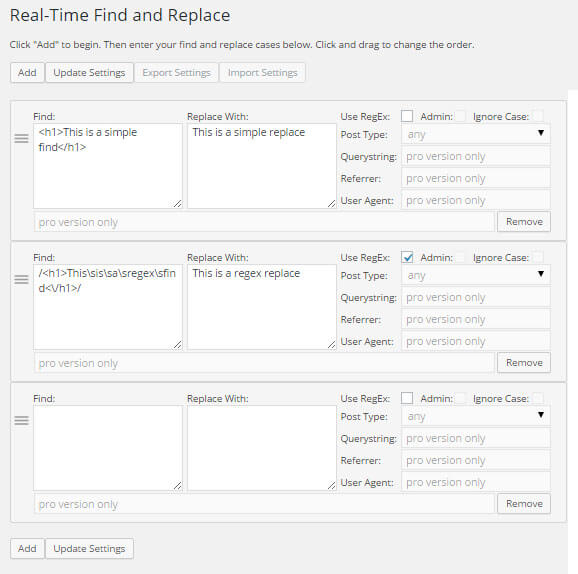
1. Have you ever noticed that Google is picking up multiple versions of your pages with different replytocom parameters? This can result in a lot of duplicate content. There are have been a bunch of suggestions on how to fix this including redirects, disallow entries in your robots.txt file, and dynamic parameter settings in Google Webmaster Tools. With the Real-Time Find and Replace plugin you can keep Google from finding these URLs entirely while still keeping the commenting functionality. Just add this rule:
?replytocom= replaced with #replytocom=
Pretty sweet, right? Now the duplicate URLs don't even exist so you don't have to block them and you won't lose link equity.
Note: This solution works perfectly on this site with this theme. I haven't tested it exhaustively with other themes so be sure to test our your comment form after implementing.
2. Sometimes I close comments on a page or post. I don't like having the text that reads “Comments are closed”. I figure such a message is redundant since you can't enter a comment. To remove this I use this regex rule:
/<p class=\"nocomments\">(\s)*Comments are closed.(\s)*<\/p>/
Note: With regex rules you to need to start and end with a forward slash.
3. I use the Author Bio Widget, but it spits out a tag I don't use. I could modify the plugin to remove it, but that would mean that when I upgrade the plugin I'll lose the code update I made. So instead I use this rule:
<span class="bio-title"></span>
4. I want Gravatar support on this site in some areas, but I hate having the same unknown icon displayed for commenters that don't have a Gravatar image and in my case that's most of them. To keep Gravatar support on while also eliminating the image I use this regex rule:
/<img(.*)?gravatar\.com\/avatar(.*)?>/
As an added bonus, removing all of these Gravatar calls reduces page load time.
5. I use the Digg Digg plugin for displaying social media buttons. This plugin injects an unnecessary call to a big JavaScript file that just slows down the page. I remove it from the HTML code using this regex rule:
/<script(.*)?sharethis\.com\/button\/buttons\.js(.*)?<\/script>/
6. The Photodropper Plugin outputs a link to an external site for every image it adds to a post. I think this is excessive so I remove the link with this rule:
<a href="http://www.photodropper.com/photos/">photo</a> which is replaced with just "photo"
Note this technique of removing links from plugins works everywhere. I've used it for a bunch of plugins.
7. The Digg Digg plugin (mentioned above) calls a JavaScript file well above the closing body tag of the page. To help with fixing a problem related to Facebook generating pages by appending a parameter (see this discussion on the fb_xd_fragment problem) to my URLs I need to remove this JavaScript call so I can manually add it to footer.php in the right place. I remove this code with this replace rule:
<script src="http://connect.facebook.net/en_US/all.js#xfbml=1"></script>
Is it possible after these 7 examples there still isn't even one possible use for your site? If you're convinced, you can buy it here.

 (8 votes, average: 4.38 out of 5)
 Loading...
Hi,
I have the pro version of your tool and its been great. Recently I noticed that it isn't removing an auto generated line that is created from a free RSS tool I am using. You will see it at the bottom of the page I attached.
I've tried regular text and also the html and still no luck. Other than that it has been doing a wonderful job.
Any help would be appreciated.
Thanks
Can you see the text you want to replace when you use your browser's "view source"?
I do. It shows us as this.
(Feed generated with FetchRSS)
Good. As long as it shows with "view source", you can replace it. Note that "view source" isn't the same as "inspect" so be sure you're using the right option.
For the replacement, I would start with having the Find match a single word within that text and then keep adding to the Find until it stops working so you can zero in on what the problem is. It's typically a missing space or something represented by a special HTML code.
I got it to remove it by putting the whole line from the view source!!
Thanks you so much for your help!!
Hi, I would like to use regex to format text to Lowercase or Uppercase
/(.*)?/ - Regex
\U\1 would be the usual replace , but the \U is treated a normal text while \1 is the content
How can I add additional formatting to the enforced using regex?
The plugin uses PHP's implementation of regex and I don't think the \U transformation is supported by it.
How can I replace text by user?
My plugin doesn't have that feature.
Not working for me, a refund would be nice , thank you !
You'll need to remove the files from your server first.
HI, I bought the Pro version and I love it, but now I have a problem. I installed the Poll Maker plugin and that plugin only works when Real-Time Search and Replace is deactivated - I have everything set to POST on the replace setting. Something is not right. Please help.
Thanks
Dan
Every time someone reports an issue with another plugin the reason has been that one of the rules is replacing something unexpected. Typically a replacement is affecting the path to a CSS, JS, or image file. Or the path to a URL is being altered.
To confirm it's not the plugin itself, you can remove all of the rules and leave the plugin active. If that works, add back each rule one by one until things break. You'll then know which rule is the problem.
Hey Marios,
I would like to replace this entire div with all it's HTML content with an empty string.
OTHER HTML HAVING OTHER DIVS, etc HERE
I tried many things I think it would be much simpler for you to provide a solution instead of showing what I tryed.
Thanks.
Hello,
I had bought the pro version of the plugin and the find and replace with html code it doesn't work. I have put in the
Find:
<i class
Replace:
<span class
And it doesn't doing the replace.
Much appreciated.
The plugin supports HTML replacements. My guess is what you put in the Find doesn't match anything on the page. You can double-check by using the "view source" feature of your browser and doing a search for what's in the Find box.
Another possibility is your site uses caching and you're viewing the cached version without the change. If this is the case, you'll need to flush the cache for your site or for the specific pages.
Thank you so much!
will upgrade to the pro version soon.
My first use case was changing the name="s" to name="q" and action="mysitedotcom/" to action="mysitedotcom/search/"
Hi. I'd like to ask a question before buy.
I've tried free version and added a rule:
Hazreti Süleyman --> Hazreti Süleyman
But two problems occured. First one is the post title. When hovering over the tab it shows the html tags. And secondly the QR Code below my post is also broken.
Is it possible to set some rules for example to not change the post title?
You need to write the rule with enough specificity so that it doesn't match the post title. This usually involves included surrounding code/text so that only the elements of interest are matched.
Thanks a lot Marios for your incredibly fast response. I see that the codes I wrote in my comment are deleted. Can you kindly check the screenshot below, please?
https://ibb.co/vJ7Z0jR
And can you give me an example for what you mean with your reply?
I don't have a specific example since each site is different. What you need to do is include additional code or text in the Find box so that it only matches what you want to match. You could use your browser's "view source" feature to see what occurs before and/or after the text you want to replace and include that in the Find box. If there isn't anything you can include, then you could try using the RegEx option which allows you greater matching functionality i.e. you could basically write don't match if this is the title, but match everything else. RegEx is tricky though. If you're not familiar with it, I recommend using an online RegEx testing tool to figure things out.
Hi Marios,
I want to apply random links at the end of my posts content,
eg.: link1|link2|link3
Can you please advice what rule to use?
Regards,
Stathis
My plugin doesn't have randomness functionality.
hi, i have download link that want to change without breaking the link
for example
i have this text on my post
https://wordpress.com/ | wordpress.com
so i just want to change that text "wordpress.com", and without breaking https://wordpress.com/
how to do that?
What have you tried?
what do you mean?
do you know what i mean?
What rule have you tried to accomplish what you're trying to do?
idk about rule, that why i'm asking..
find: wordpress.com
replace: Wordpress
but it's breaking the https://wordpress.com/ link
i just want to replace the text without breaking link
You have to change the Find so that it is more specific. Use the "view source" of your browser to see if there's additional text/code you can include before and/or after "WordPress" so the Find only matches what you want it to match.
Are the changes permanet in the database?
No they aren't. Remove the plugin or remove a rule and things go back to the way they were.
Thank you very much for your work!
I'd like to report that your plugin works perfect with caching plugin. Changes by your plugin are executed BEFORE cache plugin prepares the output = no speed loss, really real time change! :-)
Μιας και Έλληνες, θα γράψω ελληνικά!
Προσπαθώ να καταλάβω γιατί δεν κάνει replace πχ ένα image tag που έχει άδειο alt attribute.
είναι αυτό :
" "
και απλά θέλω να γεμίζω το alt ώστε να μην έχω θέματα accesibility. Δεν το κάνει ότι συνδυασμό και αν δοκίμασα
If you use "view source" in your browser and you can find the text when viewing the source, then the plugin should be able to replace it. If it's not working, that probably means the rule you've written isn't matching possibly because of a small difference like a space.
Hi i am the men who i writed the last comment i want change $ to € and also i want change this keyword téléphone to smartphone but is don't work i don't work .
But is worked for $ to € but now is don't want work i cleared cache but don't work
What find and replace rule have you tried?
I want find this $ and chage it to €
And téléphone to smartphone
I understand. But what actual find and replace rule have you tried?
I don't have any rule because i have only the free version
hi i don't know why is don't work I added now a rule to change $ to € but is don't work I don't know why and also I cleared my website cache but is don't work.
What find and replace rule have you tried?
Hello. I purchased the pro version. Actually, your software solved the most problem for me. I appreciate that very much. Now I am stucking in a situation. I tried to change text in Account page. Most are ok such as: Downloads, Addresses, Wishlist, Account Details, WISHLIST, Logout, LOGOUT,.. excepted DOWNLOADS and ADDRESSES. I also tried ticking the admin box but nothing happened. Please help me out with this case.
The parts that aren't working may be AJAX-driven. If that's the case, then the plugin won't have any effect as AJAX bypasses my plugin. The best way to confirm this is to use your browser's "view source" feature. Note that some browsers also have an "inspect" feature which isn't the same as "view source". If you can find the text when viewing the source, then the plugin should work. If you can't find the text when viewing source, then the plugin won't be able to find it either.
I fixed it. The front-end words are style differently from the html code so that I chose wrong words for filter. View source code solved the problem. Thank you very much. Excellent software!
Hi I just purchased the pro version.
I need "find and replace" to work only on a specific post (a draft, not published). If my unpublished post is https://mywebsite.com/this-is-my-post ... how do I make sure words are replaced only, but only on that specific draft (not throughout the website)?
I have a lot of content and don't want to screw up previous posts that may contain the same words or phrases.
The Querystring field allows you to specify text that must be in the URL for the replace to occur. So in your case, you would add this-is-my-post in the Querystring field and then the rule would execute only if the URL contains this-is-my-post.
It looks like this is mostly for creating dynamic "rules".
How do I change the actual text on a post permanently? I am looking to do the most basic form of search and replace text.
Find = this is my current text
Replace = what I want the text to be
Querystring = https://mywebsite.com/this-is-my-post
Is this possible with the pro version or is it only for dynamically changing page text? Because it's not working, and if I want to have 5,000 posts... it will probably crash the servers eventually.
Yes, my plugin makes the changes dynamically and they aren't permanent. It sounds like you need to find a different plugin for your particular situation.
Hopefully, someone can help out.
I have in text an old shortcode that is not working anymore.. so it just shows as text in the article.
{gallery}numbers{/gallery}
numbers are random
How to do the query? :(
Hi, i would like to replace HTML inside another element in order to add a chekcbox. I hace a recipe web and there are not plugins in wordpress to show a checklist. The ones you can find have not been updated since 2 years ago!
The plugin can replace HTML with other HTML.
I am trying to replace something like this that is dynamically generated
$890.10
with
$890.10
Price is dynamic
What rule have you tried?
I use find and repace on many sites. Most specifically to replace things like with © and forcing URLs from http:// to https:// but it is so terrifically useful and much appreciated
Can I use this plugin if I want to PERMANENTLY replace all examples of, say, a given word/phrase in the Pages throughout my website?
Thanks
The changes this plugin makes are in effect only while the plugin is active. So, in that sense, they're not permanent.
Hi,
I want to use the user agent filter but I have a doubt.
I'm using your plugin in a app generated by WordPress with WPMobile.App plugin.
I want to apply the search and replace to all the ios devices independent of the device or ios version.
How can I achieve that with the user agent filter?
Regards
If you specify a user agent, the rule will execute only when the actual useragent contains the text that you specified e.g. setting ios would match all user agents that contain ios.
Love find and replace. Upgraded to pro because I had so many uses for it. I'm currently stuck trying to accomplish a regex find and replace. I want to change a link address where parts are unknown.
Original link: https://exploreunioncounty.com/places/tags/basketball/new-jersey/roselle-park/
Replacement link: https://exploreunioncounty.com/places/tags/basketball/
As you can see, I want to strip off new-jersey/(any city name)/ Also, "basketball" can be any tag name. I've been able to match the link with the following regex:
/(http|https):\/\/exploreunioncounty.com\/places\/tags\/[^\/]+\/new-jersey\/.*/
The problem is creating the new link to include the tag. Hoping it's possible. Thanks
Wrap () around the tag that you're matching. In the replacement, use \1 to insert the matched tag. You can do this as many times as needed i.e. the first () is referenced with \1, the second use of () is referenced by \2. This is called a capturing group and a backreference in case you want to look up the details.
Worked like a treat! Thank you so much!
I'm struggling to get it to remove the default theme footer. On the left I have:
Copyright © 2020 Rani Rai. All Rights Reserved. | Fotografie by Catch Themes
On the right I have: Copyright © 2020 Rani Rai
But nothing changes. What am I missing?
Many thanks
That should work. My guess is that there's a character or space difference somewhere. I would start by replacing a few words at a time and continue adding to the Find portion until you've replaced the whole thing.
It works if I replace just the first word (Copyright) but if I try any other word or combination it fails. My understanding is that I can use either the text or the html code with all the "
Copyright © 2020 Rani Rai. All Rights Reserved. | Fotografie by Catch Themes" etc
There must be something different between what's in the source when you "view source" and what you're putting into the Find box. Are you using "view source"? Note that "view source" and "inspect" aren't the same thing.
Ah View Soure in Chrome worked whereas Show Source in Safari didn't for me. Thanks
Is it possible to use a seccion variable as the replacement string?
I want to be able to send a string through the URL and have a set of defined strings be replaced by it. I will put that get parameter into the session so it persists. Does your code facilitate that?
No that's not possible.
Hi Marios,
I would love to buy your plugin because I don't want to mess my WP code... but I have no knowledge in regex. Before I get my hands into it and learn regex, can you please tell me if I will be able to change all text including text inside buttons after I buy the pro version?
For example, on my site: https://compareboreholecameras.com I want to change the View Cart button text (displayed on the right after an item is Added to Request). Unfortunately, if I search View Cart and replace it with View List, nothing happens. And if I find this code:
View cart and replace it with
View list
then check the Regex option, the site does not load anymore.
Will the pro version solve my problem and how?
Thanks!
Eric
If replaces aren't working there's a good chance your cart functionality uses AJAX which my plugin can't find/replace.
I don't have any sort of cart. I am trying to replace the copyright statement in a theme footer?
Replacing a copyright statement should work. Basically, anything you can see when you use your browser's "view source" feature is replaceable.
I'm just trying to change text inside my search box. I'm not sure how this plugin works so forgive me for not being very tech savvy. I'm just confused on what I put in the "Find" and "Replace With" boxes. Thanks for your time.
The Find should contain the text and/or HTML code you want to replace. In the Replace box put the new text and/or HTML code you want to put in place of matched your Find.
I'm searching for a method of permanently removing hacking code from posts and pages on one of my sites. I have 5200+ social media posts on this site and 350+ have the hacking code. I can't use the post search feature to quickly find each post due to the volume of posts on the site. That means I have to manually look at every single post, find and delete the code before saving the changes.
Do you have a plugin for this seek & remove process or know of one that does?
Thanks in advance for your assistance.
Janice
Sorry, I don't have a plugin that is good for this kind of work. I'm sure there is one in the plugin repository. You can't be the only one that's had their site hacked. Good luck!
Hi Marios,
Is there any way of replacing whatever word with a [shortcode]?
Thanks
No because by the time my plugin has run, shortcodes have been processed. So if you replaced a word with a shortcode, all you'd see on the web page is the actual shortcode.
I am very happy with my premium version. Now I would like to hide any text between the abbreviations HIDESTART and HIDESTOP on my page. Despite intensive testing of regex, I don't know what the correct wording should be. Could you please send me the regex expression? That would be really great! Thank you very much in advance!!
Post the rule you tried. Maybe it'll just be a small edit to get it to work.
Do far it’s very limited:
//
I'm guessing your rule didn't come through. All I see are two slashes.
Oh sorry. Now the problem is fixed and works brilliant :-)
Can we even install plugins with our current access level? Would the urls remain changed even if the plug-in gets removed in the future? I'm okay with using something like this so that the job can get done, but I want to make sure that you are very careful in executing it. Doing a find/replace can be very powerful, but can also mess things up.
The plugin doesn't change any permanently. If you remove the plugin or deactivate it, all rules cease to run so changes disappear.
Marios hoping you can advise me. I used your plugin as part of the AMP deactivation process. Having done the following
Click on Real-Time Find and Replace under tools in your WordPress dashboard. Click on “Add” and add the following code into the Find: field:
"potentially unsafe action preventing post"
Click on the box next to “RegEx” and then click on “Update Settings.” This will replace/remove that important AMP tag as Google recommends on your canonical non-AMP pages and or posts.
Is there a way of now undoing that so I can reinstate AMP to give it another shot?
Just delete the rule and things will go back to the way they were before. The plugin doesn't make any permanent changes.
Good day Marios,
I would like to find out if this plugin can be used to find and replace phone numbers and email addresses in front-end message platform. (Similar to Airbnb, etc.)
Please advise.
Many thanks and kind regards,
Blue
I can't say for certain without knowing more. Try the free version to confirm.
Hello,
I have a page on 1 Wordpress site that I've duplicated many times on that single site. I have a "template" page that serves as my master page, which I replicate. Each page has the same video embedded on the page.
When I want to swap out the video with an updated version, is it possible to use your plugin to swap and replace that video code on all the pages in my site that have that original video code?
Thanks for your help in advance!
Tom
Sounds doable. Try out the free version to confirm.
Hi, I would like to change a rule on a single page, can you? and how??
Use the Querystring field to filter on only a single URL that matches.
How can I use this if I have seo-friendly URLs like /somepost/ ?
Would really like to restrict a search&replace to one specific page!
You can use the Querystring field to restrict a rule to a particular URL. The field acts like a simple match so /somepost/ will match any URL with /somepost/ in it.
You comment: You can use the Querystring field to restrict a rule to a particular URL.
But how do you do that?
Do I put the url in the Querystring field?
Can you give an example?
Thanks!
Put a portion of the URL you want to match in the querystring field e.g. /category/. Any URL that contains /category/ will be matched.
Yes I can filter it in a language, for example putting / pt-pt / but I can't get the querystring of the main page.
I would need to change code only on the main Spanish page (and with / es-es / it doesn't work).
The website is https://www.viajarporegipto.com/
Thanks.
Correct. Since the homepage URL doesn't have anything to match, the querystring field won't be able to filter the rule.
I just submitted a comment saying that I could not get it to work even after clearing cache.
I did get it to work!
Great tool!
Thank you for building this!
Bud Hines
Marios, here's what I'd like to do...
On many blog posts throughout my site I present an offer to the reader, something like: "My book is free to anyone who subscribes before it's published. Go here [Go here is a link to a url] and get on the list."
I want to find these statements and replace them with a different statement and link.
Can your plug-in do that?
If can see the text when you "view source" using your browser, then you should be able to change the text.
Hi,
I'm new to WP still but Ive moved a site I was working on from a folder on the server to the root now its finished. My images are not showing well any of my media so will this help me edit the paths.
Thanks
R
Yes you could use this plugin to modify the paths. However, you probably want something that will make the changes permanently which this plugin doesn't do.
Genius Plugin. This is a HUGE timesaver for me. Best plugin I have found for its usefulness in forever.
Hi there,
Cool plugin. Thanks.
I'm wondering if it's possible to target only a specific page where I might want to replace only occurrences of a specific word such a "sample word" with "better word". I'd also need it to replace the occurrences in the head, and seo plugins, etc.
Thanks in advance,
Wayne
If you can see the text when you "view the source" in your browser then you can change it with the plugin. You can target specific pages by providing a URL pattern to match.
Beautiful, thank you.
Hi there,
Can you tell me how do I replace a text which is inside a tour component of Visual Composer that I have in all 200 product pages of my store?
Thanks
I'm not familiar with what you're asking about.
Hello Marios,
I'm looking for a good way to change text on a landing page based on the URL that the user enters the site through. Basically what Unbounce does: https://unbounce.com/dynamic-text-replacement/. Is this something your plugin can do?
Thanks!
It may be possible, but I think you'd have to jump through too many hoops. You're probably better off using a plugin that allows PHP code to execute in a post/page and then dropping in a snippet of code that adjusts the text accordingly. You should get the flexibility you need from that approach.
Alright, thank you so much for the advice, Marios. It's much appreciated!
Hi Mario,
Great plugin.
I need to get the hang of it still.
Is it possible to target content rendered on my web page coming from an external IFRAME source?
I can't seem to get it to work.
Thanks
No you can't modify content in an iframe. Content in iframe doesn't pass through your server or WordPress so there's no opportunity to manipulate it. There are ways to do what you've described by requesting the content via PHP's curl functionality which would then allow my plugin to work.
Hello, need to find this regex rule:
/(class="entry-title ">)(\w.*)(\.php)/
and replace it with
/(class="entry-title ">)(\w.*)/
delet the ",php"
Thank you
Hi,
i replace test features for caracteristicas, on my site there is a js snippet the uses the word features and it is replacing it also causing that on console i see a function not working because it contains the word features. What can i do? I have the pro version.
Could you provide some more detail about the problem(s) you're having? I don't understand what you've described. An example URL with an example rule would help.
Hi. Is it possible to replace html codes in Wordpress dashboard backend? I want few customization there to make it look the way we need.
Any idea or solution is appreciated.
Best,
Art
Yes, the plugin can modify the backend (admin pages). The one exception is that it won't modify anything on the plugin's one admin page.
I'm trying to replace "[word][forward-slash][word]" with "[word][hair-space][forward-slash][hair-space][word]" (adding hair-spaces around forward-slashes).
However… when I try to replace a / with anything, the page doesn't render (which makes sense).
Is it possible to do what I'm trying to do?
Replacing forward slashes works as far as I know. I've got some active rules with slashes myself.
Is this is a regex rule you're creating? If so, forward-slashes need to be preceded with a backward slash because forward-slash is a special character. If the rule isn't regex, there isn't anything special you need to do.
If the above doesn't help, email me (support at this domain.com) your rule and I'll test it. If you post it here it might get garbled.
Shoot, I forgot an important note: I'd like to replace forward-slashes between *any* words…
left/right
breakfast/lunch
orange/purple
My guess is that I'll need to use a regex capturing group to isolate the forward-slash. But, am I right that the plugin doesn't support capturing groups?
Capturing groups should work. If you get stuck, send me some text to match and the rules you're using.
great plugin
I have a question
how to replace the space to -- in the post only
pls answer
I'm not sure what you mean. It sounds like you want to replace a space with 2 dashes. Have you tried putting a space in the find box and 2 dashes in the replace box?
It is a great plugin, for sure.
My question:
Is there a wildcard character?
I have thousands of posts going back about six years in wordpress. Some posts I have disclaimer content that legally needs to be updated to current version on the fly. There are company names and other variables inside of those paragraphs that we used to insert. The single version of that paragraph no longer needs all of the client details.
I could use the phrase that starts the paragraph and the phrase that ends the paragraph and use a wildcard in between - if that is possible. Is there one?
It sounds like you'll need to use the regular expression option for your search and replace. With a regular expression you can match pretty much any pattern.
Marios,
Killer plugin! Thanks for contributing it. I need to isolate an instance of a word on 1 page. Is there a way to identify it with the page class, e.g.:
.page-id-123 Title
Thanks again!
Sadly there are no filtering options. Such functionality keeps coming up as being useful, but I've yet to implement anything. Hopefully when the paying gigs dry up!
Great plugin and it's working great! I wondered if there would be any easy way to extend it to work on the admin side also?
Cheers, Andrew
There's no option for that in the interface, but technically it could be accomplished with changes to the code. Modifying the admin would introduce some potential problems though as many people make mistakes with their regex rules resulting in white screens on their sites. If the admin went white too, they'd be stuck having to delete the plugin via FTP every time they made a mistake.
I have a huge problem and I hoped your plugin can fix it: as you may know insecure content appear often under new moved sites to SSL.
There are a lot of resources like css hardcoded images or js generated links that still display http:// instead of https://
I tried to used a lot of expressions and regex to either:
1 - replace only http://mysite.com with https://mysite.com EVERYWHERE in the output page(that is mixed php with html under wordpress)
2- replace http: with space, so make resources and assets relative - like http://mysite/wp-content/thumbs/img.jpg to //mysite/wp-content/thumbs/img.jpg
Please help me with the correct regex expressions.
I have the feeling that simply it doesn't replace ...something is wrong there in the plugin
I dont know why but it does not replace..cache is disabled and uninstalled.
You shouldn't need a regular expression to replace what you're describing. So make sure the regex check box is unchecked and try a simple replace.
I mentioned that i used both expressions and regex. Is not working in neither ways. Seems that the script prefer to replace only html code, and doesn't touch other resources.
That is correct. The plugin replaces code in the final rendered HTML. The replacement happens at the time the page is rendered and is not permanent. The plugin doesn't dig through PHP code since such code is at the server level and not in the final rendered HTML. I hope that helps!
Well, your plugin was my last hope... but it did not what I hoped.
I am sure you know these ugly file input buttons, that are named by browsers?
Mozilla says: "Choose file" and "No file selected".
IE says: "Choose file" and "No file chosen."
I tried to translate them with you plugin and, maybe I don´t know way or... maybe it is not possible. Maybe you can help
This plugin can replace any text that appears in the source HTML. Stuff the browser does probably can't be replaced. To confirm, go to the web page of interest and select view source from your browser's menu. If, within the source, you can see the text you can replace, then the plugin should be able to replace it.
Marios
Hi.
This plugin is great, but I do have a question.
I am trying to find and replace a lot of data, is there anyway to copy in a lot of data without having to do it one by one in the plugin backend as provided.
I have numbers that need to be replaced with updated numbers, I am looking for a quick way to make this change.
Thanks,
That functionality doesn't exist at this time. Your only option is to insert the necessary fields directly into the WordPress database for the plugin to use.
Marios
Hi
Thanks for the quick response. I'm not quite sure I understand your response....Are you saying there is a way I could do this by inserting the necessary fields into the Wordpress database for the plugin? Or do you mean the only way is to insert the items one-by-one into the plugin?
You could write SQL queries to insert the data into the WordPress database in the same way the plugin does. Sometimes that can be pretty quick work, but it'll depend on how familiar you are with SQL.
Thanks Marios, Unfortuneately I do not know how to do the SQL stuff, but I will keep looking into ways to get this done.
Thanks, Plugin is awesome!
hello,
is it possible to add a variable to a url with your plugin?
example:
test.com/fixed/random/random
to
test.com/fixed/samerandomasabove/samerandomasabove?variable=mysite.com
regards
If you're trying to add a variable that changes, then no.
sorry, i wrote it wrong, i meant ?site=mysite.com and it is fixed, those that change every time are the "random" parts.
i need to add ?site=mysite.com to every new link from test.com. I tried a regexp but of i screwed, the resulting post became blank :)
Thanks for the replay btw
Hi, Marios...
[I posted this in the support forum, but I thought I would also post it here.]
This plugin could be a miracle saver for me, as it's a brilliant plugin!
I just installed it, but it doesn't seem to working. I have no cache plugin installed, and I've tried clearing the cache in my browser. I've tried replacing html that is being rendered by js and also simple text replacements contained in a post, but no changes are occurring.
Does Real-Time Find and Replace v2.0 work with Wordpress v3.9?
I would really appreciate your help...
:) jonathan
Hi Jonathan,
I just tried the plugin with WP 3.9 and it seems to work. It sounds like you are doing things correctly, but just to confirm if you "view source" is the text you're trying to replace visible? The plugin requires the content to actually be in the source.
Is there any permanent replacement?
No the changes are made when the page renders. They can't be permanent because the code being replace might not actually exist until the page is created. If you want to make permanent changes to content, look up the Search RegEx plugin.
Hi,
I really like your plugin, it's the only search and replace plugin that i found that meets my requirements:
-replaces the meta parameters as well
-replaces terms right before the post is published.
I was wondering ...is there any way to make the search and replace changes permanent not just passive?
On my website works fine just as it is, but if i connect wp to google+ ,the posts imported to g+ includes the deleted string. Ofcourse the string doesn't appear on my website only on g+.Any idea how to solve this problem?
Thanks for your time.
Hi Marios
Just a comment/question on this plugin´s use you may have not thought about
I do have few afiliates programes runing right now on my site.
Plugins like "ad inject" do a great job into inserting the ads i like, but it does it on all site´s pages and posts.
Not practical.
What i need is to keep track of what each campain is doing in wich part of site in order to keep the best ones running.
Im thinking of placing manually all ads in the areas i need them to be placed.
Then Real-Time Find and Replace plugin could just replace each ad code by areas, leaving in each area the right ad.
I will need to run test first but I think itll work just fine.
Rgds
I am simply trying to remove Category Archives off my blog. I'm on wordpress 3.8.1. I've used the commands >Category Archives: < It hasn't changed anything on my site, the Category Archives title is still there. Am I missing something? Thank you
That seems straight-forward enough and it should work. Have you tried taking the text you're searching for, viewing the source of the page, and then searching for it using the browser's search feature? Just to confirm that it's appearing in the page in the expected way.
Hello,
I recently imported 112 posts from Hubspot into WordPress, which worked nearly flawlessly except it included some strange character entities that I need to replace.
For example, the word didn't uses \'92 for the apostrophe: didn\'92t
Obviously, I'd like to replace it with the proper character entity such as '
I installed the plugin, but it didn't work therefore I'm probably overlooking something so does anyone have a suggestion?
Thanks in advance,
Mario
The plugin should be able to handle what you're describing. You shouldn't need to use the regex functionality either. So a simple find and then a replace with what you've specific should work. You're not looking at a cached version of the page, are you? If you've got WP Super Cache or W3 Total Cache then you need to flush the cache or configure it to not cache for your ID. If that isn't the case then I'd double-check that what you've provided for the find is correct. For example, is the quote a straight quote or curly quote. It's not always obvious from looking so I prefer to copy from the source and paste into the plugin.
I hope that helps!
Cool plugin, but how to replace the path to the images? I like the website address http://site.com/wp-content/uploads/year/month/ and I want to replace it at this http://site1.com/uploads/year/month/
to year and month - themselves replaced, you know?
I'm not sure I'm understanding your question, but it seems like you just need to search for:
site.com/wp-content/uploads/year/month/
And replace with:
site1.com/uploads/year/month/
You'll need to use regular expressions to match the year and month since they're going to change all of the time. For example, you could match a year with [0-9][0-9][0-9][0-9].
It seems that after Wordpress upgrade to the lates versio WP 3.6, the plugin stop functioning,
Thanks for the heads up. I usually don't upgrade to the latest WordPress until they release the .1 of any version so that I don't have to deal with the initial bugs that are typically associated with a new version. As soon as I do I'll be checking out how the plugin works.
I found some jQuery incompatibilities and I believe I have corrected them. The latest version (1.5) should work as expected.
I am using a wordpress theme for a real estate website but it has $ all over it and as im in the UK i need it to be £ so I have installed the Real-Time Find and Replace plugin which replaces it in some locations but not when the search runs.
I guess this is due to the fact that the search results are populated after the search and replace is completed. Any ideas how i can get around this?
Much appreciated.
Dan
The search and replace functionality works for the search results on this site. Are your search results perhaps coming from a third-party source via JavaScript. One way to check this is to view the source of the web page and confirm that the text appears in the source code. If not, then this plugin won't be able to replace text.
Yeah they are coming from a third party site, which is both good and bad.
I am guessing there is no way of re-running the search and replace within the JavaScript search code?
Cheers Dan
There may be a way, but every third-party does something different so there's no way for me to know. Often third-parties provide other ways to access their data which allows you manipulate it before displaying it (usually referred to as an API), but then the onus is on you to take care of displaying the data properly.