

Cache Clearer
The following is AI-generated (aka vibe-coded) software. The software is specific to my needs and my system and may not work for you or your system. Support is limited, but if you report a bug I'll certainly look into it. All code is provided in a zip file for you to review should you choose.
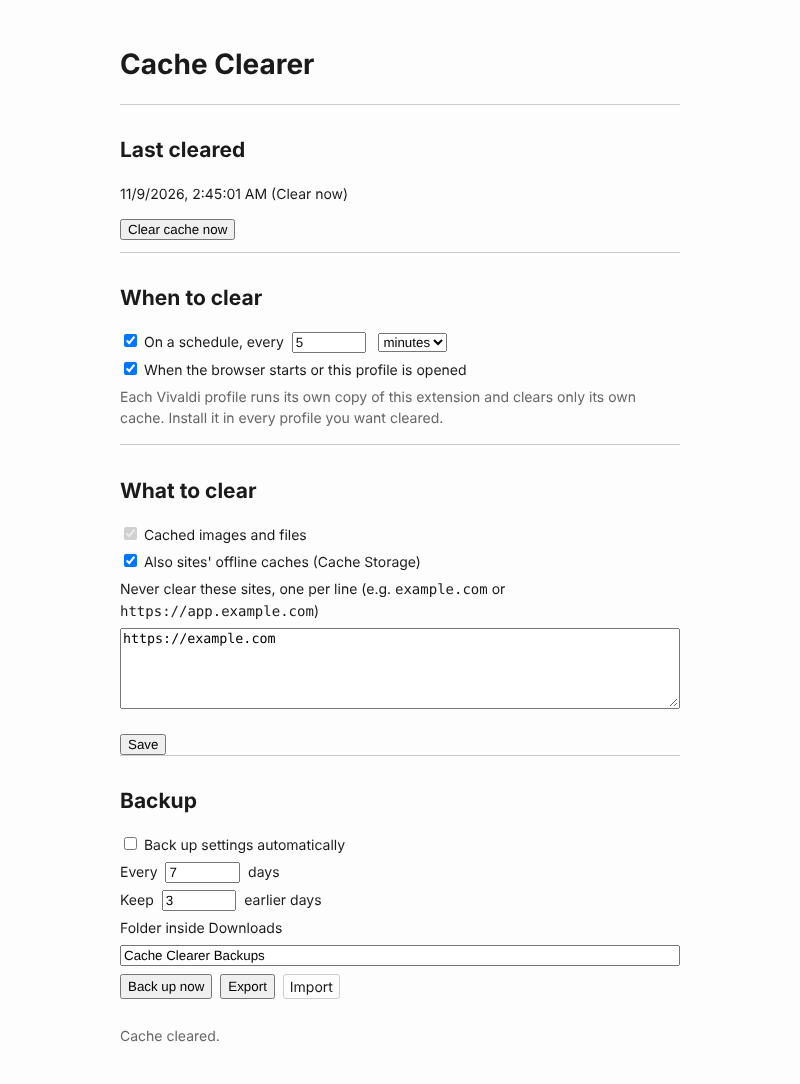
Clears Vivaldi’s cache (cached images and files) automatically: every few minutes, hours or days, whenever the browser starts or a profile is opened, or on demand. It can also clear sites’ offline caches, skip sites you choose, and back its settings up to a folder every few days.
Everything runs locally. The extension makes no network requests, reads no page content and has no host permissions. It never touches history, cookies, passwords or site logins.
Install
- Open
vivaldi://extensionsand turn on Developer mode. - Click Load unpacked and pick this folder.
The options page opens after installing. Click the toolbar button to open it again.
Using it
When to clear
Tick one or both triggers and click Save:
- On a schedule, every N minutes / hours / days (1 to 999 of the chosen unit). The next clear is timed from the last one, so restarting the browser or re-saving the form doesn’t push it back. If the browser was closed or asleep when a clear fell due, it happens shortly after it’s running again.
- When the browser starts or this profile is opened.
This ischrome.runtime.onStartup, which fires once per profile when that profile first opens: at browser start for the profile that opens then, and later for any other profile the moment you open a window for it.
Clear cache now clears straight away. The Last cleared line shows when the last clear happened and what triggered it, or the error if it failed.
Profiles and limits
- Each Vivaldi profile is separate. A profile runs its own copy of the extension with its own settings, and can only clear its own cache. Install the extension in every profile you want cleared (or restore a backup file into each one).
- Opening a second window of a profile that is already open doesn’t count as opening the profile, so it doesn’t clear.
- Private windows aren’t cleared. Their cache is kept in memory and thrown away when they close.
- There is no “on exit” trigger. Extensions get no reliable event when the browser closes. Use the startup trigger instead, which clears what the last session left behind.
- Vivaldi’s own data (thumbnails, speed dial images, the session) is not part of the browser cache and isn’t touched.
What to clear
- Cached images and files (the HTTP cache) are always cleared, from all time.
- Also sites’ offline caches adds Cache Storage, which sites and web apps use to work offline. Clearing it can make such apps download everything again, or stop working offline until you visit them online.
- Never clear these sites takes one site per line:
example.commeanshttps://example.com; writehttp://or a port to name a different origin. Each line is an exact origin, soexample.comdoesn’t coverwww.example.com. Anything that isn’t anhttp(s)site is dropped on save.
Keeping the current site from the toolbar
Right-click the toolbar button and choose Never clear this site (or clear it again). It adds the current tab’s site (its exact origin, e.g. https://www.example.com) to “Never clear these sites”, or takes it off if it’s already there. The button briefly shows + (added) or − (removed), and hovering it says which site. On a page that isn’t an http(s) site, such as vivaldi:// pages, it shows ! and changes nothing.
Backup and restore
Settings can be exported to a JSON file and imported again from the options page. Scheduled backups are saved into a folder inside Downloads every N days. Only the newest backup from each earlier day is kept, for as many days as the “Keep” setting allows. A restored file is checked the same way as the settings form, so a crafted file can’t store anything the form wouldn’t. The last-cleared time isn’t part of a backup.
Files
| File | Purpose |
|---|---|
manifest.json |
Manifest V3, module service worker |
background.js |
Service worker: the clear alarm, the startup trigger, clearing, the toolbar menu, message handlers and scheduled backups |
lib.js |
Settings, sanitizeSettings, toggleKeepSite, alarm timing (alarmPlan, firstDelay), the browsingData arguments (removalArgs), backup file build and parse (tested in Node) |
options.html, options.js, options.css |
Options page |
shared/backup.js |
Shared backup helpers and scheduler, on globalThis.SharedBackup. A plain script, so the worker loads it with import and pages with <script>. Do not edit here |
shared/sender.js |
Shared message-sender and host checks. Do not edit here |
test_backup.mjs |
Node tests for lib.js and shared/: node test_backup.mjs |
test_worker.mjs |
Node tests that run background.js against a fake chrome: node test_worker.mjs |
screenshot.png |
The options page, for this README |
Permissions
| Permission | Why |
|---|---|
activeTab |
Reading the current tab’s address, only when you choose the toolbar menu item |
contextMenus |
The “Never clear this site” item on the toolbar button’s right-click menu |
browsingData |
Clearing the cache (and, if chosen, Cache Storage) |
alarms |
The clear schedule, and the hourly check for whether a scheduled backup is due |
storage |
Settings and the last-cleared time |
downloads |
Saving scheduled backups and removing old ones |
Implementation notes
- Clearing is one call:
chrome.browsingData.remove({ since: 0, excludeOrigins }, { cache: true, cacheStorage }).removalArgsinlib.jsbuilds both arguments from the settings. - The schedule is one repeating alarm,
clear-cache.
Chrome doesn’t promise that alarms survive a restart, sosyncAlarmruns on install, on every startup and whenever the settings change.alarmPlankeeps an alarm whose period already matches, removes it when the schedule is off, and otherwise creates it with the first delay counted from the last successful clear (firstDelay). - A startup clear and an overdue alarm often arrive together;
clearCacheruns one clear at a time and hands both callers the same result. onStartupcan’t be tried out with Playwright: an extension loaded with--load-extensionis installed afresh on every launch and getsonInstalledinstead. Load it with Load unpacked and restart Vivaldi (or open a second profile) to try the startup trigger.
Security notes
- Every message handler checks the sender with
shared/sender.js.clear-nowandbackup-noware accepted only from the options page. - Settings from storage, the form or a backup file all go through
sanitizeSettings. Kept sites are parsed withURLand stored as barehttp(s)origins. - There are no content scripts and no host permissions. The toolbar menu sees the current tab’s address only through
activeTab, which Chrome grants for that one click. Text is written withtextContent, neverinnerHTML.
Tests
node test_backup.mjs && node test_worker.mjsVersion history
1.0.0 — First version: clears the cache on a schedule (minutes, hours or days), at browser or profile start and on demand, with optional Cache Storage, kept sites, and settings backups.
1.1.0 — The toolbar button’s right-click menu adds the current site to “Never clear these sites”, or takes it off again.
Leave a Reply